Loading
Form preview
  • US Legal Forms
  • Form Library
  • More Forms
  • More Multi-State Forms
  • Neft Receipt

Get Neft Receipt

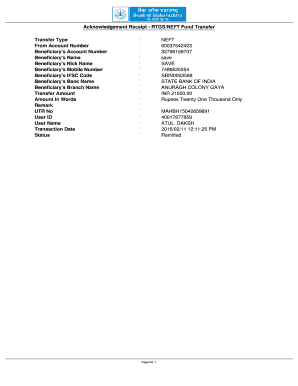
Acknowledgement Receipt RTGS/NEFT Fund Transfer Transfer Type From Account Number Beneficiary 's Account Number Beneficiary 's Name Beneficiary 's Nick Name Beneficiary 's Mobile Number Beneficiary.

How it works

  1. Open form

    Open form follow the instructions

  2. Easily sign form

    Easily sign the form with your finger

  3. Share form

    Send filled & signed form or save

How to fill out the Neft Receipt online

Filling out the Neft Receipt online can streamline your fund transfer process. This guide will navigate you through each section of the form to ensure accurate completion.

Follow the steps to successfully complete your Neft Receipt.

  1. Click the ‘Get Form’ button to access the Neft Receipt and open it in your editor of choice.
  2. In the 'Transfer Type' section, select 'NEFT' as the method of transfer.
  3. Enter the 'From Account Number' where the funds will be withdrawn from.
  4. Fill in the 'Beneficiary's Account Number' which should accurately reflect the recipient's account.
  5. Input the 'Beneficiary's Name' as registered with their bank.
  6. Optionally, use the 'Beneficiary's Nick Name' field for easier reference but ensure it is correctly associated with the main beneficiary's name.
  7. Enter the 'Beneficiary's Mobile Number' for contact and verification purposes.
  8. Fill in the 'Beneficiary's IFSC Code,' which is vital for directing the transfer accurately to the recipient's bank.
  9. Specify the 'Beneficiary's Bank Name' where the account is held.
  10. Input the 'Beneficiary's Branch Name' to ensure clarity in the transaction process.
  11. Indicate the 'Transfer Amount' in figures, ensuring it matches the required value.
  12. In the 'Amount In Words' section, write out the amount in full to avoid any discrepancies.
  13. Provide a brief 'Remark' for any notes pertinent to the transaction.
  14. Record the 'UTR No' for tracking your transaction across systems.
  15. Fill in your 'User ID' for identification purposes.
  16. Enter your 'User Name' to complete the documentation requirements.
  17. Document the 'Transaction Date' so it accurately reflects the date of transfer.
  18. Review the 'Status' section to ensure it reflects the current state of the transaction.
  19. Finally, save your changes, and you may choose to download, print, or share the completed Neft Receipt.

Complete your Neft Receipt online today for a seamless fund transfer experience.

Get form

Experience a faster way to fill out and sign forms on the web. Access the most extensive library of templates available.
Get form

Related content

B-414636, Ghazanfar Neft Gas LTD - GAO
Jul 21, 2017 · Additionally, the RFP encouraged offerors to verify receipt of e-mail...
Learn more
Payment Details - Rajarambapu Institute of...
500 by using UPI payment and upload the receipt while filling application form. PGDAEV...
Learn more
Toshiba Ma 1595 1 Series Owners Manual Owner's...
Dec 13, 2014 — Receipt Print Format -- 7(& 6725( 3($&+ '5,9( 3+21( Max.4 lines of Store...
Learn more

Related links form

Residual Functional Capacity Questionnaire Vision Impairment NV Work Injury Reporting Procedures 2020 AU VicRoads Dealer Application For Transfer Of Registration 2020 UK NHS Emergency Health Care Plan Template

Questions & Answers

Get answers to your most pressing questions about US Legal Forms API.

Contact support

The proof of NEFT transfer comes in the form of a NEFT receipt, which you receive after completing the transaction. This receipt contains important details such as the transaction ID, date, and amount sent, providing essential verification for your records. You can download this receipt from your bank’s online portal after the transaction is processed.

Tracking your NEFT transaction is straightforward. You can use the reference number from your NEFT receipt on your bank's website or mobile application. This feature is designed for your convenience, allowing you to follow up on your transferred funds with ease.

You can check your NEFT status online by logging into your bank's internet banking platform. Most banks provide an option to track your transaction under the NEFT section. You will need your NEFT receipt's reference number to retrieve the status easily.

The primary proof of a NEFT transaction is the NEFT receipt issued by your bank. This receipt confirms that the funds have been transferred and contains essential information about the transaction. Retaining this document is important for your records and can help solve issues or disputes related to the transaction.

Yes, NEFT transactions can be tracked using the unique reference number provided in the NEFT receipt. You can check the status of your transaction through your bank's online portal or mobile app. This feature enables you to have peace of mind regarding your funds and assists you in monitoring the transaction efficiently.

A bank NEFT receipt is a document confirming that an NEFT transaction has been successfully executed. It includes crucial information such as the transaction reference number, date, time, and details of the sender and receiver. This NEFT receipt is essential for maintaining records and can be useful when you need to verify or inquire about a transaction.

A NEFT payout refers to the transfer of funds through the National Electronic Funds Transfer system. When you initiate a NEFT transfer, the bank processes the transaction and provides you with a NEFT receipt. This receipt serves as proof of the transaction and includes important details such as the date, time, and amount transferred.

A NEFT transaction typically takes a few hours to complete, but it can vary based on the bank's processing times. Most banks process NEFT transactions in batches, which means that transactions done after the cutoff time may be delayed until the next business hour. You can refer to your bank's schedule or contact them for specific timing related to your NEFT receipt.

To obtain your UTR receipt, first check the transaction history in your bank's online portal. Each NEFT transaction generates a unique UTR number along with the Neft Receipt. If needed, you can also request a detailed statement or a separate receipt from your bank for your records.

To generate a Neft Receipt, initiate your NEFT transaction through your bank’s online services. Once the transaction is completed, the system will automatically create the receipt. You can easily save or print the Neft Receipt directly from the confirmation page.

Get This Form Now!

Use professional pre-built templates to fill in and sign documents online faster. Get access to thousands of forms.
Get form
If you believe that this page should be taken down, please follow our DMCA take down processhere.

Industry-leading security and compliance

US Legal Forms protects your data by complying with industry-specific security standards.
  • In businnes since 1997
    25+ years providing professional legal documents.
  • Accredited business
    Guarantees that a business meets BBB accreditation standards in the US and Canada.
  • Secured by Braintree
    Validated Level 1 PCI DSS compliant payment gateway that accepts most major credit and debit card brands from across the globe.
Get Neft Receipt
Get form
Form Packages
Adoption
Bankruptcy
Contractors
Divorce
Home Sales
Employment
Identity Theft
Incorporation
Landlord Tenant
Living Trust
Name Change
Personal Planning
Small Business
Wills & Estates
Packages A-Z
Form Categories
Affidavits
Bankruptcy
Bill of Sale
Corporate - LLC
Divorce
Employment
Identity Theft
Internet Technology
Landlord Tenant
Living Wills
Name Change
Power of Attorney
Real Estate
Small Estates
Wills
All Forms
Forms A-Z
Form Library
Customer Service
Your Privacy Choices
Terms of Service
Privacy Notice
Legal Hub
Content Takedown Policy
Bug Bounty Program
About Us
Help Portal
Legal Resources
Blog
Affiliates
Contact Us
Delete My Account
Site Map
Industries
Forms in Spanish
Localized Forms
State-specific Forms
Forms Kit
Legal Guides
Real Estate Handbook
All Guides
Prepared for You
Notarize
Incorporation services
Our Customers
For Consumers
For Small Business
For Attorneys
Our Sites
US Legal Forms
USLegal
FormsPass
pdfFiller
signNow
altaFlow
DocHub
Instapage
Social Media
Call us now toll free:
+1 833 426 79 33
As seen in:
  • USA Today logo picture
  • CBC News logo picture
  • LA Times logo picture
  • The Washington Post logo picture
  • AP logo picture
  • Forbes logo picture
© Copyright 1997-2025
airSlate Legal Forms, Inc.
3720 Flowood Dr, Flowood, Mississippi 39232
Form Packages
Adoption
Bankruptcy
Contractors
Divorce
Home Sales
Employment
Identity Theft
Incorporation
Landlord Tenant
Living Trust
Name Change
Personal Planning
Small Business
Wills & Estates
Packages A-Z
Form Categories
Affidavits
Bankruptcy
Bill of Sale
Corporate - LLC
Divorce
Employment
Identity Theft
Internet Technology
Landlord Tenant
Living Wills
Name Change
Power of Attorney
Real Estate
Small Estates
Wills
All Forms
Forms A-Z
Form Library
Customer Service
Your Privacy Choices
Terms of Service
Privacy Notice
Legal Hub
Content Takedown Policy
Bug Bounty Program
About Us
Help Portal
Legal Resources
Blog
Affiliates
Contact Us
Delete My Account
Site Map
Industries
Forms in Spanish
Localized Forms
State-specific Forms
Forms Kit
Legal Guides
Real Estate Handbook
All Guides
Prepared for You
Notarize
Incorporation services
Our Customers
For Consumers
For Small Business
For Attorneys
Our Sites
US Legal Forms
USLegal
FormsPass
pdfFiller
signNow
altaFlow
DocHub
Instapage
Social Media
Call us now toll free:
+1 833 426 79 33
As seen in:
  • USA Today logo picture
  • CBC News logo picture
  • LA Times logo picture
  • The Washington Post logo picture
  • AP logo picture
  • Forbes logo picture
© Copyright 1997-2025
airSlate Legal Forms, Inc.
3720 Flowood Dr, Flowood, Mississippi 39232