Loading
Get Naf Wv Gov
How it works
-

Open form follow the instructions
-

Easily sign the form with your finger
-

Send filled & signed form or save
How to fill out the Naf Wv Gov online
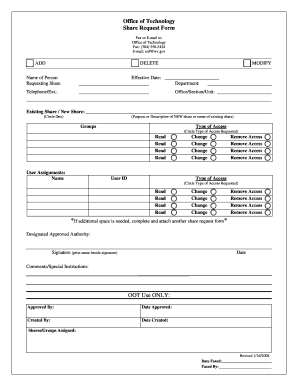
Filling out the Naf Wv Gov online is a straightforward process that allows users to request shares efficiently. This guide provides a step-by-step approach to ensure that all necessary information is correctly entered.
Follow the steps to fill out the Naf Wv Gov form online.
- Click the ‘Get Form’ button to access the share request form and open it in your editing tool.
- Enter the effective date in the designated field. This date indicates when the request should be processed.
- Provide the name of the person requesting the share. Ensure the name is accurately spelled, as this identifies who is making the request.
- Fill in the telephone number and extension of the requester to facilitate any necessary communication regarding the request.
- Indicate the department where the requester is employed, such as DOT or DHHR, to clarify the context of the request.
- Complete the office, section, or unit field with the requester’s specific location to ensure proper routing of the request.
- Circle the appropriate response for existing share or new share, and if requesting a new share, provide a description or purpose for it.
- List the groups for which access is being requested, with instructions on whether users are to be added or removed.
- For user assignments, include the name and user ID of each employee and specify the type of access they need, circling the appropriate options.
- Ensure that a designated approved authority within the office signs the form and prints their name next to the signature, as this is a necessary approval.
- Add any comments or special instructions in the designated comments section.
- Once completed, save the changes, then download, print, or share the form as needed. Make sure to fax it to (304) 558-5434 or e-mail it to naf@wv.gov.
Begin filling out your Naf Wv Gov form online today for an efficient share request process.
The registration process for a business in West Virginia typically takes a few days to a few weeks. Factors affecting the timeline include the type of business and the completeness of your submitted documents. To streamline the process, consider using resources available on Naf Wv Gov. Ensuring all your paperwork is correct from the start can significantly speed things up.