Loading
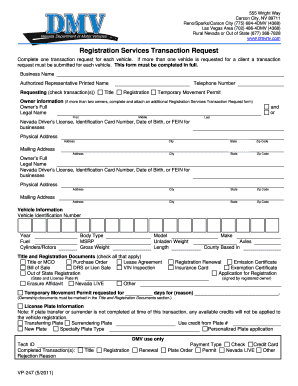
Get Drs Dmv
How it works
-

Open form follow the instructions
-

Easily sign the form with your finger
-

Send filled & signed form or save
How to fill out the Drs Dmv online
Filling out the Drs Dmv form online is a crucial step in managing vehicle registration transactions in Nevada. This guide provides clear instructions on each section of the form, ensuring that all users can complete it accurately and efficiently.
Follow the steps to fill out the Drs Dmv form with ease.
- Click ‘Get Form’ button to obtain the form and open it in the editor.
- Begin by completing the 'Requesting' section. Check the appropriate transaction(s) you are requesting for your vehicle, such as Title, Registration, or Temporary Movement Permit.
- Fill in the 'Owner Information' section with the owner's full legal name. For multiple owners, attach an additional Registration Services Transaction Request form.
- Provide the necessary identification details, including the Nevada Driver’s License, identification card number, date of birth, or the Federal Employer Identification Number (FEIN) for businesses.
- Complete the physical address fields with your street address, city, state, and zip code. Repeat this for the mailing address section if it differs.
- In the 'Vehicle Information' section, input details like the Vehicle Identification Number (VIN), year, make, model, and body type. Be sure to fill in the weights and lengths as required.
- Indicate which title and registration documents you are including by checking all that apply, such as Bill of Sale, Lease Agreement, or VIN Inspection.
- If applying for a Temporary Movement Permit, specify the number of days requested and the reason for the permit.
- Complete the 'License Plate Information' section based on whether you are transferring, surrendering, or requesting a new plate.
- Finally, choose the payment type for your transaction and ensure all required fields are completed.
- After ensuring accuracy, save your changes and proceed to download, print, or share the completed form as needed.
Start completing your Drs Dmv form online today for a smooth transaction experience.
The number 69 has not been officially banned in F1; however, teams often choose numbers based on personal or historical significance. Some drivers may opt for different numbers for branding purposes. It's a fun fact that illustrates how number choice can add an extra layer of personality to the drivers.