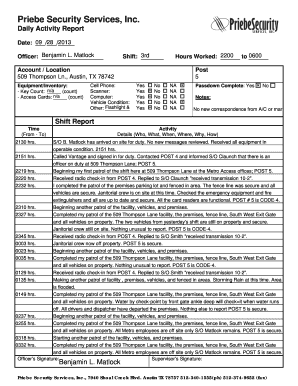
Priebe Security Services, Inc. Daily Activity Report 09 28 2013 Date: / / L. Matlock Officer: Benjamin 3rd Shift: 2200 to 0600 Hours Worked: Account / Location 509 Thompson Ln., Austin, TX 78742 Equipment/Inventory:.
Open form follow the instructions
Easily sign the form with your finger
Send filled & signed form or save
How to fill out the Daily Activity Report - REPORTRACK online
The Daily Activity Report - REPORTRACK is an essential tool for documenting daily activities, ensuring accountability and communication within security operations. This guide provides a detailed, step-by-step approach to completing the form online, making it accessible to all users regardless of their experience level.
Follow the steps to fill out your Daily Activity Report online.
- Press the ‘Get Form’ button to obtain the Daily Activity Report - REPORTRACK and open it in your preferred online editor.
- In the 'Date' field, input the current date in the format ___/___/_____.
- Enter your name in the 'Officer' section. For instance, you may write 'L. Matlock'.
- Indicate your shift number in the 'Shift' field.
- Fill in the 'Hours Worked' section with the number of hours you worked during the shift.
- In the 'Account / Location' section, input the specific location, such as '509 Thompson Ln., Austin, TX 78742.'
- For 'Equipment/Inventory', indicate the number of keys counted and access cards if applicable.
- Specify the conditions of your vehicle and any additional gear required in the 'Vehicle Condition & Gear' section.
- Confirm if the 'Passdown Complete' section is answered with either 'Yes' or 'No'.
- In the 'Notes' section, document any relevant information or communication from management.
- In the 'Shift Report' section, start filling out the details of your activities with the time, and activity specifics, including key observations and tasks performed.
- Upon completing all sections, be sure to save your changes. You may have the option to download, print, or share the finished report.
Complete your Daily Activity Report - REPORTRACK online today to enhance your documentation process.
Experience a faster way to fill out and sign forms on the web. Access the most extensive library of templates available.
Related content
Feb 24, 2018 — TERM OF CONTRACT: This Invitation to Bid is to establish a requirements...
Real-time interactive dashboards track ISU Police service calls and arrests. Crime logs...
APC by Schneider Electric 製の Metered Rack Power Distribution...
Get answers to your most pressing questions about US Legal Forms API.
How to make a security daily activity report?
To make a security daily activity report, gather all incidents and security measures taken throughout the day. Document any unusual behavior and responses enacted by security personnel. The Daily Activity Report - REPORTRACK offers features tailored for security reporting, ensuring transparency and accountability in your daily activities.
How to make a daily activity report?
Making a daily activity report requires a clear structure. Start with the date and a summary of activities, then detail any important outcomes or issues. The Daily Activity Report - REPORTRACK simplifies this task by providing a template that captures essential information professionally and efficiently.
How to create a daily activity log?
Creating a daily activity log is straightforward; just dedicate a document or digital tool for logging tasks performed throughout the day. Regularly enter details such as task name, duration, and any interruptions. Consider using the Daily Activity Report - REPORTRACK to efficiently compile and track your daily activities in a structured manner.
How do I create a daily report in Excel?
To create a daily report in Excel, start by opening a new spreadsheet and setting up columns for the date, activities, and any relevant notes. Input your data daily to keep it updated and organized. Utilizing the Daily Activity Report - REPORTRACK can enhance your Excel reporting capabilities, making it easier to analyze your daily operations.
How to create a daily activity report in Salesforce?
To create a daily activity report in Salesforce, begin by selecting the reports tab and choosing the 'New Report' option. You can customize the report type based on your activities and filter the data accordingly. The Daily Activity Report - REPORTRACK can integrate seamlessly with Salesforce, helping you create detailed reports with minimal effort.
How do you create an activity report?
Creating an activity report involves gathering data on activities performed over a specific period. You can outline the goals, tasks completed, and issues encountered. With the Daily Activity Report - REPORTRACK, you can easily consolidate this information, allowing for clear communication and better project management.
How to fill out a daily construction report?
To fill out a daily construction report effectively, start by noting the date and project details at the top. Include sections for labor, materials used, daily weather conditions, and any significant events that occurred on-site. Using the Daily Activity Report - REPORTRACK, you can streamline this process, ensuring you capture all necessary details efficiently.
How to write a daily report sample?
To craft a daily report sample, start by establishing a clear format. The Daily Activity Report - REPORTRACK provides an intuitive template to help you organize your information effectively. Include the date, tasks undertaken, and any critical notes or observations. This sample will not only demonstrate your reporting abilities but also serve as a useful guide for others within your organization.
How to write a daily activity report example?
Creating a daily activity report example begins by outlining the essential components. Start with the date, project title, and a breakdown of activities completed using the Daily Activity Report - REPORTRACK as your template. Highlight achievements and setbacks, ensuring to keep your entries clear and informative. This example can serve as a reference for future reports, streamlining the reporting process.
How to fill out a daily activity report?
Filling out a daily activity report is straightforward when you break it down into sections. Use the Daily Activity Report - REPORTRACK to guide you through documenting the date, tasks accomplished, and any notable occurrences. Remember to summarize your experiences concisely, focusing on productivity and any hindrances faced during the day. This structured approach will aid in effective project monitoring.
Use professional pre-built templates to fill in and sign documents online faster. Get access to thousands of forms.
If you believe that this page should be taken down, please follow our DMCA take down process here.