Loading
Get Isp3505
How it works
-

Open form follow the instructions
-

Easily sign the form with your finger
-

Send filled & signed form or save
How to fill out the Isp3505 online
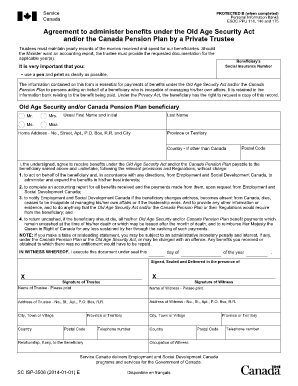
Filling out the Isp3505 form online can streamline the process of administering benefits under the Old Age Security Act and/or Canada Pension Plan. This guide provides clear instructions to help you navigate through the various sections of the form effectively.
Follow the steps to complete the Isp3505 form with ease.
- Click the ‘Get Form’ button to access and open the form in your preferred digital format.
- Begin by filling out the beneficiary's Social Insurance Number clearly. Ensure that you double-check for accuracy.
- Indicate the beneficiary’s title by selecting from the options: Mr., Mrs., Ms., or Miss.
- Enter the beneficiary’s usual first name and initial, followed by their last name.
- Provide the province or territory where the beneficiary resides.
- Fill in the home address including the number, street name, apartment, P.O. Box, rural route, and city.
- If applicable, indicate the country of residence if it is outside of Canada.
- Enter the postal code associated with the beneficiary’s home address.
- In the declaration section, affirm the intention to receive benefits on behalf of the beneficiary, ensuring to follow relevant regulations.
- Complete an accounting report for all benefits received and expenditures made, as required by Employment and Social Development Canada.
- Confirm your commitment to notify Employment and Social Development Canada of any significant changes regarding the beneficiary.
- Sign and date the form, ensuring it is duly witnessed; include the witness's name, address, occupation, and signature.
- Once the form is completely filled out, save the changes, and consider downloading, printing, or sharing the completed document as needed.
Complete your documents online today for a faster processing experience.
Get form
Experience a faster way to fill out and sign forms on the web. Access the most extensive library of templates available.
Changing ISPs can be manageable, depending on your current contract and the providers in your area. Ensuring a seamless transition involves preparing for possible service downtime and understanding the installation process of your new ISP. Utilizing tools like Isp3505 can provide you with the necessary information to ease this transition.
Get This Form Now!
Use professional pre-built templates to fill in and sign documents online faster. Get access to thousands of forms.