Loading
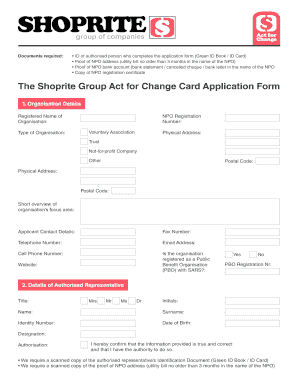
Get Shoprite Agreement Contract
How it works
-

Open form follow the instructions
-

Easily sign the form with your finger
-

Send filled & signed form or save
How to fill out the Shoprite Agreement Contract online
Filling out the Shoprite Agreement Contract online is a straightforward process that requires attention to detail. This guide will walk you through the necessary steps to ensure your application is completed accurately and efficiently.
Follow the steps to complete your application smoothly.
- Click ‘Get Form’ button to obtain the Shoprite Agreement Contract and open it in the designated editor.
- Begin by filling out the 'Organisation Details' section. Provide the registered name of the organisation, select the type of organisation, and input the NPO registration number. Include a brief overview of your organisation’s focus area and contact details such as fax number, telephone number, email address, and cell phone number. Indicate whether the organisation is registered as a Public Benefit Organisation (PBO) with SARS.
- Next, move to the 'Details of Authorised Representative' section. Enter the title, initials, name, surname, identity number, date of birth, and designation of the authorised representative. Confirm your authority to submit this information by checking the relevant box.
- In the 'Bank Account Details' section, provide information regarding your organisation's bank account including the bank name, account number, account holder’s name, branch code, and type of account. Note that a certified copy of the proof of NPO bank account is required.
- Proceed to the 'Debit Order Authorisation' section. Indicate if you would like to pay by debit order and if so, complete the required bank details.
- Fill out the 'Preferences' section by selecting how you would like to receive statements and account information. Provide your preferred store location as well.
- In the 'Purchase Limit' section, specify the purchase limit you are applying for, noting that organisations can also apply for a zero credit limit.
- Finally, sign the application by typing your full name as a signature, including your designation and the date. Ensure that all details are accurate and that you have read and understood the Terms and Conditions.
- Once you have completed the form and gathered the required supporting documents, save your changes and prepare to email the form to actforchangecard@shoprite.co.za.
Complete your Shoprite Agreement Contract online today to start the application process.
Filling out a contract form requires careful attention to each section. Input all relevant information such as names, dates, and specific terms of the agreement. You can streamline this process by using formats available on USLegalForms for creating a Shoprite Agreement Contract.
Industry-leading security and compliance
US Legal Forms protects your data by complying with industry-specific security standards.
-
In businnes since 199725+ years providing professional legal documents.
-
Accredited businessGuarantees that a business meets BBB accreditation standards in the US and Canada.
-
Secured by BraintreeValidated Level 1 PCI DSS compliant payment gateway that accepts most major credit and debit card brands from across the globe.