Loading
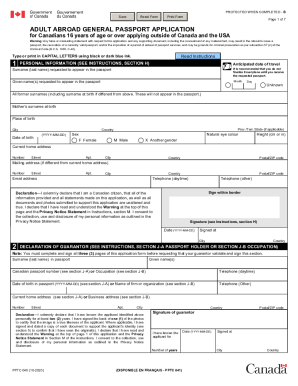
Get Canada Pptc 040 2020
How it works
-

Open form follow the instructions
-

Easily sign the form with your finger
-

Send filled & signed form or save
How to fill out the Canada PPTC 040 online
Filling out the Canada PPTC 040 form online for your passport application can be straightforward when you have clear guidance. This step-by-step guide will help you navigate each section of the form to ensure that all required information is correctly provided.
Follow the steps to successfully complete your passport application.
- Press the 'Get Form' button to access the Canada PPTC 040 form online.
- Begin by entering your anticipated date of travel. It's important to remember not to finalize any travel plans until you have received your passport.
- Fill in your date of birth in the format YYYY-MM-DD, as well as your place of birth (city, province/territory/state, and country). Select your sex and include your natural eye color and height.
- Read the declaration thoroughly, affirming that all information provided is true and that you've understood the warnings and privacy statements. Sign within the designated area and input the date.
- Proceed to the declaration of guarantor section. If applicable, have your guarantor complete their information, ensuring they meet all qualifications outlined in the instructions.
- Indicate whether you have any previous Canadian travel documents and follow up with the required details if applicable.
- Select your desired period of validity for the passport: 5-year, 10-year, or other options, and proceed to provide any additional personal information.
- Complete the references section by providing details of two individuals who know you well enough to confirm your identity and fill in any emergency contact information if desired.
- Review all entries carefully for accuracy. Once satisfied, you can save your changes, download, print, or share your completed application.
Start completing your Canada PPTC 040 passport application online today for a hassle-free experience.
Get form
Experience a faster way to fill out and sign forms on the web. Access the most extensive library of templates available.
Yes, you can submit your Canadian customs declaration online using the appropriate government services. However, for a more user-friendly experience, consider using the Canada PPTC 040 available on the USLegalForms platform. It provides templates and guidance to help ensure your customs declaration is completed accurately and promptly.
Get This Form Now!
Use professional pre-built templates to fill in and sign documents online faster. Get access to thousands of forms.