Loading
Get Singapore Polyclinic Mc Template
How it works
-

Open form follow the instructions
-

Easily sign the form with your finger
-

Send filled & signed form or save
How to fill out the Singapore Polyclinic Mc Template online
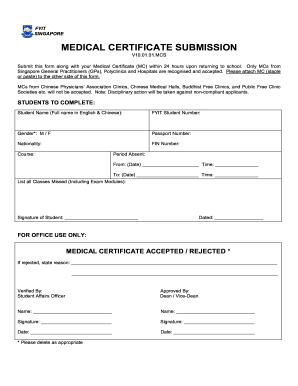
Filling out the Singapore Polyclinic Mc Template online ensures that you comply with school requirements regarding medical certificates. This guide provides step-by-step instructions to help users complete the form accurately.
Follow the steps to complete the Singapore Polyclinic Mc Template online.
- Press the ‘Get Form’ button to access the template and open it for editing.
- Enter your full name (in English and Chinese) in the designated field labeled 'Student Name'.
- Input your FYIT student number in the corresponding field.
- Select your gender by marking either 'M' or 'F' as needed.
- Fill in your passport number accurately in the provided section.
- State your nationality in the specified field.
- Enter your FIN number when requested.
- Indicate your course name in the relevant section.
- Input the dates and times for your absence under the 'Period Absent' section, ensuring accuracy.
- List all missed classes, including exam modules, in the designated area.
- Provide your signature in the space labeled 'Signature of Student' to confirm the information is correct.
- Finally, date the form in the section provided.
- Once all sections are completed, you can save changes, download, print, or share the form as necessary.
Complete your documents online today to ensure a smooth submission process.
Overseas MCs are often not recognized in Singapore without prior approval from employers. Each company has its own policies regarding medical certificates from abroad, so it's essential to communicate this with your employer beforehand. To facilitate a smoother process, consider using the Singapore Polyclinic Mc Template, which clarifies local expectations and requirements for sick leave documentation.