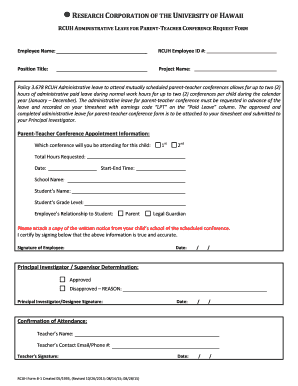
Get B-1 Parent Teacher Conference Form (rev 08-28-15 Cf) Rd.pdf
How it works
-

Open form follow the instructions
-

Easily sign the form with your finger
-

Send filled & signed form or save
How to fill out the B-1 Parent Teacher Conference Form (Rev 08-28-15 CF) RD.pdf online
This guide provides a comprehensive overview of how to effectively fill out the B-1 Parent Teacher Conference Form online. By following the step-by-step instructions, you can ensure that all necessary information is completed accurately and submitted in a timely manner.
Follow the steps to complete the B-1 Parent Teacher Conference Form online.
- Press the ‘Get Form’ button to access the B-1 Parent Teacher Conference Form and open it in your preferred online editor.
- Begin by filling in your employee name in the designated field. Ensure that your name matches the records of your employer to avoid discrepancies.
- Enter your RCUH Employee ID number accurately. This ID number is crucial for identification purposes within the organization.
- Provide your position title in the specified field to clarify your role within the organization.
- In the Project Name section, enter the name of the project you are currently working on. This helps in associating your leave with the relevant project.
- Indicate which conference you will be attending for your child by selecting either '1st' or '2nd'. This helps in tracking the number of conferences attended.
- Fill in the total hours requested for the leave you wish to take during normal work hours. Ensure it does not exceed the allowed hours specified in the policy.
- Enter the date of the conference in the provided format to ensure accurate scheduling.
- Specify the start and end time of the conference. This information is essential for your supervisor to understand time commitments.
- Provide the school name where your child attends. This is important for verification purposes.
- Enter your child’s name and grade level to clarify whom the conference appointment is for.
- Indicate your relationship to the student by selecting either 'Parent' or 'Legal Guardian'. This clarifies your position regarding the child's education.
- Attach a copy of the written notice from your child’s school regarding the scheduled conference. This supports your request for administrative leave.
- Sign the form to certify that all information provided is true and accurate. Include the date of signing.
- Submit the completed form to your Principal Investigator or supervisor and await their determination, either approved or disapproved, along with their signature and date.
- After receiving the approval, save your changes, and consider downloading or printing the form for your records, or sharing as needed.
Start completing your forms online to ensure accurate and timely submissions!
In a parent-teacher conference, it's helpful to express your interest in your child's education and ask specific questions about their progress. Acknowledge the teacher's efforts and provide insights about your child's learning habits at home. Use the B-1 Parent Teacher Conference Form (Rev 08-28-15 CF) RD.pdf to guide your conversation, ensuring you address essential topics and collaboratively seek solutions to any challenges.
Industry-leading security and compliance
-
In businnes since 199725+ years providing professional legal documents.
-
Accredited businessGuarantees that a business meets BBB accreditation standards in the US and Canada.
-
Secured by BraintreeValidated Level 1 PCI DSS compliant payment gateway that accepts most major credit and debit card brands from across the globe.