Loading
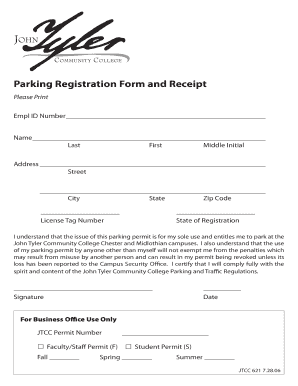
Get John Tyler Parking Pass
How it works
-

Open form follow the instructions
-

Easily sign the form with your finger
-

Send filled & signed form or save
How to fill out the John Tyler Parking Pass online
This guide provides user-friendly instructions for completing the John Tyler Parking Pass online. By following these steps, you can ensure accurate submission of your parking pass application.
Follow the steps to fill out your parking pass application correctly.
- Click ‘Get Form’ button to obtain the form and open it in the editor.
- Begin by entering your Employee ID number in the designated field. This number is unique to you and is often provided by your institution.
- Fill in your name in the appropriate fields, including last name, first name, and middle initial. Ensure that this information matches the identification you will use.
- Next, enter your complete address. This includes your street address, city, state, and zip code to ensure accurate processing of your application.
- Input your license tag number in the designated space. This number is found on your vehicle’s registration and is essential for parking authorization.
- Indicate the state of registration for your vehicle in the corresponding field to confirm where your vehicle is registered.
- Review the statement regarding the exclusive use of the parking permit and enter your signature in the provided area to certify your agreement. Remember to date the form as well.
- For internal processing, fill in the request for Faculty/Staff or Student permit selection as needed.
- Finally, ensure all fields are completed accurately, then save your changes and download, print, or share the form as necessary.
Complete your John Tyler Parking Pass application online today!
To obtain a parking pass at UCA, look no further than their official website for instructions specific to the John Tyler Parking Pass program. Usually, you can complete the application process online, ensuring easy access to your preferred parking option. It's vital to follow the guidelines provided to secure your pass efficiently. Additionally, you can contact the campus parking office if you have any questions or require further assistance.