Loading
Form preview
  • US Legal Forms
  • Other Templates
  • More Forms
  • More Uncategorized Forms
  • Direct Deposit Registration For Learners - Human Services

Get Direct Deposit Registration For Learners - Human Services

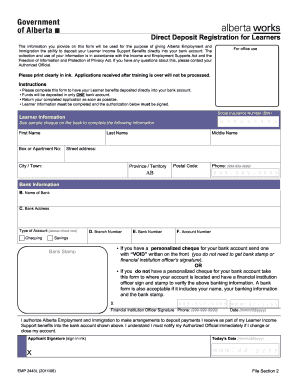
Direct Deposit Registration for Learners The information you provide on this form will be used for the purpose of giving Alberta Employment and Immigration the ability to deposit your Learner Income.

How it works

  1. Open form

    Open form follow the instructions

  2. Easily sign form

    Easily sign the form with your finger

  3. Share form

    Send filled & signed form or save

How to fill out the Direct Deposit Registration For Learners - Human Services online

Filling out the Direct Deposit Registration For Learners form online is essential for ensuring your Learner Income Support Benefits are deposited directly into your bank account. This guide provides step-by-step instructions to help you complete the form accurately and efficiently.

Follow the steps to complete your registration smoothly.

  1. Click the 'Get Form' button to access the Direct Deposit Registration For Learners form and open it in the editor.
  2. Fill out the Learner Information section clearly. Provide your first name, last name, middle name (if applicable), box or apartment number, street address, city or town, province or territory, and postal code. Ensure accuracy to avoid any processing delays.
  3. Enter your Social Insurance Number (SIN) in the designated field. This number is crucial for the processing of your benefits.
  4. In the Bank Information section, provide your bank's name and address. Select the type of account where you wish the funds to be deposited, either Chequing or Savings.
  5. Fill in the branch number, bank number, and account number accurately. Refer to your cheque or bank documentation for this information.
  6. If you have a personalized cheque, attach a voided cheque with 'VOID' written on the front. If you do not have one, visit your financial institution to get the form signed and stamped by an officer, or provide a bank form that includes your name and banking information.
  7. Sign the authorization section that grants Alberta Employment and Immigration permission to deposit your benefits into the specified bank account. Remember to notify your Authorized Official if you change or close your account.
  8. Lastly, provide today's date in the specified format (mmm/dd/yyyy) and ensure you have signed the application in ink. Review all information for accuracy before submission.
  9. Once completed, save your changes, download, print, and share the form as required for your submission.

Complete your Direct Deposit Registration For Learners online today to ensure timely receipt of your benefits.

Get form

Experience a faster way to fill out and sign forms on the web. Access the most extensive library of templates available.
Get form

Related content

Go Direct® - Home
To enroll for direct deposit, you will be asked to provide information such as your:...
Learn more
Direct Deposit - System Human Resource Services
Signing up for Direct Deposit is a quick, easy, and efficient way to receive your pay...
Learn more
2017 Publication 907
Feb 8, 2018 — Using direct deposit. The fastest way to receive a tax refund is to...
Learn more

Related links form

Designated Beneficiary Plan Agreement. APP10780-19 Hypnotherapy Consent Form.docx ADHESION - CONTRACT FORM Application For Approval Of Indian Organization Form CA-182 A - Dgca Nic

Questions & Answers

Get answers to your most pressing questions about US Legal Forms API.

Contact support

Enrolling in direct deposit means you are setting up an arrangement for your payments to be deposited directly into your bank account. This process eliminates the need for paper checks, making it convenient and secure. By completing your Direct Deposit Registration For Learners - Human Services, you ensure timely access to your funds.

To enroll in direct deposit, you need to fill out a direct deposit authorization form provided by your employer. Make sure to provide your banking information clearly. After submitting the form, your bank will process your enrollment, which is a key part of your Direct Deposit Registration For Learners - Human Services.

For direct deposit, you generally need to provide your bank account number, routing number, and sometimes the name of your bank. This information allows your payments to be securely deposited into your account. Ensure your details are accurate to avoid any disruptions in your Direct Deposit Registration For Learners - Human Services.

Enrolling in direct deposit typically requires you to fill out a direct deposit authorization form from your employer. Be sure to include your bank account details and any other requested information. After submitting the completed form, your enrollment in Direct Deposit Registration For Learners - Human Services will begin processing, making receiving payments easier.

To get a direct deposit form from TD, visit the TD website or your nearest branch. You can also ask your employer for a copy, as they often have the required forms available. Once you complete and submit the TD direct deposit form, the process will move forward, ensuring your Direct Deposit Registration For Learners - Human Services is set up efficiently.

Setting up your own direct deposit involves contacting your employer or the organization that provides your payments. You will need to provide them with your banking information and complete the necessary forms. Once your details are verified, you’ll enjoy the convenience of Direct Deposit Registration For Learners - Human Services without delay.

To obtain a direct deposit authorization, you typically need to request a form from your employer or the financial institution you're using. This document provides permission for your earnings to be deposited directly into your account. Make sure to complete the form accurately and submit it as instructed to facilitate your Direct Deposit Registration For Learners - Human Services.

To set up direct deposit on Step, first, log in to your Step account. Then, navigate to the direct deposit section and input your bank details. It's essential to double-check your information to ensure accuracy. Completing these steps will allow you to enjoy the benefits of Direct Deposit Registration For Learners - Human Services.

For your direct deposit, you should provide accurate information including your name, bank account number, and routing number. This details ensure that your payments are directed to the correct account. Using our platform at uslegalforms, you can easily navigate through the Direct Deposit Registration For Learners - Human Services process, making it straightforward and reliable.

An example of a direct deposit includes receiving your paycheck directly into your bank account. This method is efficient, as it eliminates the waiting time for checks to clear. With the Direct Deposit Registration For Learners - Human Services, you can enjoy timely access to your funds without any hassle.

Get This Form Now!

Use professional pre-built templates to fill in and sign documents online faster. Get access to thousands of forms.
Get form
If you believe that this page should be taken down, please follow our DMCA take down processhere.
Get Direct Deposit Registration For Learners - Human Services
Get form
  • Adoption
  • Bankruptcy
  • Contractors
  • Divorce
  • Home Sales
  • Employment
  • Identity Theft
  • Incorporation
  • Landlord Tenant
  • Living Trust
  • Name Change
  • Personal Planning
  • Small Business
  • Wills & Estates
  • Packages A-Z
  • Affidavits
  • Bankruptcy
  • Bill of Sale
  • Corporate - LLC
  • Divorce
  • Employment
  • Identity Theft
  • Internet Technology
  • Landlord Tenant
  • Living Wills
  • Name Change
  • Power of Attorney
  • Real Estate
  • Small Estates
  • Wills
  • All Forms
  • Forms A-Z
  • Other Templates
  • Legal Hub
  • About Us
  • Help Portal
  • Legal Resources
  • Blog
  • Affiliates
  • Contact Us
  • Delete My Account
  • Site Map
  • Industries
  • Forms in Spanish
  • Localized Forms
  • State-specific Forms
  • Forms Kit
  • Real Estate Handbook
  • All Guides
  • Notarize
  • Incorporation services
  • For Consumers
  • For Small Business
  • For Attorneys
  • USLegal
  • FormsPass
  • pdfFiller
  • signNow
  • altaFlow
  • DocHub
  • Instapage
Form Packages
  • Adoption
  • Bankruptcy
  • Contractors
  • Divorce
  • Home Sales
  • Employment
  • Identity Theft
  • Incorporation
  • Landlord Tenant
  • Living Trust
  • Name Change
  • Personal Planning
  • Small Business
  • Wills & Estates
  • Packages A-Z
Form Categories
  • Affidavits
  • Bankruptcy
  • Bill of Sale
  • Corporate - LLC
  • Divorce
  • Employment
  • Identity Theft
  • Internet Technology
  • Landlord Tenant
  • Living Wills
  • Name Change
  • Power of Attorney
  • Real Estate
  • Small Estates
  • Wills
  • All Forms
  • Forms A-Z
  • Other Templates
Customer Service
  • Legal Hub
  • About Us
  • Help Portal
  • Legal Resources
  • Blog
  • Affiliates
  • Contact Us
  • Delete My Account
  • Site Map
  • Industries
  • Forms in Spanish
  • Localized Forms
  • State-specific Forms
  • Forms Kit
Legal Guides
  • Real Estate Handbook
  • All Guides
Prepared for you
  • Notarize
  • Incorporation services
Our Customers
  • For Consumers
  • For Small Business
  • For Attorneys
Our Sites
  • USLegal
  • FormsPass
  • pdfFiller
  • signNow
  • altaFlow
  • DocHub
  • Instapage
Social Media
Call us now toll free:
+1 833 426 79 33
As seen in:
© Copyright 1999-2026 airSlate Legal Forms, Inc. 17 Station Street, Suite 303, Brookline, MA 02445
  • Your Privacy Choices
  • Terms of Service
  • Privacy Notice
  • Content Takedown Policy
  • Bug Bounty Program