Get Commercial Service New Occupant Form (pdf) - Xcel Energy
How it works
-

Open form follow the instructions
-

Easily sign the form with your finger
-

Send filled & signed form or save
How to fill out the Commercial Service New Occupant Form (PDF) - Xcel Energy online
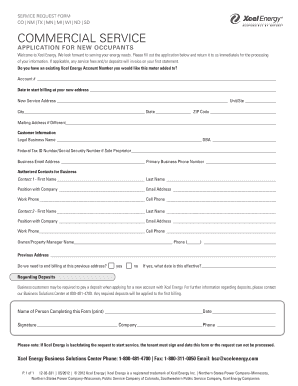
Filling out the Commercial Service New Occupant Form for Xcel Energy is a straightforward process that ensures your new energy account is set up efficiently. This guide provides clear instructions on how to complete the form and submit it for your service activation.
Follow the steps to complete your application with ease.
- Press the ‘Get Form’ button to access the Commercial Service New Occupant Form and open it in your preferred editor.
- Begin by entering your existing Xcel Energy account number, if applicable. This allows the meter to be added to your current account.
- Specify the date you would like billing to commence at your new service address.
- Provide the complete new service address, including unit number, city, state, and ZIP code.
- If your mailing address differs from the service address, please indicate this and enter the mailing address.
- Fill in the customer information section with the legal business name, Doing Business As (DBA) name if applicable, and either the Federal Tax ID number or Social Security number if you are a sole proprietor.
- Enter the business email address and primary business phone number for general contact.
- List the authorized contacts for your business by providing their first name, last name, position within the company, email address, work phone, and cell phone for two contacts.
- Enter the owner or property manager's name and contact number, as well as the previous address if applicable.
- Indicate whether billing needs to be ended at the previous address by selecting 'yes' or 'no.' If 'yes,' specify the effective date.
- Review the information related to deposits. Note that business customers may need to pay a deposit; contact the Business Solutions Center for further details if necessary.
- Print the name of the person completing the form and the date it is filled out. Include their signature, company name, and phone number.
- Finally, save your changes, download the completed form, and print it for submission. Ensure that all required details are complete to avoid any delays.
Complete your documents online with confidence and ensure your new energy services are activated promptly.
Xcel Energy has offices throughout the states it serves, including regional locations in Minnesota, Colorado, Texas, and New Mexico. This strategic distribution helps to deliver localized support and services. When moving to a new property, make sure to complete the Commercial Service New Occupant Form (PDF) - Xcel Energy to activate your utility services at your new address.
Industry-leading security and compliance
-
In businnes since 199725+ years providing professional legal documents.
-
Accredited businessGuarantees that a business meets BBB accreditation standards in the US and Canada.
-
Secured by BraintreeValidated Level 1 PCI DSS compliant payment gateway that accepts most major credit and debit card brands from across the globe.