We use cookies to improve security, personalize the user experience, enhance our marketing activities (including cooperating with our marketing partners) and for other business use.
Click "here" to read our Cookie Policy. By clicking "Accept" you agree to the use of cookies. Read less
Read more
Accept
Loading
Form preview
  • US Legal Forms
  • Form Library
  • More Forms
  • More Multi-State Forms
  • Kyc Updation Cum Customer Service Request Form (non Individuals) - Csb Co

Get Kyc Updation Cum Customer Service Request Form (non Individuals) - Csb Co

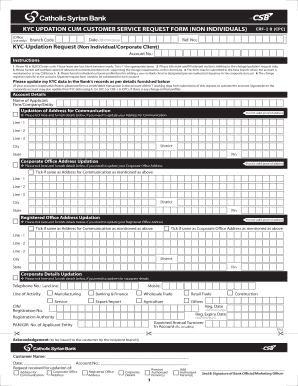
KYC UPDATION CUM CUSTOMER SERVICE REQUEST FORM (NON INDIVIDUALS) (Office use only) Ref. No.: Date dd/mm/yyyy Branch Code CRF1 B (CPC) KYCUpdation Request (Non Individual/Corporate Client) Account.

How it works

  1. Open form

    Open form follow the instructions

  2. Easily sign form

    Easily sign the form with your finger

  3. Share form

    Send filled & signed form or save

How to fill out the KYC UPDATION CUM CUSTOMER SERVICE REQUEST FORM (NON INDIVIDUALS) - Csb Co online

This guide will help you complete the KYC updation cum customer service request form tailored specifically for non-individuals at Csb Co. Follow the detailed steps to ensure all necessary information is filled out accurately and completely.

Follow the steps to effectively complete the form.

  1. Press the ‘Get Form’ button to access the KYC updation cum customer service request form. Open the form in your preferred editor.
  2. Fill in the reference number, date, and branch code at the top of the form. These details are essential for proper record-keeping.
  3. Complete the KYC-updation request section, specifying the account number of your client and the name of the applicant, company, or entity.
  4. Indicate the specific update you wish to make by ticking the appropriate boxes. Options include updating the communication address, corporate office address, and registered office address. Ensure you provide valid proof of address for each update requested.
  5. If you need to add or remove authorized persons, complete the relevant sections by indicating their designation and providing necessary details such as client ID and signature.
  6. Submit certified copies of all supporting documents relevant to your changes. This may include resolutions pertaining to the updates being requested.
  7. Read and sign the declaration section, confirming that the information provided is accurate and that you authorize updates to be made in the bank's records.
  8. After filling out the entire form, ensure that you save the changes, download the document, print it, or share it as needed for submission.

Start filling out your KYC updation cum customer service request form online today to ensure your information is accurate and up-to-date.

Get form

Experience a faster way to fill out and sign forms on the web. Access the most extensive library of templates available.
Get form

Related content

(PPRF)-Position-Personnel-Request-Form
Aug 7, 2017 — 6, Classified/Non-Classified/Faculty/Student/Work Study (Student)/GA...
Learn more

Related links form

PDF Transitional Work Offer And Acceptance Form - Ohio BWC CA DE 2320 2019 How To File A Complaint With MIOSHA - State Of Michigan West Virginia State Tax Department Form 433B Collection ...

Questions & Answers

Get answers to your most pressing questions about US Legal Forms API.

Contact support

Yes, you can easily access CSB Bank online on your phone by using the CSB Mobile Banking app. This application allows you to manage your accounts, perform transactions, and much more. Remember to fill out the KYC UPDATION CUM CUSTOMER SERVICE REQUEST FORM (NON INDIVIDUALS) - Csb Co. if you need any updates or services tailored to your needs.

To enable Mobile Banking in CBS, start by logging into your account through the CSB Mobile Banking app. Navigate to the settings section to activate mobile banking features. If you face any difficulties, completing the KYC UPDATION CUM CUSTOMER SERVICE REQUEST FORM (NON INDIVIDUALS) - Csb Co. is a great way to receive dedicated help.

The full form of CSB Bank is Catholic Syrian Bank. Established over a century ago, it has evolved to provide excellent banking services. If you need clarification or further assistance, do not hesitate to fill in the KYC UPDATION CUM CUSTOMER SERVICE REQUEST FORM (NON INDIVIDUALS) - Csb Co.

You can obtain your customer ID by visiting your nearest CSB branch or checking your account statement. Alternatively, you might find your ID within your account-related emails. If you encounter challenges, utilizing the KYC UPDATION CUM CUSTOMER SERVICE REQUEST FORM (NON INDIVIDUALS) - Csb Co. could expedite the retrieval.

To activate CSB mobile banking, download the app and register with your customer information. During the registration, you may be prompted to validate your identity, ensuring secure access. For any complications, the KYC UPDATION CUM CUSTOMER SERVICE REQUEST FORM (NON INDIVIDUALS) - Csb Co. can be submitted for support.

CSB Bank serves a diverse customer base, including individuals, businesses, and non-profit organizations. With a strong presence across various regions in the U.S., CSB focuses on delivering quality banking services. If you require personalized assistance, you can complete the KYC UPDATION CUM CUSTOMER SERVICE REQUEST FORM (NON INDIVIDUALS) - Csb Co.

Activating access to Mobile Banking involves setting up your account through the CSB Mobile Banking app. Ensure you have your customer ID ready, then follow the prompts to enter your credentials. If you face any issues, consider filling out the KYC UPDATION CUM CUSTOMER SERVICE REQUEST FORM (NON INDIVIDUALS) - Csb Co. for assistance.

To activate Mobile Banking, you need to download the CSB Mobile Banking app from your device's app store. After downloading, follow the on-screen instructions to register using your customer ID and other necessary details. Once registered, you can easily submit a KYC UPDATION CUM CUSTOMER SERVICE REQUEST FORM (NON INDIVIDUALS) - Csb Co. to update your information if needed.

Doing KYC without visiting a branch is possible through online platforms. Many banks allow you to fill out the KYC UPDATION CUM CUSTOMER SERVICE REQUEST FORM (NON INDIVIDUALS) - Csb Co. online, enabling you to submit documents electronically. Confirm with your financial institution that their online services support your needs for a simplified process.

You can obtain a KYC form through various channels. Most banks offer the form on their websites for easy access. Alternatively, you can request it by visiting a local branch or by contacting customer service directly, ensuring you have the necessary resources for your KYC UPDATION CUM CUSTOMER SERVICE REQUEST FORM (NON INDIVIDUALS) - Csb Co.

Get This Form Now!

Use professional pre-built templates to fill in and sign documents online faster. Get access to thousands of forms.
Get form
If you believe that this page should be taken down, please follow our DMCA take down processhere.

Industry-leading security and compliance

US Legal Forms protects your data by complying with industry-specific security standards.
  • In businnes since 1997
    25+ years providing professional legal documents.
  • Accredited business
    Guarantees that a business meets BBB accreditation standards in the US and Canada.
  • Secured by Braintree
    Validated Level 1 PCI DSS compliant payment gateway that accepts most major credit and debit card brands from across the globe.
Get KYC UPDATION CUM CUSTOMER SERVICE REQUEST FORM (NON INDIVIDUALS) - Csb Co
Get form
Form Packages
Adoption
Bankruptcy
Contractors
Divorce
Home Sales
Employment
Identity Theft
Incorporation
Landlord Tenant
Living Trust
Name Change
Personal Planning
Small Business
Wills & Estates
Packages A-Z
Form Categories
Affidavits
Bankruptcy
Bill of Sale
Corporate - LLC
Divorce
Employment
Identity Theft
Internet Technology
Landlord Tenant
Living Wills
Name Change
Power of Attorney
Real Estate
Small Estates
Wills
All Forms
Forms A-Z
Form Library
Customer Service
Terms of Service
Privacy Notice
Legal Hub
Content Takedown Policy
Bug Bounty Program
About Us
Help Portal
Legal Resources
Blog
Affiliates
Contact Us
Delete My Account
Site Map
Industries
Forms in Spanish
Localized Forms
State-specific Forms
Forms Kit
Legal Guides
Real Estate Handbook
All Guides
Prepared for You
Notarize
Incorporation services
Our Customers
For Consumers
For Small Business
For Attorneys
Our Sites
US Legal Forms
USLegal
FormsPass
pdfFiller
signNow
altaFlow
DocHub
Instapage
Social Media
Call us now toll free:
+1 833 426 79 33
As seen in:
  • USA Today logo picture
  • CBC News logo picture
  • LA Times logo picture
  • The Washington Post logo picture
  • AP logo picture
  • Forbes logo picture
© Copyright 1997-2025
airSlate Legal Forms, Inc.
3720 Flowood Dr, Flowood, Mississippi 39232
Form Packages
Adoption
Bankruptcy
Contractors
Divorce
Home Sales
Employment
Identity Theft
Incorporation
Landlord Tenant
Living Trust
Name Change
Personal Planning
Small Business
Wills & Estates
Packages A-Z
Form Categories
Affidavits
Bankruptcy
Bill of Sale
Corporate - LLC
Divorce
Employment
Identity Theft
Internet Technology
Landlord Tenant
Living Wills
Name Change
Power of Attorney
Real Estate
Small Estates
Wills
All Forms
Forms A-Z
Form Library
Customer Service
Terms of Service
Privacy Notice
Legal Hub
Content Takedown Policy
Bug Bounty Program
About Us
Help Portal
Legal Resources
Blog
Affiliates
Contact Us
Delete My Account
Site Map
Industries
Forms in Spanish
Localized Forms
State-specific Forms
Forms Kit
Legal Guides
Real Estate Handbook
All Guides
Prepared for You
Notarize
Incorporation services
Our Customers
For Consumers
For Small Business
For Attorneys
Our Sites
US Legal Forms
USLegal
FormsPass
pdfFiller
signNow
altaFlow
DocHub
Instapage
Social Media
Call us now toll free:
+1 833 426 79 33
As seen in:
  • USA Today logo picture
  • CBC News logo picture
  • LA Times logo picture
  • The Washington Post logo picture
  • AP logo picture
  • Forbes logo picture
© Copyright 1997-2025
airSlate Legal Forms, Inc.
3720 Flowood Dr, Flowood, Mississippi 39232