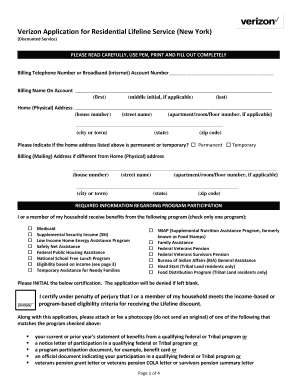
Get Verizon Application For Residential Lifeline Service (new York)
How it works
-

Open form follow the instructions
-

Easily sign the form with your finger
-

Send filled & signed form or save
How to fill out the Verizon Application For Residential Lifeline Service (New York) online
The Verizon Application For Residential Lifeline Service provides a discounted communication service for eligible users in New York. This guide offers detailed, step-by-step instructions on how to complete the application form online, ensuring you can effectively secure this vital service.
Follow the steps to fill out the application form accurately.
- Click ‘Get Form’ button to obtain the form and open it in your preferred online editor.
- Fill in the billing telephone number or broadband account number accurately, ensuring that you provide the correct information.
- Enter the billing name on the account. Include the first name, middle initial (if applicable), and last name as required.
- Provide your home (physical) address, including house number, street name, apartment/room/floor number (if applicable), city, state, and zip code.
- Indicate whether your home address is permanent or temporary by selecting the appropriate option.
- If your billing (mailing) address is different from your home address, complete that section with the same detail as before.
- In the required program participation section, check only one box that corresponds to the program from which you or another member of your household receives benefits.
- Initial the certification statement to acknowledge that you or a member of your household meets the eligibility criteria for receiving the Lifeline discount.
- Attach or fax a photocopy of the required documentation that matches the selected program.
- Initial each of the program rules to acknowledge your understanding and agreement to follow the Lifeline program regulations.
- Specify whether your household is occupied by other adults by selecting the correct statement and initialing.
- Complete the Lifeline discount selection by indicating whether you are applying this discount to voice service or broadband (internet) service.
- Provide information regarding your household size and ensure that you know the income eligibility guidelines mentioned in the document.
- Fill out the required billing name information, including the last four digits of the Social Security Number and date of birth.
- If applicable, provide the information of the household member receiving benefits and sign the form.
- Ensure that all signatures are collected and dated within the last 30 days to validate the application.
- After reviewing the application for completeness, save changes, download, print, or share the form as needed to submit your application.
Get started on your application for discounted services online today!
The Lifeline discount in New York generally provides a reduction of up to $9.25 per month on your phone or internet service. This benefit can significantly help reduce your monthly expenses. When completing your Verizon Application For Residential Lifeline Service (New York), ensure to ask about any specific discounts or promotions that may apply. Staying informed can help maximize your savings.
Industry-leading security and compliance
-
In businnes since 199725+ years providing professional legal documents.
-
Accredited businessGuarantees that a business meets BBB accreditation standards in the US and Canada.
-
Secured by BraintreeValidated Level 1 PCI DSS compliant payment gateway that accepts most major credit and debit card brands from across the globe.