Loading
Get Td Ameritrade Name Change
How it works
-

Open form follow the instructions
-

Easily sign the form with your finger
-

Send filled & signed form or save
How to fill out the Td Ameritrade Name Change online
Changing your name on your Td Ameritrade account is a straightforward process that can be completed online. This guide will walk you through the necessary steps to ensure your name change request is submitted accurately and efficiently.
Follow the steps to complete the Td Ameritrade Name Change form online.
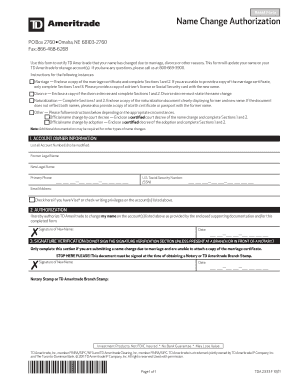
- Press the ‘Get Form’ button to obtain the Name Change Authorization form and open it for editing.
- In the ACCOUNT OWNER Information section, fill out all required fields. List all account numbers that need to be updated, along with your former legal name, new legal name, primary phone number, U.S. Social Security Number, and email address.
- If applicable, indicate whether you have Visa® or check-writing privileges on the accounts by checking the corresponding box.
- Proceed to the AUTHORIZATION section. Here, you must provide your signature, confirming your request for a name change on the accounts listed. Include the date of your signature.
- If you are unable to provide certain documentation due to a marriage name change, refer to the SIGNATURE VERIFICATION section. You must complete this section only if you are in the presence of a Notary or at a TD Ameritrade Branch.
- Lastly, ensure that you have all required supporting documentation ready to submit alongside the form, such as a marriage certificate, divorce decree, or court decree, based on your specific circumstances. Save your changes, and download or print the completed form for submission.
Start filling out your Td Ameritrade Name Change form online today!
To change your name on your TD account, visit your account settings or contact customer service for guidance. You will need to provide proof of your name change to complete this update. Following this process ensures that your account reflects your new name consistently, especially important for compliance and identity verification.