Loading
Get Articles Of Organization California
How it works
-

Open form follow the instructions
-

Easily sign the form with your finger
-

Send filled & signed form or save
How to fill out the Articles of Organization California online
Filling out the Articles of Organization for a limited liability company in California is a straightforward process if you understand each section of the form. This guide provides clear, step-by-step instructions to help you complete the document online.
Follow the steps to successfully complete your Articles of Organization.
- Click ‘Get Form’ button to access the Articles of Organization form and open it in your preferred editor.
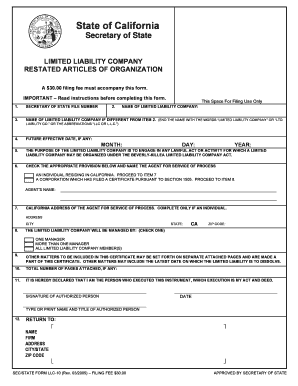
- Enter the Secretary of State file number issued for your limited liability company in Item 1.
- Provide the name of your limited liability company in Item 2, ensuring it is as filed with the California Secretary of State.
- If applicable, amend the company name in Item 3 to include 'Limited Liability Company,' 'Ltd. Liability Co.,' or the abbreviation 'LLC' to comply with naming requirements.
- Complete Item 4 by entering a future effective date for your Articles, if you desire it to take effect later. If no date is provided, it will be effective upon filing.
- In Item 5, acknowledge the preprinted purpose of the limited liability company, which follows California law.
- Enter the name of your agent for service of process in Item 6, indicating whether they are an individual resident of California or a corporation, and proceed to the appropriate subsequent item.
- If you designated an individual as the agent, provide their California address in Item 7. Do not use abbreviations or 'in care of' notations.
- In Item 8, select how your limited liability company will be managed: by one manager, more than one manager, or all members.
- Include any additional matters not covered in the previous sections in Item 9 and attach separate pages if necessary.
- Record the number of attached pages, if applicable, in Item 10.
- Ensure the document is signed in Item 11 by at least one authorized person, including their name and title. If signed by an entity or trust, additional details are required.
- Complete Item 12 by providing the name and address of the person or firm to receive a copy of the filing.
- After filling out the form, save your changes, download, print, or share the completed document as needed.
Start completing your Articles of Organization online today.
Get form
Experience a faster way to fill out and sign forms on the web. Access the most extensive library of templates available.
Once you file your Articles of Organization California, you typically do not need to file them again unless you make significant changes to your LLC. However, you must file an annual Statement of Information to keep your business information up-to-date. Staying compliant with these requirements is essential for maintaining your LLC's good standing in California.
Get This Form Now!
Use professional pre-built templates to fill in and sign documents online faster. Get access to thousands of forms.