Loading
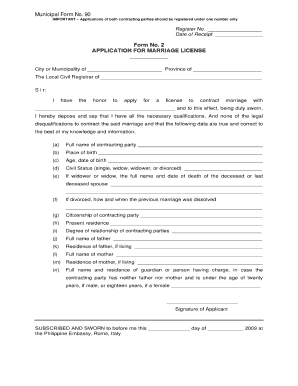
Get Municipal Form 90 Form No 2
How it works
-

Open form follow the instructions
-

Easily sign the form with your finger
-

Send filled & signed form or save
How to fill out the Municipal Form 90 Form No 2 online
Filling out the Municipal Form 90 Form No 2 online may seem daunting, but with the right guidance, the process can be straightforward and efficient. This guide provides a clear and supportive approach to completing the form, ensuring that all users can navigate it with ease.
Follow the steps to fill out Municipal Form 90 Form No 2 online
- Press the ‘Get Form’ button to access the form and open it in your preferred editor.
- Begin by entering the required identification information at the top of the form. This includes your name, address, and any other relevant personal details.
- Next, navigate to the section that requests specific details about your application or request. Be thorough and provide all necessary information to complete this section accurately.
- Continue to the next section, which may include options or choices specific to your municipal needs. Ensure you review each option carefully and select the one that applies to your situation.
- Once you have completed all the sections, review your entries for accuracy and completeness. This step is crucial to avoid potential delays in processing your application.
- Finally, you can choose to save your changes, download the form for your records, print it, or share it as required. Make sure to keep a copy of the completed form for your files.
Take the first step towards completing your Municipal Form 90 Form No 2 online today!
To register a marriage certificate in the Philippines, couples must first obtain a marriage license and then complete their marriage ceremony. Following the ceremony, ensure that the marriage is recorded with the local civil registrar. Utilizing resources like the Municipal Form 90 Form No 2 can guide you through the documentation needed for this process.