Loading
Get 15021 Katy Freeway, Suite 400
How it works
-

Open form follow the instructions
-

Easily sign the form with your finger
-

Send filled & signed form or save
How to fill out the 15021 Katy Freeway, Suite 400 online
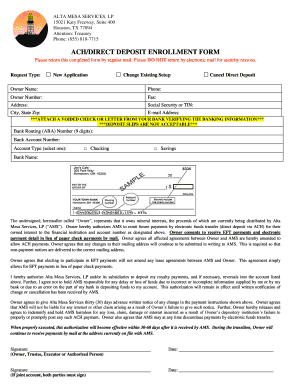
This guide provides clear instructions for completing the ACH/Direct Deposit Enrollment Form associated with Alta Mesa Services, LP. Whether you are submitting a new application or making changes, this step-by-step approach will help you fill out the form accurately and efficiently.
Follow the steps to complete the form correctly
- Click ‘Get Form’ button to access the enrollment form and open it in your chosen editing platform.
- Indicate your request type by selecting one of the options: 'New Application' or 'Change Existing Setup' in the designated checkbox.
- Provide your full name as the owner in the ‘Owner Name’ field for identification purposes.
- Fill in your primary phone number in the ‘Phone’ section, ensuring it is a number where you can be easily reached.
- Enter your owner number, if applicable, in the provided field to facilitate your account identification.
- Include your fax number in the ‘Fax’ field, if you have one, for any potential correspondence.
- Complete your address, including street, city, state, and zip code, ensuring accuracy for any communications.
- Input your Social Security number or Tax Identification Number in the respective field to verify your identity and ownership.
- If applicable, check the box for 'Cancel Direct Deposit' to indicate that you wish to discontinue that option.
- Enter your email address in the ‘E-mail Address’ section for electronic communication and confirmations.
- Attach a voided check or a letter from your bank verifying your banking information to ensure accuracy of your account details.
- Input the 9-digit Bank Routing Number in the appropriate field for electronic fund transfers.
- Fill in your Bank Account Number to specify where funds should be deposited.
- Select your Account Type by checking either 'Checking' or 'Savings' to identify the nature of your banking account.
- Provide the name of your bank in the 'Bank Name' field for reference.
- Read the authorization statement regarding electronic funds transfer to ensure your understanding and agreement.
- Sign the form in the designated 'Signature' field, adding your title if necessary (Owner, Trustee, Executor, or Authorized Person).
- If applicable, the joint account holder must also sign and date the form.
- Review all entries and ensure that all required fields are completed before finalizing.
- Once the form is filled out, save your changes, and proceed to print or share the document as needed.
Complete your forms online today for a streamlined experience!
Get form
Experience a faster way to fill out and sign forms on the web. Access the most extensive library of templates available.
Get This Form Now!
Use professional pre-built templates to fill in and sign documents online faster. Get access to thousands of forms.