Loading
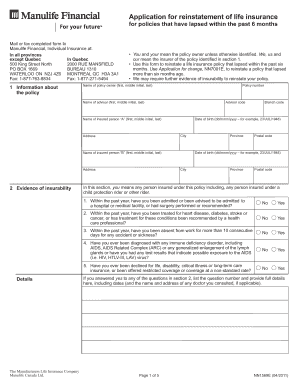
Get Manulife Reinstatement Form
How it works
-

Open form follow the instructions
-

Easily sign the form with your finger
-

Send filled & signed form or save
How to fill out the Manulife Reinstatement Form online
Completing the Manulife Reinstatement Form online can be a straightforward process if you follow the correct steps. This guide provides detailed instructions to help you navigate each section of the form with confidence.
Follow the steps to successfully complete the form.
- Press the ‘Get Form’ button to access the Manulife Reinstatement Form. This will allow you to open the document in your chosen digital editor.
- In section 1, provide the necessary information about the policy, including the policy number, the name of the policy owner, and their date of birth. Ensure you fill in each field correctly to avoid processing delays.
- For section 2, complete the evidence of insurability. Answer the health-related questions honestly and provide detailed explanations if you answer 'Yes' to any of them.
- In section 3, review the authorizations, agreements, and signatures carefully. Ensure that the policy owner and insured individuals sign where required. This section is crucial, as it authorizes the insurer to use your information for processing the application.
- If applicable, complete the automatic monthly withdrawal plan section thoroughly, ensuring all banking details are accurate and the correct persons sign.
- Once you have reviewed all the information, save your changes. You can also choose to download, print, or share the completed form as needed.
Start filling out your Manulife Reinstatement Form online today to ensure your life insurance policy is reinstated smoothly.
To reinstate a lapsed policy, complete the Manulife Reinstatement Form. Ensure you understand any specific requirements for your situation, which may include paying overdue premiums or providing proof of insurability. Submit the form promptly, as timely action is crucial for reinstatement.