Loading
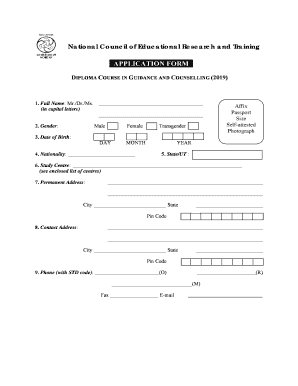
Get Application Form - Ncert
How it works
-

Open form follow the instructions
-

Easily sign the form with your finger
-

Send filled & signed form or save
How to fill out the Application Form - Ncert online
This guide provides a comprehensive overview of how to effectively complete the Application Form - Ncert for the diploma course in guidance and counselling. Whether you are familiar with online applications or new to the process, this step-by-step guide will help ensure that your application is filled out accurately.
Follow the steps to successfully complete your Application Form - Ncert.
- Click ‘Get Form’ button to obtain the form and open it in the editor.
- In the first section, enter your full name in capital letters as required. Ensure that you select the appropriate title such as Mr., Dr., or Ms.
- Select your gender from the provided options: Male, Female, or Transgender. Make sure to affix a self-attested passport size photograph in the designated area.
- Fill out your date of birth, ensuring to specify day, month, and year correctly.
- Indicate your nationality in the provided space.
- Choose your state or union territory from the list.
- Provide your study centre choice based on the enclosed list of centres.
- Enter your permanent address, including city, state, and pin code.
- Fill out the contact address in the same manner as the permanent address, if different.
- Provide contact numbers along with the STD code for your office, residence, and mobile phone. Also, include your fax number and email address.
- Detail your current occupation and official address, along with the city, state, and pin code.
- List your educational qualifications starting from the final school examination, including the examining body, year of completion, percentage of marks or grade point average, and subjects studied. Attach self-attested copies of relevant documents.
- Provide details of your professional qualifications in the same manner as your educational qualifications.
- Outline your work or professional experience, including employer, position held, duration, and nature of duties.
- Mention any short-term courses or training attended that are relevant, providing course name, institute, year, and duration.
- If applicable, indicate any disability and attach the necessary certificate.
- Select your category as General, SC, ST, or OBC, according to your status, and attach certificates where necessary.
- Review and confirm your declarations regarding the accuracy of the information provided and your fitness for the course.
- Ensure all required enclosures are attached and, if necessary, include the names and contact information of two referees.
- Complete the application by obtaining the signature of the head of your school or institution if presently employed. Make sure to include their name and designation.
- After reviewing your application for completeness, save any changes made, download, print, or share the form as necessary.
Complete your application form online today and take the next step towards your educational journey.
The full form of NCTE is the National Council for Teacher Education. This Indian regulatory body plays a critical role in overseeing teacher education programs across the country. Understanding the significance of both NCTE and NCERT can guide educators in their professional development and educational pursuits.