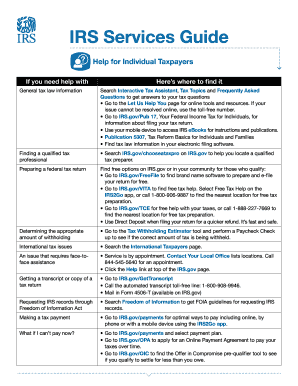
IRS Services Guide Help for Individual Taxpayers If you need help withHeres where to find itGeneral tax law informationSearch Interactive Tax Assistant, Tax Topics and Frequently Asked Questions to.

How it works
  • Open form

    Open form follow the instructions

  • Easily sign form

    Easily sign the form with your finger

  • Share form

    Send filled & signed form or save

How to fill out the IRS Publication 5136-A online

Filling out the IRS Publication 5136-A form online can be a straightforward process when you have the right guidance. This guide provides step-by-step instructions to ensure that you complete the form accurately and efficiently.

Follow the steps to complete the IRS Publication 5136-A form online.

  1. Click the ‘Get Form’ button to obtain the form and open it in your editor.
  2. Begin by entering your personal information in the designated fields. This includes your full name, Social Security number, and address. Make sure all information is accurate for any correspondence you may receive.
  3. Proceed to fill out the specific sections of the form. Review any instructions provided alongside each section to ensure that you completely understand what is required.
  4. Check any relevant boxes that apply to your situation. This may include questions related to your tax status or specific deductions.
  5. Once you have completed all sections, save your changes and consider downloading a copy of the form for your records. You can also print the form if needed.
  6. If necessary, share the completed form with a tax professional or relevant parties for review before submission.

Start filling out your IRS Publication 5136-A form online today to ensure a hassle-free tax experience.

Get form

Experience a faster way to fill out and sign forms on the web. Access the most extensive library of templates available.

Related content

Publication 5136-A (Rev 8-2020)

Go to IRS.gov/OIC to find the Offer in Compromise pre-qualifier tool to see if you qualify...

Learn more
2010 Instruction 1040 (Tax Tables)

At. But. Single Married Married Head. At. But. Single Married Married Head. At. But...

Learn more
united states securities and exchange commission

The Parent Company is a REIT, whose only material asset is its ownership of the...

Learn more
Questions & Answers

Get answers to your most pressing questions about US Legal Forms API.

Contact support

Who has access to IRS information?

Access to IRS information is generally restricted to you and authorized representatives, such as accountants or legal advisors with appropriate permissions. The IRS maintains strict confidentiality regarding personal tax records. For a better understanding of access rights, IRS Publication 5136-A provides valuable insights.

You can get information from the IRS either online or by speaking with a representative on the phone. For detailed inquiries, visiting the IRS office may also be beneficial. To stay informed, ensure to check IRS Publication 5136-A for additional context and resources.

To pull up your tax documents, start by logging into your IRS account online where you can view and download past returns. You may also use third-party services like uslegalforms to organize your tax history if needed. IRS Publication 5136-A assists you in navigating these processes seamlessly.

You can obtain IRS information through several avenues, including the official IRS website, phone inquiries, and by visiting local IRS offices. Each method has its benefits, so consider what works best for you. Make sure to check IRS Publication 5136-A for comprehensive resources on accessing IRS information.

Yes, the IRS maintains records of your tax filings and related information. This includes your income, deductions, and any payments you've made. If you have questions about what they may have, IRS Publication 5136-A can help clarify.

Whether to fax or mail documents to the IRS depends on your specific situation. Faxing can be faster, especially for time-sensitive matters, while mailing may be more appropriate for detailed submissions. For clearer guidance on your options, refer to IRS Publication 5136-A.

You can access your IRS account by visiting the IRS website and selecting the 'Sign In' option. You'll need to create an account if you haven't already, which involves personal information verification. IRS Publication 5136-A offers detailed instructions on managing your online account effectively.

To report digital assets to the IRS, you need to identify the types of digital currencies or assets you own and their fair market value. Refer to IRS Publication 5136-A for the latest information on how to report these investments, as the process can vary. Ensure you accurately disclose this information on your tax return to stay compliant and avoid potential penalties.

The easiest way to fill out your taxes is to use reliable tax preparation software or online platforms like UsLegalForms. These tools often guide you step-by-step through each section, simplifying the process and reducing the chances of error. Additionally, consulting IRS Publication 5136-A can provide you with essential tips that make tax filing more manageable and straightforward.

When writing a letter to the IRS, start by including your contact information and relevant tax identification number at the top. Clearly state the purpose of your letter, whether it's a response to a notice or a request for clarification. For a comprehensive approach, refer to IRS Publication 5136-A, which provides insights on proper formatting and content to help ensure your message is well-received.

Get This Form Now!

Use professional pre-built templates to fill in and sign documents online faster. Get access to thousands of forms.

If you believe that this page should be taken down, please follow our DMCA take down process here.

Get IRS Publication 5136-A