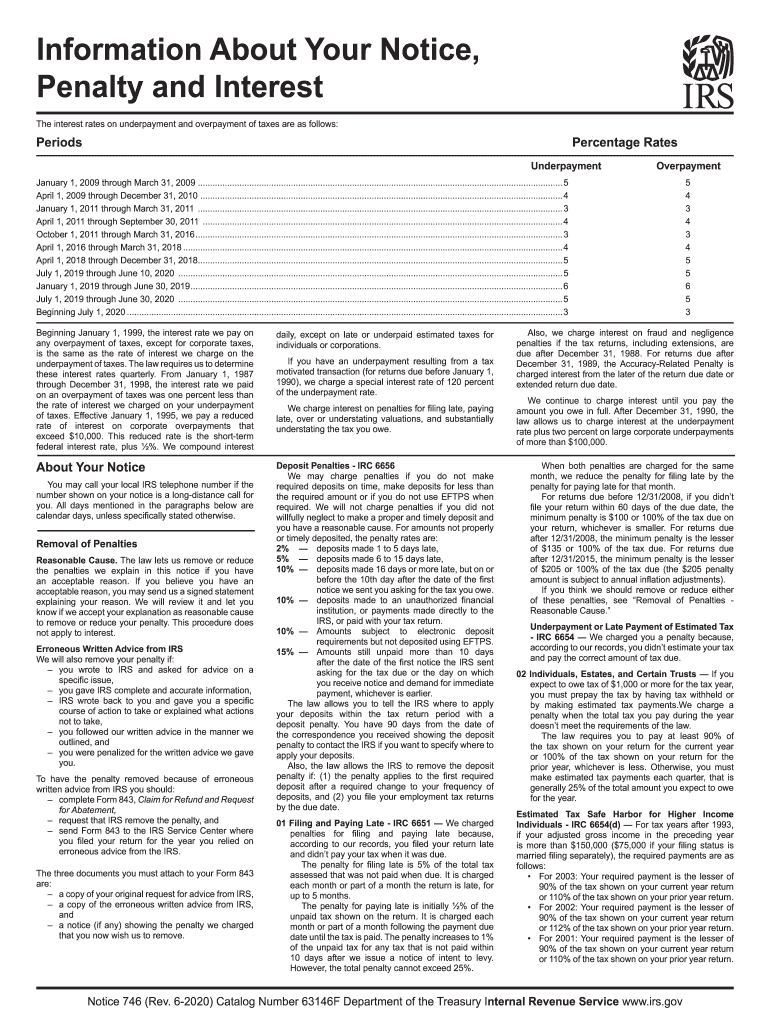
Information About Your Notice, Penalty and InterestIRSThe interest rates on underpayment and overpayment of taxes are as follows:PeriodsPercentage Rates UnderpaymentOverpaymentJanuary 1, 2009 through.
Loading

Open form follow the instructions

Easily sign the form with your finger

Send filled & signed form or save
How to fill out the IRS Notice 746 online
Filling out the IRS Notice 746 can seem daunting, but this guide will help you navigate the necessary information with ease. This form is crucial for understanding penalties and interest related to your tax situation, ensuring that you can respond appropriately.
Follow the steps to accurately complete the IRS Notice 746 online.
- Click ‘Get Form’ button to obtain the form and open it for completion.
- Carefully read the introductory section of the form to understand its purpose and details regarding penalties and interest.
- Enter your personal information in the designated fields, ensuring accuracy to avoid future complications.
- Review the sections regarding penalties to determine which may apply to your situation based on the information in the notice.
- Complete the corresponding fields related to the penalties you are addressing, including any explanations or claims for reduction of penalties.
- Check for any additional required documentation, such as previous notices or communications with the IRS, that may need to be attached.
- Once all sections and fields are filled out, review your entries for correctness and completeness.
- Save your changes to the document. You may choose to download, print, or share the form as needed.
Ensure you complete your documents online to have a streamlined and efficient process.
Experience a faster way to fill out and sign forms on the web. Access the most extensive library of templates available.
Related content
For amounts not properly or timely deposited, the penalty rates are: 2% — deposits made...
Jun 9, 2008 — A penalty notice contains an IRS representative's name and/or telephone...
Apr 27, 2017 — The medical device tax no longer applies to sales for 2 years beginning...
Get answers to your most pressing questions about US Legal Forms API.
What are the IRS reject codes?
IRS reject codes are numeric identifiers generated when your tax return fails to process correctly due to specific errors. These codes help indicate what needs to be corrected to resubmit your tax return successfully. Understanding these codes can save you time, and utilizing the resources available through US Legal Forms can aid in resolving these issues efficiently.
What is a code 767 for the IRS?
Code 767 is an IRS designation that typically refers to the application of an estimated tax payment. This adjustment usually occurs when a taxpayer has overpaid their taxes or made a late payment. If you encounter this code, it is prudent to review your IRS records and ensure that everything aligns with your current financial status.
What is the IRS 746 code?
The IRS 746 code specifically signifies that the IRS has issued a notice regarding your tax refund or adjustment. When you receive an IRS Notice 746, it is critical to review its details to understand any implications for your tax situation. Keeping informed about your IRS communications can help you take appropriate actions when necessary.
How do I get the IRS to remove penalties and interest?
To have the IRS remove penalties and interest, you can request penalty relief through written correspondence or by calling the agency directly. It's essential to provide a valid reason for your request, such as experiencing financial hardship. Using resources from services like US Legal Forms can help simplify the application process and support your case more effectively.
What happens if I miss the October 15 tax deadline?
Missing the October 15 tax deadline can lead to penalties and interest on any amount owed to the IRS. It is vital to file your taxes as soon as possible to lessen potential consequences. If you find yourself in this situation, seeking help from platforms like US Legal Forms can provide you with the necessary legal resources to manage your tax issues effectively.
What is the IRS one time forgiveness?
The IRS one-time forgiveness program allows eligible taxpayers to request forgiveness for certain penalties related to late filing or payment. This opportunity can be a lifeline for anyone struggling with unexpected financial challenges. If you need assistance navigating this program, consider using platforms like US Legal Forms to streamline the process.
What does code 765 mean on an IRS transcript?
Code 765 on an IRS transcript typically indicates that the IRS has canceled a tax assessment for the tax year in question. This may happen due to reasons such as adjustments made during processing or a correction in your account. If you receive any notices related to this code, it is essential to check your documents to ensure there are no further actions needed on your part.
What is the IRS Code 746?
IRS Code 746 refers to a notification from the Internal Revenue Service regarding an adjustment to your tax account. This code usually indicates that the IRS has made a decision on a credit or refund based on your tax return. Understanding your IRS Notice 746 is crucial because it offers insights into any tax changes you should be aware of.
What is a good reasonable cause for penalty abatement?
A good reasonable cause for penalty abatement could involve situations like severe illness, family crises, or unexpected natural disasters that hindered your ability to file on time. Citing IRS Notice 746 in your request can provide a solid framework for your argument. Supporting your claim with documentation helps reinforce the legitimacy of your situation. Showing that you acted in good faith can greatly enhance your chances of relief.
What is reasonable cause under the IRS?
Reasonable cause under the IRS refers to a legitimate reason that prevents compliance with tax obligations. This can include unexpected events like serious illness, mishaps, or system malfunctions. Understanding this concept is crucial when dealing with penalties, as outlined in IRS Notice 746. By demonstrating reasonable cause, you can often secure penalty relief.
Use professional pre-built templates to fill in and sign documents online faster. Get access to thousands of forms.
If you believe that this page should be taken down, please follow our DMCA take down process here.