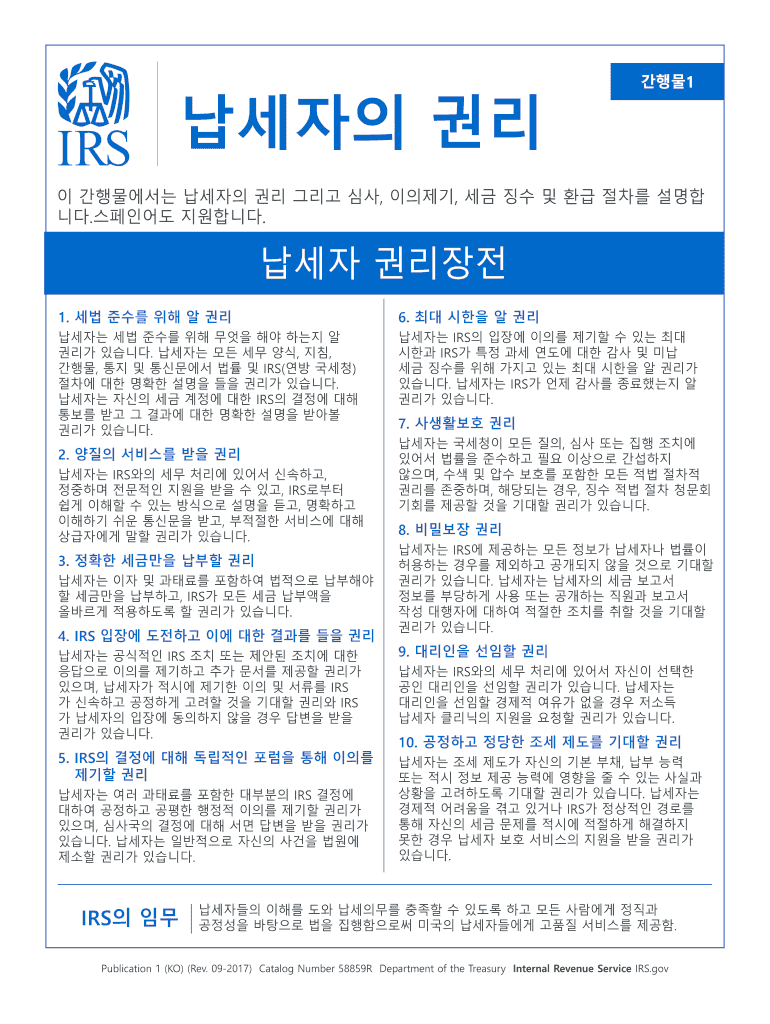
1 , , . . 1. 6. . , , , IRS( ).

Open form follow the instructions

Easily sign the form with your finger

Send filled & signed form or save
How to fill out the IRS Publication 1 (KO) online
Filling out IRS Publication 1 (KO) online can help you understand your rights as a taxpayer and navigate related processes. This guide will provide you with clear, step-by-step instructions to successfully complete the form.
Follow the steps to complete your form efficiently.
- Click ‘Get Form’ button to obtain the publication and open it in your preferred online editor.
- Carefully read the introductory section of the publication. This section includes an overview of taxpayer rights and the relevant procedures for audits, appeals, tax collection, and refunds.
- Review each component of the taxpayer bill of rights. Take note of your rights, such as the right to know and the right to quality service, to ensure you understand what you are entitled to as a taxpayer.
- Fill in any sections that require personal information, if applicable. This may include your contact details and any specific concerns you'd like to address.
- Navigate through the rights outlined, ensuring that you understand and document any procedures that may impact you, such as the right to appeal or request further assistance.
- After completing the relevant sections, review everything for accuracy and completeness. Make any necessary edits.
- Once you have finalized the form, save your changes, and consider downloading or printing a copy for your records. You may also share the completed form as needed.
Don't hesitate to complete your documents online for a smoother tax process.
Experience a faster way to fill out and sign forms on the web. Access the most extensive library of templates available.
Related content
Product Number Publication 1 (KO) · Title Your Rights As A Taxpayer (Korean Version)...
2024 · Cited by 1 — The treaty is effective for withholding taxes on payments made on...
IRS (standing for International Record Syndicate) Records was a record label formed by...
Get answers to your most pressing questions about US Legal Forms API.
What is publication 1?
IRS Publication 1 serves as a crucial document for understanding taxpayer rights and responsibilities. It highlights the rights you have when dealing with the IRS and informs you about available assistance programs. Familiarizing yourself with IRS Publication 1 empowers you as a taxpayer.
What is an IRS form K-1?
IRS Form K-1 is used to report income, deductions, and credits from partnerships, S corporations, and estates. It provides detailed information that partners or shareholders need to file their tax returns accurately. Knowing how to read your K-1 from IRS is crucial for proper tax reporting.
What is publication 526?
IRS Publication 526 explains the rules regarding charitable contributions and how they can affect your tax return. It clarifies what qualifies as a deductible donation and the necessary documentation. Understanding IRS Publication 526 can enhance your tax savings if you donate to charities.
What is the IRS publication 995?
IRS Publication 995 provides guidelines regarding the tax implications of foreign income. It covers reporting requirements for American citizens earning income abroad. Using IRS Publication 995 ensures you stay compliant while handling any international tax situations.
What is schedule 1 in income tax?
Schedule 1 is an additional form used to report income or adjustments that aren't listed on the main tax form. It includes supplemental information like unemployment compensation and certain deductions. Knowing how to complete Schedule 1 is vital for accurate tax reporting.
What is publication 590?
IRS Publication 590 discusses individual retirement arrangements (IRAs). It outlines contribution limits, tax benefits, and withdrawal rules. Familiarizing yourself with IRS Publication 590 is crucial for effective retirement planning and maximizing tax advantages.
What is publication 550?
IRS Publication 550 explains the tax treatment of investment income and expenses. It provides insights on how to report interest, dividends, and capital gains. Reviewing IRS Publication 550 is essential for investors looking to accurately understand their tax obligations.
What is publication 4557?
IRS Publication 4557 provides guidance on protecting taxpayer data and privacy. It emphasizes the importance of safeguarding personal information while handling taxes. Understanding this publication helps taxpayers and tax professionals secure sensitive data effectively.
What does IRS stand for?
IRS stands for the Internal Revenue Service, which is the U.S. federal agency responsible for tax collection and enforcement of tax laws. The IRS administers federal tax codes and provides resources to help taxpayers remain compliant. For more information about how the IRS operates, consider checking IRS Publication 1 (KO), which offers useful insights into your responsibilities. You can further explore resources on US Legal Forms for guidance in navigating tax matters.
What is IRS publication 1?
IRS Publication 1 (KO) centers on taxpayer rights and provides vital information about the IRS's obligations to you. It describes how the IRS must treat you as a taxpayer and outlines the appeals process if disagreements arise. Utilizing IRS Publication 1 (KO) ensures you are aware of your rights while navigating tax situations. For comprehensive support, visit US Legal Forms for additional resources.
Use professional pre-built templates to fill in and sign documents online faster. Get access to thousands of forms.
If you believe that this page should be taken down, please follow our DMCA take down process here.