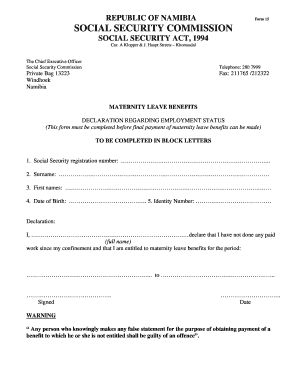
Get Social Security Form 15
How it works
-

Open form follow the instructions
-

Easily sign the form with your finger
-

Send filled & signed form or save
How to fill out the Social Security Form 15 online
Filling out the Social Security Form 15 online is a straightforward process that ensures you can apply for maternity leave benefits efficiently. This guide will walk you through each section of the form, providing clear instructions to help you complete it accurately.
Follow the steps to complete the Social Security Form 15 online.
- Click ‘Get Form’ button to access the form and open it in the editor.
- Begin filling in your social security registration number. This number is crucial as it identifies your account within the Social Security system.
- Enter your surname in the designated field. Ensure to spell it correctly as it appears on official documents.
- Fill in your first names in the corresponding box. Again, accuracy is important to match your identification documents.
- Input your date of birth in the format required by the form. This information validates your identity.
- Provide your identity number in the next space. This number typically appears on your national ID card.
- In the declaration section, write your full name to declare that you have not performed any paid work since your confinement and that you qualify for maternity leave benefits.
- Specify the period for which you are claiming maternity leave benefits, indicating the start and end dates clearly.
- Sign the declaration to confirm that all information provided is accurate and true.
- Date your signature to indicate when the form was completed.
- Once you have filled out all the required fields, you can save your changes, download, print, or share the form as needed.
Complete your Social Security Form 15 online today to ensure you receive your maternity leave benefits promptly.
Line 15 on Form 1095-C indicates the offer of health coverage made to an employee. It includes details about the type of coverage available and may relate to Social Security as it impacts your overall tax situation. Understanding this line is important for accurately reporting your insurance status. For more information on how it connects to social security benefits, explore the support offered on the uslegalforms platform.