Loading
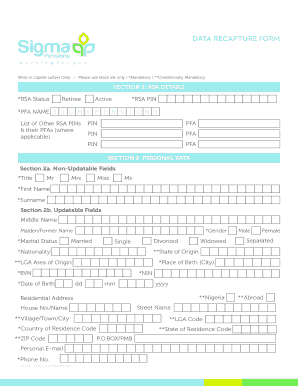
Get Data Recapture Form - Sigma Pensions Limited
How it works
-

Open form follow the instructions
-

Easily sign the form with your finger
-

Send filled & signed form or save
How to fill out the Data Recapture Form - Sigma Pensions Limited online
Filling out the Data Recapture Form for Sigma Pensions Limited is a straightforward process that ensures your retirement savings account information is accurate and up to date. This guide provides a detailed, step-by-step approach to completing the form online, ensuring you have all the necessary details at hand.
Follow the steps to successfully complete the form.
- Click the ‘Get Form’ button to access the Data Recapture Form and open it in your preferred editor.
- Begin with Section 1, which requires you to provide your RSA status (Retiree or Active) and your RSA PIN. Include the name of your Pension Fund Administrator (PFA), which should be under Sigma Pensions, and list any other RSA PINs and their respective PFAs if applicable.
- Move to Section 2, where you will fill out your personal data. In part 2a, complete the non-updatable fields such as your title, first name, and surname. In part 2b, provide updatable fields including your middle name, maiden/former name, marital status, gender, nationality, and National Identification Number (NIN). Ensure to include your residential address, place of birth, date of birth, and contact information, including your email and phone number.
- Proceed to Section 3a to detail your employment records. Select your sector classification and indicate if your employer is under the IPPIS system. Fill in your employer’s name, address, and details about your employment, including your employee ID and designation.
- If applicable, complete Section 3b by providing your salary structure details. This section may include information required for Federal Government Treasury funded MDAs, such as harmonized salary structure and current salary details.
- In Section 4, provide details for your next of kin. Fill out their title, gender, first name, surname, relationship to you, and their contact information, ensuring accuracy in the address fields.
- Review Section 5 for biometrics. Ensure to upload your passport photograph and provide your signature where required.
- Finally, review all sections to ensure accuracy, gather necessary documents required for submission, and save your changes. You may then download, print, or share the form as needed.
Complete your Data Recapture Form online today to ensure your information is up to date.
The timeline for accessing 25% of your pension varies based on individual circumstances and the completeness of your submitted Data Recapture Form - Sigma Pensions Limited. Generally, once your application is approved, you may receive the funds within a few weeks. Keeping your documentation organized can help expedite the process.