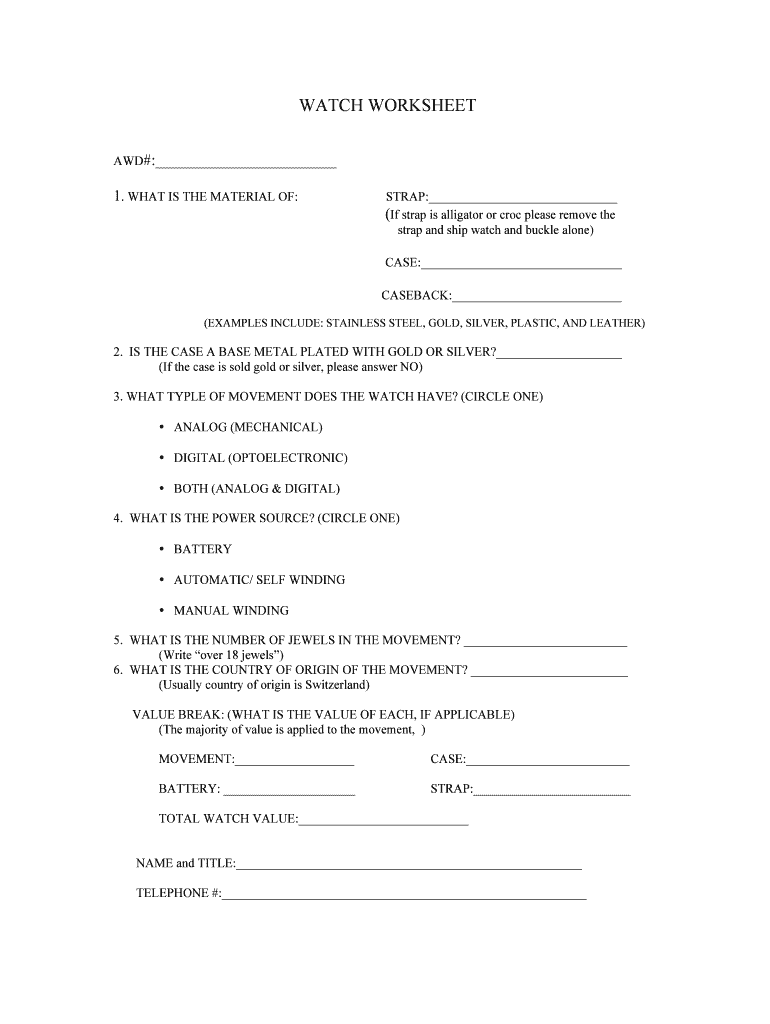
WATCH WORKSHEET AWD#: 1. WHAT IS THE MATERIAL OF:STRAP: (If strap is alligator or croc please remove the strap and ship watch and buckle alone) CASE: CASEBACK: (EXAMPLES INCLUDE: STAINLESS STEEL,.

Open form follow the instructions

Easily sign the form with your finger

Send filled & signed form or save
How to fill out the Fedex Watch Worksheet online
The Fedex Watch Worksheet is an essential document for effectively providing information about watches during shipping. This guide will help you navigate through the form smoothly and ensure you include all necessary details.
Follow the steps to fill out the Fedex Watch Worksheet online.
- Click ‘Get Form’ button to access the worksheet and open it in your preferred document editor.
- Begin by filling out the AWD# section at the top of the form, which can typically be found in the first field.
- For the material of the strap, indicate the type in the provided space. Remember to mention if it is made from alligator or crocodile skin, as this requires separate shipping of the watch and buckle.
- In the next sections, specify the materials for the case and case back. Use common terminology such as stainless steel, gold, silver, plastic, or leather.
- Respond to the question regarding whether the case is base metal plated with gold or silver. Answer 'Yes' or 'No' based on the composition.
- Now, indicate the type of movement your watch has by circling either 'Analog (Mechanical)', 'Digital (Optoelectronic)', or 'Both (Analog & Digital)'.
- Specify the power source by circling one of the options: 'Battery', 'Automatic/Self Winding', or 'Manual Winding'.
- For the number of jewels in the movement, provide the number in the designated space, noting that ‘over 18 jewels’ is a common response.
- Identify the country of origin of the movement. If applicable, Switzerland is frequently the answer.
- In the value break section, enter the respective values for the movement, case, battery, and strap. Finally, calculate and provide the total watch value in the last field.
- Complete the form by filling out your name, title, and telephone number at the bottom.
- Once all fields are accurately filled, save your changes. You can also download, print, or share the completed form as needed.
Start filling out the Fedex Watch Worksheet online to ensure accurate and efficient shipping.
Experience a faster way to fill out and sign forms on the web. Access the most extensive library of templates available.
Related content
Nov 4, 2024 — The following NOAA SIP Product Inspection Instructions provide...
Scanners are also available at Fedex Office, Staples, and other, similar stores for your...
FedEx tracking number. Print out the completed form and include it with the ... “Without...
Get answers to your most pressing questions about US Legal Forms API.
How to get a retrieval code at FedEx?
To get a retrieval code at FedEx, start by visiting the FedEx website and accessing the tracking section. Enter your tracking number and follow the prompts to request your retrieval code. This code will grant you access to specific shipment information. Utilizing tools like the Fedex Watch Worksheet can simplify this process and keep you informed about your shipments.
How to get FedEx air waybill?
To obtain a FedEx air waybill, you can create one through the FedEx website or mobile app. Simply log in to your account, and navigate to the shipping section. You can fill out your shipment details, print the air waybill, and attach it to your package. For added efficiency, consider using the Fedex Watch Worksheet, which can help you track and manage your shipments more effectively.
How to fill out FedEx US airbill?
When filling out a FedEx US airbill, start by placing your shipping details in the designated fields. Include the sender and recipient address, shipping date, and package information, such as weight and dimensions. Reference the Fedex Watch Worksheet for tips on completing the airbill correctly to avoid errors. An accurate airbill helps ensure your package moves efficiently through the shipping process.
How to fill out a FedEx invoice?
Filling out a FedEx invoice requires accurate details about the services provided and the costs incurred. Begin by listing the sender and recipient information, then detail each item or service, including item descriptions, quantities, and prices. Utilize the Fedex Watch Worksheet to ensure you include all necessary information to support international transactions. This will help ensure compliance and facilitate smooth processing.
How to fill out FedEx International?
To fill out the FedEx International shipping label, you start by ensuring you have all the necessary information at hand. Include the sender and recipient addresses, package details, and any customs information required for the destination country. Make sure to review the Fedex Watch Worksheet for specific guidelines on documentation. This will help streamline the process and prevent delays during shipment.
Use professional pre-built templates to fill in and sign documents online faster. Get access to thousands of forms.
If you believe that this page should be taken down, please follow our DMCA take down process here.