Loading
Get Rubric Logo
How it works
-

Open form follow the instructions
-

Easily sign the form with your finger
-

Send filled & signed form or save
How to fill out the Rubric Logo online
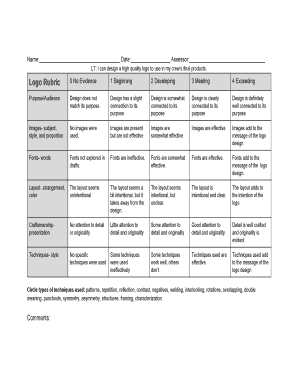
This guide provides clear and comprehensive instructions on how to successfully fill out the Rubric Logo form online. By breaking down each section and field, we aim to support users in capturing their logo assessment accurately.
Follow the steps to complete the Rubric Logo form with ease.
- Press the ‘Get Form’ button to access the Rubric Logo form and open it in your preferred online platform.
- Begin by filling in your name in the designated blank field at the top of the form. This identifies you as the assessor or creator of the logo.
- Next, enter the date in the specified field. This is important for tracking and reference purposes.
- In the assessor field, write your name or the name of the person conducting the evaluation to ensure accountability.
- Evaluate the logo's purpose and audience by selecting a rating from the options provided, ranging from 'No Evidence' to 'Exceeding.' Provide justifications for your choice in the comments section below.
- Assess the images used in the logo by circling the appropriate level of effectiveness. Provide notes on how the images contribute to your logo's message.
- Evaluate the fonts selected for the logo, marking how effective they are and explaining their impact on the overall design in the comments.
- Analyze the layout of the logo regarding arrangement and color. Indicate the effectiveness of the layout and provide insights on how the layout supports the logo's intention.
- Consider the craftsmanship and presentation of your logo. Rate the attention to detail and originality, justifying your rating in the comment space.
- Review the techniques employed in the logo design. Circle the types of techniques used and rate their effectiveness for conveying the desired message.
- Once you have completed all sections and added comments where necessary, ensure your work is saved. You may download, print, or share the completed form as needed.
Start completing the Rubric Logo form online for a streamlined logo evaluation process.
Related links form
A rubric format is a structured template that categorizes assessment criteria and performance levels. Typically, it consists of rows and columns where each criterion represents a row, and the performance levels are listed across the top. Using a Rubric Logo can add an aesthetic element, making the rubric visually appealing and easier to navigate. This format not only systematizes assessments but also ensures consistent grading.