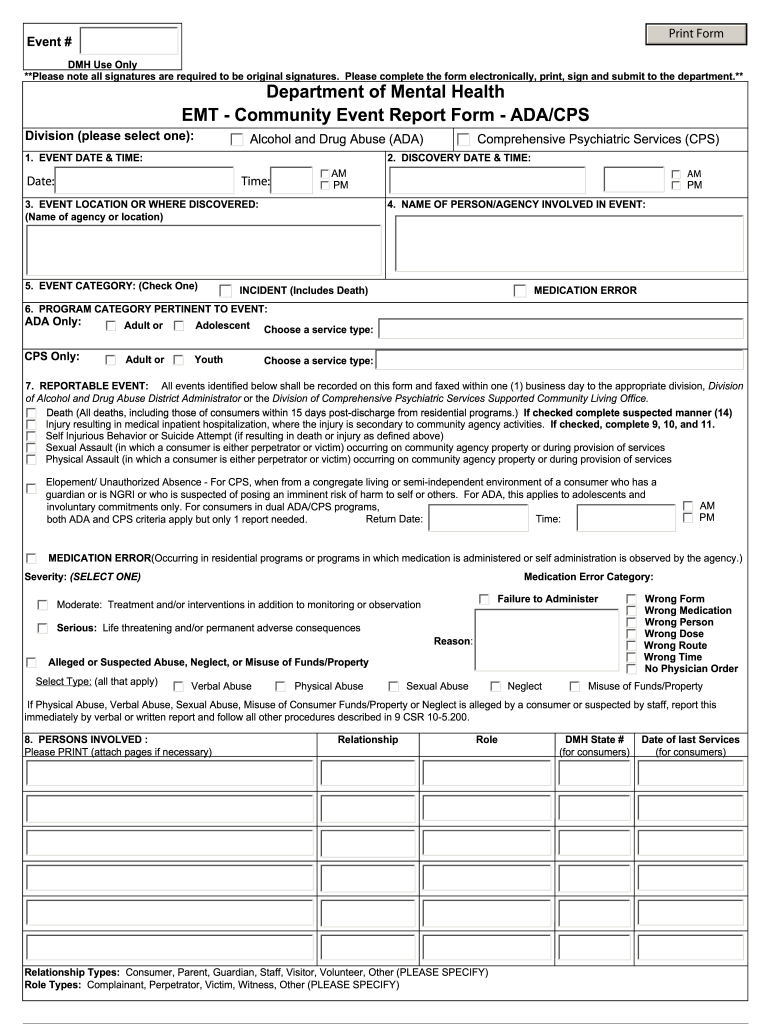
Nt of Mental Health EMT - Community Event Report Form - ADA/CPS Division (please select one): Alcohol and Drug Abuse (ADA) Comprehensive Psychiatric Services (CPS) 2. DISCOVERY DATE & TIME: 1. EVENT DATE & TIME: Date: Time: AM PM 3. EVENT LOCATION OR WHERE DISCOVERED: (Name of agency or location) 5. EVENT CATEGORY: (Check One) AM PM 4. NAME OF PERSON/AGENCY INVOLVED IN EVENT: INCIDENT (Includes Death) MEDICATION ERROR 6. PROGRAM CATEGORY PERTINENT TO EVENT: ADA Only: Adult or Ad.
Loading

Open form follow the instructions

Easily sign the form with your finger

Send filled & signed form or save
How to fill out the Dmhmogovformsemt online
The Dmhmogovformsemt is an essential form for reporting events within mental health services. This guide provides clear and user-friendly instructions to assist you in filling out the form accurately and efficiently online.
Follow the steps to complete the Dmhmogovformsemt online.
- Press the ‘Get Form’ button to access the Dmhmogovformsemt document and open it in your preferred online editor.
- Select the relevant division for the event by marking either 'Alcohol and Drug Abuse (ADA)' or 'Comprehensive Psychiatric Services (CPS)'.
- Fill in the date and time of the event, ensuring to specify AM or PM clearly.
- Enter the name of the agency or location where the event occurred in the designated field.
- Choose the category of the event by checking one of the options: 'Incident (Includes Death)' or 'Medication Error'.
- For the program category, select either 'Adult' or 'Adolescent' for ADA; or 'Adult' or 'Youth' for CPS, depending on the applicable service.
- Identify the specific reportable event by clicking the appropriate options according to the type of incident, ensuring to complete any additional fields as necessary.
- List all persons involved in the event, providing their relationship and role, as well as attaching additional pages if needed.
- Complete the injury details by selecting the type of injury and specifying the body parts affected.
- Document who was notified about the incident by filling in the names and times of contact.
- Provide a detailed description of the event, including the interventions used by staff.
- Summarize the immediate actions taken by the agency and any steps to prevent recurrence, completing the required signature section.
- Once all fields are completed, review the information for accuracy before saving changes, downloading, or printing the completed form.
Complete your Dmhmogovformsemt online today for efficient documentation!
Experience a faster way to fill out and sign forms on the web. Access the most extensive library of templates available.
Related content
The completed forms can be printed and faxed to your regional Supported Community Living...
Jefferson College will: Suicide Prevention Programs Available On and Off Campus, Crisis...
... gov) has complaint forms, IMR application forms, and instructions online. *Department...
Use professional pre-built templates to fill in and sign documents online faster. Get access to thousands of forms.
If you believe that this page should be taken down, please follow our DMCA take down process here.