Loading
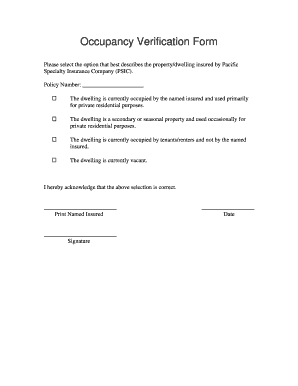
Get Occupancy Verification Form
How it works
-

Open form follow the instructions
-

Easily sign the form with your finger
-

Send filled & signed form or save
How to fill out the Occupancy Verification Form online
Filling out the Occupancy Verification Form online is a straightforward process that helps ensure accurate documentation regarding the occupancy status of your property. This guide provides step-by-step instructions to assist you in completing the form correctly.
Follow the steps to complete your form accurately.
- Use the ‘Get Form’ button to access the Occupancy Verification Form and open it for editing.
- Begin by selecting the option that best describes your property. You will find four choices: a primary residence, secondary or seasonal property, a property occupied by tenants/renters, or a vacant property. Choose the option that applies to your situation.
- Next, locate the ‘Policy Number’ field. Input your specific policy number to ensure your submission is linked to the correct account.
- After making your selections, review your choices carefully. Confirm that the information reflects your occupancy status accurately.
- Proceed to acknowledge your selections. You will find a space designated for your printed name — please ensure it matches your official records.
- Sign the form in the provided space. Your signature is essential for validating the information submitted.
- Finally, date the form in the designated area before finalizing it. Once everything is complete, you can save your changes, download the form, print it, or share it as needed.
Complete and submit your documents online today for a seamless process.
Related links form
APPLICATION For EMPLOYMENT - United Planning Organization - Upo
Field Trip Scholarship Application - Sacramento History Museum
Form A-11 Application For Admission As A Lawyer (Transfer ... - Lawsociety Sk
Game Birds And Game Animals Cold Storage Or Processing Facility Record Book. Wildlife Record Keeping
To fill in a format for tenant information, start by gathering all necessary details like current address, employment, and references. Clearly label each section and ensure accurate spelling for easy readability. Using an Occupancy Verification Form can streamline this process, offering a structured template that helps you collect and present tenant information effectively and efficiently.