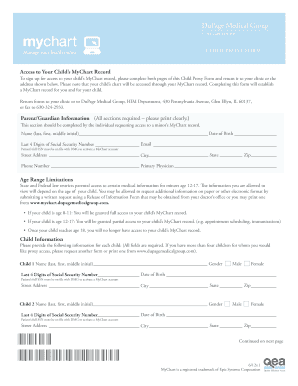
Get Dupage Medical Group Child Proxy Form
How it works
-

Open form follow the instructions
-

Easily sign the form with your finger
-

Send filled & signed form or save
How to fill out the DuPage Medical Group Child Proxy Form online
This guide provides clear, step-by-step instructions on completing the DuPage Medical Group Child Proxy Form online. Filling out this form will grant you access to your child's MyChart medical records, ensuring you can effectively manage their healthcare.
Follow the steps to fill out the form accurately.
- Click ‘Get Form’ button to obtain the DuPage Medical Group Child Proxy Form and open it in your online editor.
- Fill out the Parent/Guardian Information section. Ensure you provide your full name (last, first, middle initial), date of birth, last four digits of your Social Security number, email, street address, city, state, zip, and phone number. Also, include your primary physician's information.
- Complete the Age Range Limitations section, understanding that access to your child’s MyChart record may vary based on their age. Note that you will have full access for children aged 0-11 and partial access for those aged 12-17.
- Provide the required Child Information for each child. Fill in each child's name (last, first, middle initial), date of birth, last four digits of their Social Security number, and address details. Repeat this for up to four children; if you have more, request an additional form.
- Review the MyChart Terms and Agreement section carefully. Ensure you understand the responsibilities associated with using your MyChart account and the importance of keeping your information secure.
- Sign the form as the parent or legal guardian, indicating your relationship to the patient, and provide the date of signing. Ensure that all information provided previously is accurate.
- After completing the form, save any changes made. You may also choose to download, print, or share the filled form as required.
Complete the DuPage Medical Group Child Proxy Form online to manage your child's healthcare effectively.
To give proxy access in MyChart, you need to complete the DuPage Medical Group Child Proxy Form. After filling out the form, submit it through the MyChart system or at your local DuPage Medical Group office. Once processed, the designated proxy will receive access to your child's health information and be able to communicate with healthcare providers on their behalf. This convenient feature ensures that you can easily share important medical details while keeping everything organized.
Industry-leading security and compliance
-
In businnes since 199725+ years providing professional legal documents.
-
Accredited businessGuarantees that a business meets BBB accreditation standards in the US and Canada.
-
Secured by BraintreeValidated Level 1 PCI DSS compliant payment gateway that accepts most major credit and debit card brands from across the globe.