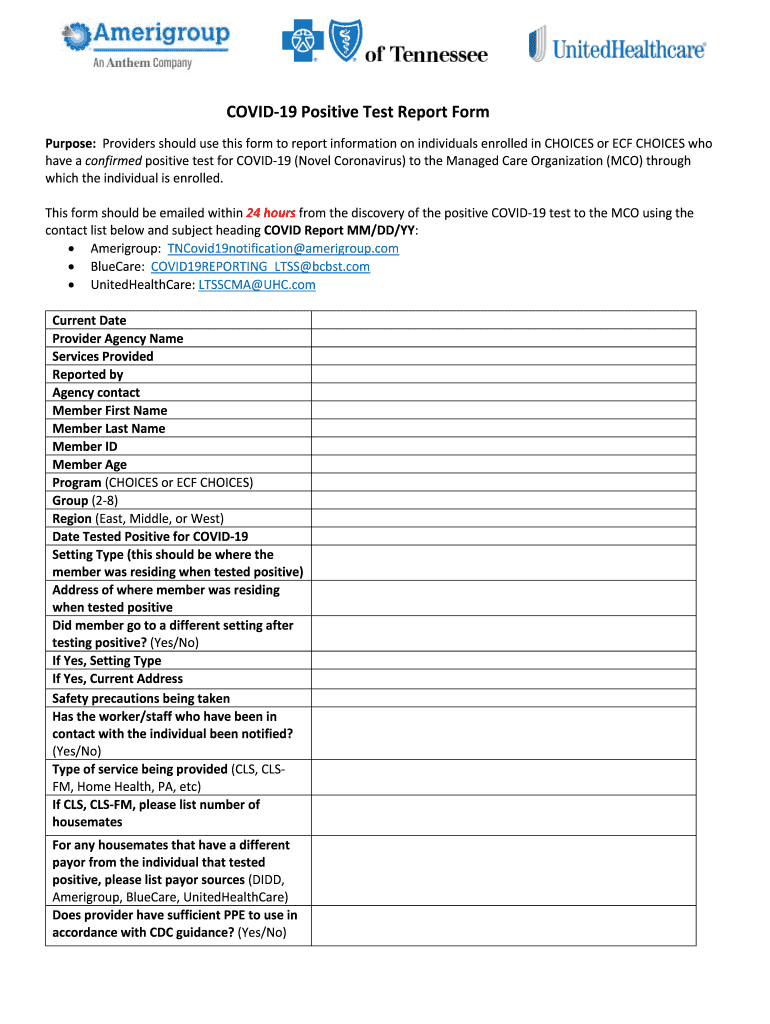
COVID19PositiveTestReportForm Purpose:ProvidersshouldusethisformtoreportinformationonindividualsenrolledinCHOICESorECFCHOICESwho haveaconfirmedpositivetestforCOVID19(NovelCoronavirus)totheManagedCareOrganization(MCO)through.
Loading

Open form follow the instructions

Easily sign the form with your finger

Send filled & signed form or save
How to fill out the COVID-19 Positive Test Report Form Rev 4.7.20.docx online
This guide provides comprehensive steps for completing the COVID-19 Positive Test Report Form Rev 4.7.20.docx online. By following these instructions, users can accurately report positive COVID-19 test results while ensuring compliance with necessary protocols.
Follow the steps to complete the form accurately and efficiently.
- Click the ‘Get Form’ button to obtain the form and open it in your online editor.
- Fill in the 'Current Date' field by entering today’s date.
- Enter the 'Provider Agency Name' which indicates the organization reporting the case.
- In the 'Services Provided' section, specify the services your agency offers to the individual.
- Report the name of the person completing the form in the 'Reported by' field.
- Provide the 'Agency contact' details for any follow-up inquiries.
- Fill in the 'Member First Name' and 'Member Last Name' sections with the individual's full name.
- Input the 'Member ID' number assigned to the person.
- Indicate the 'Member Age' of the individual.
- Select the program under which the individual is enrolled, either 'CHOICES' or 'ECF CHOICES.'
- Choose the 'Group' number that corresponds to the individual, typically between 2-8.
- Identify the 'Region' where the individual resides, selecting from East, Middle, or West.
- Enter the 'Date Tested Positive for COVID-19' as the date of the positive test result.
- Specify the 'Setting Type' referring to where the member was residing when they tested positive.
- Provide the 'Address of where the member was residing when tested positive.'
- Respond to whether the member went to a different setting after testing positive by selecting 'Yes' or 'No.'
- If applicable, indicate the 'Setting Type' and 'Current Address' for the new location.
- Document the 'Safety precautions being taken' during the individual’s care.
- Confirm whether the staff who have been in contact with the individual have been notified.
- Describe the 'Type of service being provided' (e.g., CLS, Home Health).
- If applicable, list the number of housemates if providing CLS or CLS-FM services.
- For housemates with a different payor, please list their respective payor sources.
- State whether the provider has sufficient personal protective equipment (PPE) in accordance with CDC guidance.
- Confirm notifications are complete to the relevant local health departments and other entities.
- Finally, provide any 'Outcome/Update/Resolution/Additional Comments' before submitting.
- Once completed, save your changes, and download or print the form for submission.
Complete your COVID-19 Positive Test Report Form online today to ensure timely reporting.
Experience a faster way to fill out and sign forms on the web. Access the most extensive library of templates available.
Related content
by Y Lu · 2025 — This study included paediatric patients with SARS-CoV-2 infection and...
The document "Report on Evaluation of Mass Movement Indicators" focuses on physical...
Get answers to your most pressing questions about US Legal Forms API.
What should I do if I get a positive COVID result?
When you get a positive COVID result, prioritize self-isolation and care for your health. Update your close contacts and guide them on next steps. If your symptoms worsen, contact your healthcare provider for further instructions. The COVID-19 Positive Test Report Form Rev 4.7.20.docx can be a useful tool in managing your health information and facilitating any necessary medical visits.
What to do if you get a positive COVID test result?
If you receive a positive COVID test result, it's important to self-isolate and monitor your health closely. Inform close contacts immediately so they can take precautions. Observe any changes in your symptoms and seek medical attention if necessary. Using the COVID-19 Positive Test Report Form Rev 4.7.20.docx can assist in keeping track of your health and communication with healthcare providers.
How long are you contagious with COVID after testing positive?
Generally, individuals are considered contagious starting two days before symptoms appear and for up to ten days after that. If you retain symptoms after ten days, it's essential to consult a healthcare professional about your specific situation. Following CDC guidelines and keeping track of your status can help contain the spread. You can record this information in the COVID-19 Positive Test Report Form Rev 4.7.20.docx.
Do I need to quarantine if I test positive for COVID?
Yes, you must quarantine if you test positive for COVID-19. The Centers for Disease Control and Prevention (CDC) recommends isolating from others to contain the virus. Typically, you should stay at home and avoid contact with family members for at least 10 days after your symptoms start. Access the COVID-19 Positive Test Report Form Rev 4.7.20.docx to document your quarantine period.
How to get the best COVID test results?
To achieve the best COVID test results, ensure you follow testing guidelines closely. Select a reliable testing site and follow any pre-test instructions they provide. Timing your test appropriately, like waiting a few days after potential exposure, can increase accuracy. Using the COVID-19 Positive Test Report Form Rev 4.7.20.docx helps streamline relevant information during your medical consultations.
What to do immediately after testing positive for COVID?
After receiving a positive COVID test result, it is crucial to stay calm and self-isolate to prevent spreading the virus. You should inform close contacts about your result so they can take necessary precautions. Keep monitoring your symptoms and reach out to a healthcare provider if they worsen. Additionally, using the COVID-19 Positive Test Report Form Rev 4.7.20.docx can help document your situation.
How do I report a positive Covid test in California?
In California, you can report a positive COVID test by contacting your local health department. Many counties have online reporting options as well. To simplify the process, use the COVID-19 Positive Test Report Form Rev 4.7.20.docx to ensure you include all required details and help authorities respond promptly.
Does COVID have to be reported?
COVID-19 test results must be reported to health authorities to manage public health effectively. Reporting helps track infection rates and implement necessary safety measures. You can use the COVID-19 Positive Test Report Form Rev 4.7.20.docx to submit your report accurately and efficiently.
Do I need to do anything if I test positive for COVID?
Yes, if you test positive for COVID-19, you must take several steps to protect yourself and others. Begin by isolating yourself, monitoring your symptoms, and reaching out to medical professionals for guidance. Completing the COVID-19 Positive Test Report Form Rev 4.7.20.docx can help ensure you provide the right information to your health authorities.
Who should you notify if you test positive for COVID?
You should notify your healthcare provider and anyone you have been in close contact with. This notification ensures that those individuals can monitor their health and take necessary precautions. In addition, consider using the COVID-19 Positive Test Report Form Rev 4.7.20.docx, which can guide you on how to report your situation effectively.
Use professional pre-built templates to fill in and sign documents online faster. Get access to thousands of forms.
If you believe that this page should be taken down, please follow our DMCA take down process here.