Loading
Form preview
  • US Legal Forms
  • Other Templates
  • More Forms
  • More Multi-State Forms
  • Caap Gov Ph Downloads

Get Caap Gov Ph Downloads

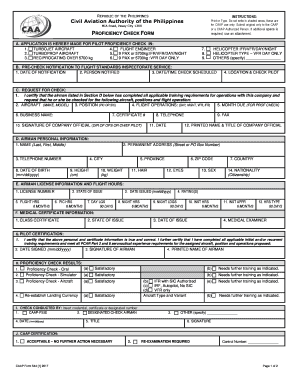
REPUBLIC OF THE PHILIPPINES INSTRUCTIONS: Civil Aviation Authority of the Philippines Print or Type. Do not write in shaded areas, these are for CAAP use only. Submit original only to the CAAP or.

How it works

  1. Open form

    Open form follow the instructions

  2. Easily sign form

    Easily sign the form with your finger

  3. Share form

    Send filled & signed form or save

How to fill out the Caap Gov Ph Downloads online

This guide provides comprehensive instructions on how to complete the Caap Gov Ph Downloads form for pilot proficiency checks. Whether you are a professional pilot or someone assisting a pilot, this guide aims to make the process user-friendly and straightforward.

Follow the steps to effectively fill out the Caap Gov Ph Downloads form.

  1. Click the ‘Get Form’ button to obtain the form and open it in your preferred editor. This will allow you to access the online filling options.
  2. Begin by filling out the application section ('A'), indicating your request for a pilot proficiency check. Mark the applicable aircraft type you are applying for, such as turbojet or helicopter, as well as any additional specifications.
  3. In section 'B', provide the pre-check notification details by entering the date of notification, the person notified, and the scheduled date and time of the check.
  4. Move to section 'C' where you will request the check. You must certify that the airman has met all training requirements and specify the relevant aircraft, position, and flight operations.
  5. Complete the airman personal information in section 'D'. This includes the airman’s full name, address, phone number, and personal details such as date of birth, height, weight, hair, eye color, sex, and nationality.
  6. In section 'E', input the airman license information and flight hours. Include the license number, state of issue, date issued, and the various flight hours as required.
  7. Fill out the medical certificate information in section 'F' by entering the class certificate, state of issue, date of issue, and medical examiner details.
  8. In section 'G', sign and certify that all provided information is accurate. Also, indicate the date of signing and your printed name.
  9. Review the proficiency check results in section 'H', marking the satisfaction level for each component of the check.
  10. Complete section 'I' by entering the details of the person conducting the check, including their signature and title.
  11. Finally, confirm your entries in section 'J', which is reserved for CAAP use only. Ensure all information is accurate and complete.
  12. Once you have filled out all sections, you can save your changes, download, print, or share the completed form as needed.

Complete your documents online today to ensure a smooth and efficient process.

Get form

Experience a faster way to fill out and sign forms on the web. Access the most extensive library of templates available.
Get form

Related content

Philippines - Prohibited & Restricted Imports
Jan 24, 2024 — Philippine law restricts the importation of certain goods for reasons of...
Learn more
(PDF) Manual of Standards for AERODROMES ...
The Manual of Standards for Aerodromes outlines the civil aviation regulations established...
Learn more
guidance on economic and financial measures
Dec 1, 2020 — On 9 March 2020, Department of Transportation of Philippines instructed...
Learn more

Related links form

Fs3 Fillable APPLICATION FOR ARPL TOWARDS TRADE TEST IN A LISTED TRADE How To Fill Delivery Note Document Arkansas Hvac Registrant Form

Questions & Answers

Get answers to your most pressing questions about US Legal Forms API.

Contact support

You can access CAAP documents online through the Caap Gov Ph Downloads portal. This user-friendly platform offers a range of downloadable resources, including guidelines, forms, and notices relevant to aviation. By utilizing these downloads, you can stay updated with the latest requirements and regulations. Regularly visiting the site ensures that you have immediate access to essential information for your aviation-related needs.

The CAAP stands for the Civil Aviation Authority of the Philippines. This government agency plays a crucial role in ensuring the safety and security of the aviation industry in the country. Through their official website, Caap Gov Ph Downloads, users can access vital documents and resources related to aviation regulations and standards. Staying informed about CAAP’s functions can benefit all stakeholders in the aviation sector.

CAAP memo 019 2025 likely refers to guidance or policy updates issued by the Civil Aviation Authority. Such memos typically provide essential information about regulations or new procedures necessary for aviation operations. For the full details, it would be beneficial to check the latest documentation available on the Caap Gov Ph Downloads section.

To get CAAP certification, you must complete the CAAP exam and follow the application procedures outlined by the authority. It is essential to review the requirements beforehand to ensure compliance. Don't forget to consult the Caap Gov Ph Downloads page for helpful resources and updates about the certification process.

In San Francisco, the CAAP exam fees may also vary based on the specific location and services offered by the testing center. Generally, you can anticipate prices around the national average, which ranges from $100 to $200. For the latest information and official updates, visit the Caap Gov Ph Downloads portal.

As of 2025, the new director general of CAAP has not yet been officially announced. However, updates about the leadership and other important news can be found through public announcements or the Caap Gov Ph Downloads page. Keep an eye on these resources to stay informed about changes and updates.

The CAAP, or Civil Aviation Authority of the Philippines, oversees and regulates aviation operations within the country. This authority ensures that air travel remains safe and efficient for all travelers. To explore further details about the CAAP and its functions, check the comprehensive resources available in the Caap Gov Ph Downloads section.

To obtain a CAAP license, you need to successfully complete the required CAAP exam and submit your application through the official channels. This process includes paying the necessary fees and meeting specific eligibility requirements. For more detailed steps, visit the Caap Gov Ph Downloads site where you can find resources and guides.

GA benefits are considered a loan to the individual(s) receiving aid. The maximum cash grant for a single person on GA is $336 per month and $548 per month for a couple.

Furthermore, the FAA states where these plates must be placed in Part 45.11: “[T]he aircraft identification plate must be secured to the aircraft fuselage exterior so that it is legible to a person on the ground, and must be either adjacent to and aft of the rearmost entrance door or on the fuselage surface near the ...

Get This Form Now!

Use professional pre-built templates to fill in and sign documents online faster. Get access to thousands of forms.
Get form
If you believe that this page should be taken down, please follow our DMCA take down processhere.
Get Caap Gov Ph Downloads
Get form
  • Adoption
  • Bankruptcy
  • Contractors
  • Divorce
  • Home Sales
  • Employment
  • Identity Theft
  • Incorporation
  • Landlord Tenant
  • Living Trust
  • Name Change
  • Personal Planning
  • Small Business
  • Wills & Estates
  • Packages A-Z
  • Affidavits
  • Bankruptcy
  • Bill of Sale
  • Corporate - LLC
  • Divorce
  • Employment
  • Identity Theft
  • Internet Technology
  • Landlord Tenant
  • Living Wills
  • Name Change
  • Power of Attorney
  • Real Estate
  • Small Estates
  • Wills
  • All Forms
  • Forms A-Z
  • Other Templates
  • Legal Hub
  • About Us
  • Help Portal
  • Legal Resources
  • Blog
  • Affiliates
  • Contact Us
  • Delete My Account
  • Site Map
  • Industries
  • Forms in Spanish
  • Localized Forms
  • State-specific Forms
  • Forms Kit
  • Real Estate Handbook
  • All Guides
  • Notarize
  • Incorporation services
  • For Consumers
  • For Small Business
  • For Attorneys
  • USLegal
  • FormsPass
  • pdfFiller
  • signNow
  • altaFlow
  • DocHub
  • Instapage
Form Packages
  • Adoption
  • Bankruptcy
  • Contractors
  • Divorce
  • Home Sales
  • Employment
  • Identity Theft
  • Incorporation
  • Landlord Tenant
  • Living Trust
  • Name Change
  • Personal Planning
  • Small Business
  • Wills & Estates
  • Packages A-Z
Form Categories
  • Affidavits
  • Bankruptcy
  • Bill of Sale
  • Corporate - LLC
  • Divorce
  • Employment
  • Identity Theft
  • Internet Technology
  • Landlord Tenant
  • Living Wills
  • Name Change
  • Power of Attorney
  • Real Estate
  • Small Estates
  • Wills
  • All Forms
  • Forms A-Z
  • Other Templates
Customer Service
  • Legal Hub
  • About Us
  • Help Portal
  • Legal Resources
  • Blog
  • Affiliates
  • Contact Us
  • Delete My Account
  • Site Map
  • Industries
  • Forms in Spanish
  • Localized Forms
  • State-specific Forms
  • Forms Kit
Legal Guides
  • Real Estate Handbook
  • All Guides
Prepared for you
  • Notarize
  • Incorporation services
Our Customers
  • For Consumers
  • For Small Business
  • For Attorneys
Our Sites
  • USLegal
  • FormsPass
  • pdfFiller
  • signNow
  • altaFlow
  • DocHub
  • Instapage
Social Media
Call us now toll free:
+1 833 426 79 33
As seen in:
© Copyright 1999-2026 airSlate Legal Forms, Inc. 17 Station Street, Suite 303, Brookline, MA 02445
  • Your Privacy Choices
  • Terms of Service
  • Privacy Notice
  • Content Takedown Policy
  • Bug Bounty Program