Loading
Get Rescheck Republic
How it works
-

Open form follow the instructions
-

Easily sign the form with your finger
-

Send filled & signed form or save
How to fill out the Rescheck Republic online
Filling out the Rescheck Republic is an essential step in ensuring your construction project complies with the energy efficiency standards. This guide will provide you with clear and detailed instructions to help you navigate the form effectively.
Follow the steps to complete the Rescheck Republic form accurately.
- Click the ‘Get Form’ button to obtain the Rescheck Republic document and open it for editing.
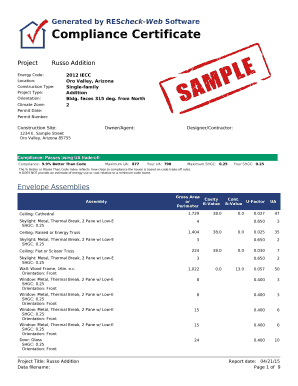
- Fill in the project title field with the name of your project, for example, 'Russo Addition'.
- Enter the energy code applicable to your project in the designated field, such as '2012 IECC'.
- Provide the location of the project by entering the city and state, such as 'Oro Valley, Arizona'.
- Complete the construction type field, selecting the appropriate category, such as 'Single-family' or 'Addition'.
- Indicate the project type, such as 'Addition', and enter the orientation of the building if applicable.
- Specify the climate zone by entering the relevant number, typically found in the documentation related to your local codes.
- Document the permit date by entering the date you received the construction permit.
- List the permit number in the corresponding field for reference during inspections.
- Fill in the construction site address, including street, city, and ZIP code.
- Enter the owner or agent’s name, along with contact information, to ensure they receive communication regarding the project.
- List the designer or contractor responsible for the project, ensuring their name and contact details are accurate.
- In sections related to compliance, fill in the calculated UA values and other metrics reflecting energy efficiency as required.
- Review the envelope assemblies section, ensuring all assemblies are recorded accurately with gross area and R-value.
- Confirm that you have completed the inspection checklist and verified all requirements mentioned.
- Save changes to the document once all fields are completed, ensuring you keep a backup of the filled document.
- Download the completed form for your records, and you may also choose to print or share it as necessary.
Complete your documents online efficiently and ensure your project meets energy code requirements.
When entering slab on grade details in REScheck, you need to specify the insulation levels and the overall dimensions of the slab. This includes considering factors like the R-value of the insulation beneath the slab. UsLegalForms offers guides that clarify this process, making it easier to meet Rescheck Republic standards.
Industry-leading security and compliance
US Legal Forms protects your data by complying with industry-specific security standards.
-
In businnes since 199725+ years providing professional legal documents.
-
Accredited businessGuarantees that a business meets BBB accreditation standards in the US and Canada.
-
Secured by BraintreeValidated Level 1 PCI DSS compliant payment gateway that accepts most major credit and debit card brands from across the globe.