Loading
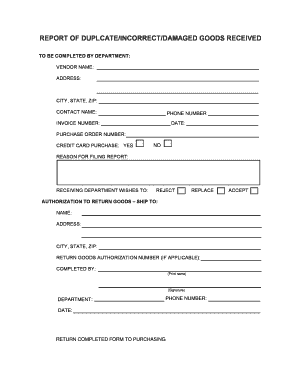
Get Damaged Goods In Pdf
How it works
-

Open form follow the instructions
-

Easily sign the form with your finger
-

Send filled & signed form or save
How to fill out the Damaged Goods In Pdf online
Filling out the Damaged Goods In Pdf is a straightforward process that allows users to report any issues with received goods. This guide provides clear instructions on how to complete each section of the form effectively.
Follow the steps to fill out your Damaged Goods In Pdf online
- Click ‘Get Form’ button to obtain the form and open it in the editor.
- Begin by entering the vendor name in the designated field. This is crucial as it identifies who the goods were purchased from.
- Fill in the vendor's address, including city, state, and ZIP code, to ensure accurate delivery updates.
- Provide the contact person's name at the vendor's company along with their phone number for any necessary communication.
- Enter the invoice number associated with the purchase, as this ties the report to specific transactions.
- Indicate the date of when the goods were received, helping to establish a timeline for the report.
- Input the purchase order number to allow for tracking of the order within your systems.
- If the purchase was made using a credit card, select ‘Yes’ or ‘No’ in response to the credit card purchase question.
- In the reason for filing report section, clearly state the issue, whether it is duplicate, incorrect, or damaged goods.
- Choose one of the options listed for the receiving department's wishes: reject, replace, or accept the goods.
- If you wish to return the goods, fill in the return authorization shipping details, including name, address, city, state, and ZIP.
- If applicable, include the return goods authorization number to streamline the return process.
- Complete the form by printing your name, signing, and indicating your department and phone number.
- Finally, enter the date of completion on the form.
- Return the completed form to the purchasing department as directed to ensure prompt processing.
Start filling out your Damaged Goods In Pdf online today for easy reporting.
In your email for a damaged product, clearly explain the situation right from the start. Use a polite tone to describe what happened, and attach supporting documents in PDF to illustrate the damage. Make sure to include a specific request for resolution, whether it is a replacement, refund, or other forms of compensation.