Loading
Get Stt Letter
How it works
-

Open form follow the instructions
-

Easily sign the form with your finger
-

Send filled & signed form or save
How to fill out the Stt Letter online
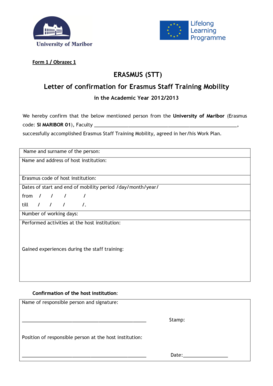
Filling out the Stt Letter for Erasmus Staff Training Mobility is a straightforward process that can be completed online. This guide provides essential steps to help you fill out each section of the form accurately and efficiently.
Follow the steps to successfully complete the Stt Letter.
- Click the ‘Get Form’ button to access the Stt Letter. This action will allow you to open the document in an online editor for easy completion.
- Begin by entering the faculty name in the appropriate field. Ensure that you include the complete and correct name of your faculty to maintain clarity.
- Next, fill in the name and surname of the person who completed the training. This information should reflect the official documentation of the individual.
- Provide the name and address of the host institution where the training took place. This details the location of the mobility and is essential for record-keeping.
- Enter the Erasmus code of the host institution. This unique identifier is crucial for the Erasmus program's processing of your application.
- Fill in the dates of the start and end of the mobility period in the day/month/year format. Ensure that these dates are correct to avoid any discrepancies.
- Indicate the number of working days completed during the mobility period. This quantifies the experience gained during the training.
- Describe the performed activities at the host institution. Be specific about the tasks undertaken to provide a comprehensive overview of the experience.
- Mention the experiences gained during the staff training. This section should reflect personal and professional growth resulting from the training.
- The host institution must provide confirmation by filling in the name and signature of the responsible person. This validates the mobility period.
- Ensure the stamp of the host institution is affixed to the document for authenticity.
- Include the position of the responsible person at the host institution to clarify their authority.
- Lastly, enter the date when the confirmation was signed. This finalizes your document before submission.
- After completing all the required fields, you can save your changes, download the document, print it, or share it as needed.
Start filling out your Stt Letter online today to ensure a smooth submission process!
To claim STT charges, you need to compile your transaction details where STT has been applied. This process often requires a careful review of your financial records to ensure accuracy. By submitting a claim with the necessary information, such as your STT Letter, you can seek recovery of overpaid charges or verify your obligations.
Industry-leading security and compliance
US Legal Forms protects your data by complying with industry-specific security standards.
-
In businnes since 199725+ years providing professional legal documents.
-
Accredited businessGuarantees that a business meets BBB accreditation standards in the US and Canada.
-
Secured by BraintreeValidated Level 1 PCI DSS compliant payment gateway that accepts most major credit and debit card brands from across the globe.