Loading
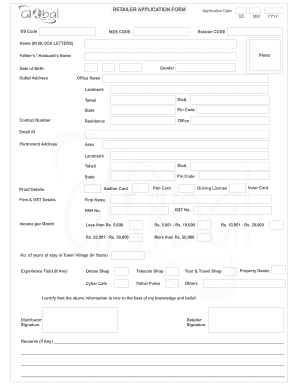
Get Retailer Application Form Application Date Dd Mm Yyyy
How it works
-

Open form follow the instructions
-

Easily sign the form with your finger
-

Send filled & signed form or save
How to fill out the RETAILER APPLICATION FORM Application Date DD MM YYYY online
Filling out the retailer application form is an essential step for individuals looking to establish themselves in retail business. This guide provides step-by-step instructions for completing the form online, ensuring that all information is accurately provided.
Follow the steps to complete the retailer application form successfully.
- Click the ‘Get Form’ button to access the retailer application form and open it in your preferred editing tool.
- Enter the application date in the format DD MM YYYY. Ensure the date is accurate as it reflects when you are submitting the application.
- Fill in the DS Code and MDS Code fields. If you do not have these codes, consult your supervisor or relevant department for assistance.
- Provide your retailer code followed by your full name in block letters. Make sure your name is spelled correctly.
- Upload a recent photograph that meets the specified guidelines, as this will be a part of your identification.
- Input the name of your father or partner, as applicable. This may be needed for verification purposes.
- Fill in your date of birth, ensuring to use the correct format of DD MM YYYY.
- Complete the outlet address section by providing the complete address where your business operates, including landmark details.
- Indicate your gender as required in the provided options.
- Enter the office name and a landmark that helps identify the office location.
- List your contact number to facilitate communication regarding your application.
- Provide details of your tehsil, district, state, and pin code corresponding to your outlet address.
- Make sure to enter both your residence and office addresses in the permanent address section, similar to the outlet address.
- Attach your Aadhar card and any other proof details such as PAN card and voter card, as required.
- Fill in your firm's details, including firm name, GST number, and PAN number.
- Indicate your income per month by selecting the appropriate category from the income brackets mentioned.
- Mention the number of years you have lived in your town or village.
- Specify any experience you may have in fields relevant to the retail job.
- Check the types of shops you have experience with or wish to operate, such as online shops, telecom shops, etc.
- Read and understand the certification statements carefully. Sign the form as both distributor and retailer to confirm the information provided is true.
- Prepare the affidavit by filling in the necessary personal details and ensuring you acknowledge the points listed.
- Finally, after all fields are completed and verified for accuracy, save your changes, and choose to either download, print, or share the form as required.
Complete your retailer application form online today to begin your journey in retail.
In Excel, you can easily set the date format to mm dd yyyy by selecting the cells containing your dates. Go to the 'Format Cells' option, select 'Date', and then choose 'mm/dd/yyyy'. For applications like the RETAILER APPLICATION FORM, this ensures your application date is displayed in a universally recognizable format.