Loading
Form preview
  • US Legal Forms
  • Form Library
  • More Forms
  • More Multi-State Forms
  • Verizon Wireless Letterhead

Get Verizon Wireless Letterhead

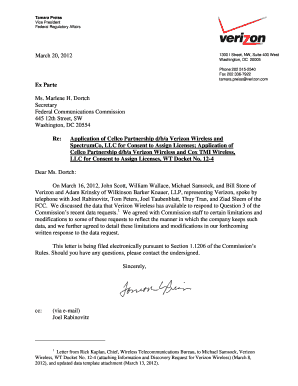
Te Ms. Marlene H. Dortch Secretary Federal Communications Commission 445 12th Street, SW Washington, DC 20554 Re: Application of Cellco Partnership d/b/a Verizon Wireless and SpectrumCo, LLC for Consent to Assign Licenses; Application of Cellco Partnership d/b/a Verizon Wireless and Cox TMI Wireless, LLC for Consent to Assign Licenses, WT Docket No. 12-4 Dear Ms. Dortch: On March 16, 2012, John Scott, William Wallace, Michael Samsock, and Bill Stone of Verizon and Adam Krinsky of Wilkinson Bar.

How it works

  1. Open form

    Open form follow the instructions

  2. Easily sign form

    Easily sign the form with your finger

  3. Share form

    Send filled & signed form or save

How to fill out the Verizon Wireless Letterhead online

This guide provides a comprehensive overview of how to effectively complete the Verizon Wireless Letterhead form online. Whether you are familiar with digital documentation or new to this process, these instructions will assist you in filling out the letterhead accurately and efficiently.

Follow the steps to fill out the Verizon Wireless Letterhead online.

  1. Click ‘Get Form’ button to acquire the Verizon Wireless Letterhead and open it in your preferred editing tool.
  2. Begin filling out the header section. Enter the date in the designated field, ensuring it reflects the day you are completing the letter.
  3. In the ‘To’ section, input the recipient's information, including their title, name, organization, and address. Take care to format the details correctly.
  4. Next, address the subject line by clearly stating the purpose of the letter based on your correspondence. Include any relevant docket numbers if applicable.
  5. Craft the body of the letter to include greetings and your main message. Be concise yet thorough, ensuring your points are clearly articulated.
  6. Conclude the letter with a polite closing statement, and provide your signature block which should include your name, title, and contact information.
  7. Finally, review the completed letter for any errors or omissions. Make necessary adjustments and ensure that all information is accurate.
  8. Save the document to preserve your changes, and choose to download, print, or share the completed letter as needed.

Take the next step and complete your document online today.

Get form

Experience a faster way to fill out and sign forms on the web. Access the most extensive library of templates available.
Get form

Related content

Verizon Letterhead
Adheres to Verizon Start-Up Identity Standards Version 3.0 dated June 23, 2000.
Learn more
Cell Phones and Wireless Communication Devices
Aug 4, 2025 — Verizon – Rep: Jerry Wall (850) 819-1000 gerald.wall@verizonwireless...
Learn more
Free 411 Search Application
In order to process your request for free 411 services, please include the applicant's...
Learn more

Related links form

MR82 Application To Change The Compulsory Third Party Insurance Premium Class On A Registration Client Authority Form - Legalaid Nsw Gov 3-D Pentomino Puzzle - Learning Resources Canada HRSDC SDE0094 2013

Questions & Answers

Get answers to your most pressing questions about US Legal Forms API.

Contact support

AI tools can assist in generating concepts and designs for a Verizon Wireless Letterhead. These systems can guide you through design choices and help you build a digital version of your letterhead. However, you will likely need to manually finalize your design using a template service or a graphic design application to ensure it meets your specific preferences.

Creating your own Verizon Wireless Letterhead involves selecting a design that reflects your style and brand. You can start by using a word processing application or an online graphic design tool. Incorporate essential elements such as your logo, contact information, and any relevant designs that represent your identity. Customizable templates available on platforms like uslegalforms can provide a solid foundation for your letterhead.

While ChatGPT can provide suggestions and outline designs, it does not directly create visual elements like a Verizon Wireless Letterhead. However, you can use ChatGPT to brainstorm ideas for your letterhead content and layout. Once you have your vision in place, you can transfer that to a graphic design tool or a template service that specializes in letterhead creation.

To obtain a Verizon Wireless Letterhead online, you can visit a reputable legal forms website. Look for platforms that specialize in providing customizable templates. These services typically allow you to fill in your specific information virtually, ensuring that your letterhead meets your needs efficiently. Once completed, you can download your letterhead in various formats for immediate use.

To file a claim on Verizon Wireless, visit the Verizon support page and navigate to the claims section. You will need to provide necessary details regarding your claim, and you can often find the required forms with Verizon Wireless Letterhead. This documentation helps streamline the claim process, ensuring your request is processed efficiently.

Verizon typically sends email receipts for transactions made through their services. If you opt in for electronic billing, you will receive receipts directly to your email, which may also feature the Verizon Wireless Letterhead. This ensures easy reference and organization while you manage your Verizon account.

Yes, you can obtain detailed billing from Verizon by accessing your account online. Look for the billing section, where you can view and download detailed statements that provide insight into your charges. Having your billing information laid out clearly, potentially on Verizon Wireless Letterhead, helps you track your expenses effectively.

To print a return label on Verizon Wireless, begin by visiting the Verizon website and logging into your account. You will need to find the order under your account history and select the option to return items. This process will generate a return label, which may feature Verizon Wireless Letterhead, allowing for a professional and clear return process.

To download your Verizon statements, start by logging into your Verizon account on their official website. Navigate to the billing section and select the statement you wish to download. From there, you can choose to download it in PDF format, which often includes the Verizon Wireless Letterhead, making it easy to save or print for your records.

To get a human at Verizon, call the customer service number and follow the prompts to reach a live agent. Specifically, ask for assistance and be persistent if you encounter automated responses. Using your Verizon Wireless Letterhead during the call can streamline communication, especially if you need to discuss billing or other account specifics.

Get This Form Now!

Use professional pre-built templates to fill in and sign documents online faster. Get access to thousands of forms.
Get form
If you believe that this page should be taken down, please follow our DMCA take down processhere.

Industry-leading security and compliance

US Legal Forms protects your data by complying with industry-specific security standards.
  • In businnes since 1997
    25+ years providing professional legal documents.
  • Accredited business
    Guarantees that a business meets BBB accreditation standards in the US and Canada.
  • Secured by Braintree
    Validated Level 1 PCI DSS compliant payment gateway that accepts most major credit and debit card brands from across the globe.
Get Verizon Wireless Letterhead
Get form
  • Adoption
  • Bankruptcy
  • Contractors
  • Divorce
  • Home Sales
  • Employment
  • Identity Theft
  • Incorporation
  • Landlord Tenant
  • Living Trust
  • Name Change
  • Personal Planning
  • Small Business
  • Wills & Estates
  • Packages A-Z
  • Affidavits
  • Bankruptcy
  • Bill of Sale
  • Corporate - LLC
  • Divorce
  • Employment
  • Identity Theft
  • Internet Technology
  • Landlord Tenant
  • Living Wills
  • Name Change
  • Power of Attorney
  • Real Estate
  • Small Estates
  • Wills
  • All Forms
  • Forms A-Z
  • Form Library
  • Legal Hub
  • About Us
  • Help Portal
  • Legal Resources
  • Blog
  • Affiliates
  • Contact Us
  • Delete My Account
  • Site Map
  • Industries
  • Forms in Spanish
  • Localized Forms
  • State-specific Forms
  • Forms Kit
  • Real Estate Handbook
  • All Guides
  • Notarize
  • Incorporation services
  • For Consumers
  • For Small Business
  • For Attorneys
  • USLegal
  • FormsPass
  • pdfFiller
  • signNow
  • altaFlow
  • DocHub
  • Instapage
Form Packages
  • Adoption
  • Bankruptcy
  • Contractors
  • Divorce
  • Home Sales
  • Employment
  • Identity Theft
  • Incorporation
  • Landlord Tenant
  • Living Trust
  • Name Change
  • Personal Planning
  • Small Business
  • Wills & Estates
  • Packages A-Z
Form Categories
  • Affidavits
  • Bankruptcy
  • Bill of Sale
  • Corporate - LLC
  • Divorce
  • Employment
  • Identity Theft
  • Internet Technology
  • Landlord Tenant
  • Living Wills
  • Name Change
  • Power of Attorney
  • Real Estate
  • Small Estates
  • Wills
  • All Forms
  • Forms A-Z
  • Form Library
Customer Service
  • Legal Hub
  • About Us
  • Help Portal
  • Legal Resources
  • Blog
  • Affiliates
  • Contact Us
  • Delete My Account
  • Site Map
  • Industries
  • Forms in Spanish
  • Localized Forms
  • State-specific Forms
  • Forms Kit
Legal Guides
  • Real Estate Handbook
  • All Guides
Prepared for you
  • Notarize
  • Incorporation services
Our Customers
  • For Consumers
  • For Small Business
  • For Attorneys
Our Sites
  • USLegal
  • FormsPass
  • pdfFiller
  • signNow
  • altaFlow
  • DocHub
  • Instapage
Social Media
Call us now toll free:
+1 833 426 79 33
As seen in:
© Copyright 1999-2026 airSlate Legal Forms, Inc. 3720 Flowood Dr, Flowood, Mississippi 39232
  • Your Privacy Choices
  • Terms of Service
  • Privacy Notice
  • Content Takedown Policy
  • Bug Bounty Program