Loading
Get Annexure Q
How it works
-

Open form follow the instructions
-

Easily sign the form with your finger
-

Send filled & signed form or save
How to fill out the Annexure Q online
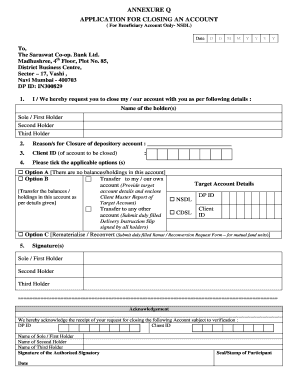
This guide provides comprehensive instructions on how to fill out the Annexure Q, an application for closing a beneficiary account. By following these steps, you will be able to accurately complete the form online, ensuring a smooth submission process.
Follow the steps to successfully complete the Annexure Q form online.
- Press the ‘Get Form’ button to access the Annexure Q form. This will allow you to begin filling out the document online.
- Enter the date you are submitting the request in the format: Day, Month, Year.
- Provide the name of the account holder(s) as required: Sole/First Holder, Second Holder, and Third Holder.
- Indicate the reason for closing the depository account in the designated section, providing clear and concise information.
- Input the Client ID associated with the account you wish to close.
- Select the applicable options regarding the balances or holdings in the account. Choose between keeping options A, B, or C based on your situation.
- If you select Option B for transferring balances, fill in the target account details, including the Client Master Report.
- Gather the necessary signatures from all holders in the designated signature section.
- Once all information is completed, review the form for accuracy before proceeding. Save any changes you made.
- Finalize your submission by downloading or printing the completed form, or share it as needed.
Complete your Annexure Q and submit your documents online for a hassle-free experience.
When writing an application for account closure, clearly state your intention to close the account at the top of the letter. Include your account number, personal details, and a request for confirmation of the closure. Following the format outlined in Annexure Q can enhance your application, ensuring all critical information is included.