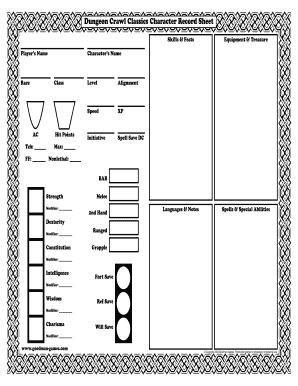
Get Dungeon Crawl Classics Character Sheet
How it works
-

Open form follow the instructions
-

Easily sign the form with your finger
-

Send filled & signed form or save
How to fill out the Dungeon Crawl Classics Character Sheet online
Filling out the Dungeon Crawl Classics Character Sheet online can enhance your gaming experience by keeping your character organized and easily accessible. This guide provides a step-by-step approach to ensure that you accurately complete each section of the character sheet.
Follow the steps to effectively complete your character sheet online.
- Click the ‘Get Form’ button to obtain the form and open it in the editor.
- Begin by entering the character’s name in the designated field. This is the name that will represent your character in the game.
- Next, fill in the player’s name to indicate who is managing the character during gameplay.
- Select the character’s race from the options available, being mindful of how race influences abilities and skills.
- Choose the character class. This choice affects the character's abilities and spells.
- Input the character's hit points and armor class (AC) to reflect their current defensive capabilities.
- Document the character's level and alignment, as these will impact decisions and interactions in the game.
- For speed, enter the character's movement rate, often determined by race and class.
- Record experience points (XP) to track the character's progress and leveling up.
- Fill out initiative and spell save DC, which are crucial for combat situations.
- Complete the ability scores: strength, dexterity, constitution, intelligence, wisdom, and charisma, along with their respective modifiers.
- For any skills, feats, spells, or special abilities, fill in those respective sections to showcase your character's unique strengths.
- Finally, ensure that all remaining fields such as equipment, treasure, languages, and notes are filled out completely.
- Once you have accurately filled out all sections, be sure to save your changes, and consider downloading, printing, or sharing the completed character sheet for easy access during gameplay.
Start filling out your character sheet online today to prepare for your next adventure!
Yes, printing your character sheet from Roll20 is easy. Simply navigate to your character sheet, then click on your browser's print option. This method allows you to create a tangible copy of your Dungeon Crawl Classics Character Sheet that you can refer to during your sessions. A printed sheet can enhance your gameplay by allowing you to keep all of your character's vital information at your fingertips.