Loading
Get Hazelwood School District Transcripts
How it works
-

Open form follow the instructions
-

Easily sign the form with your finger
-

Send filled & signed form or save
How to fill out the Hazelwood School District Transcripts online
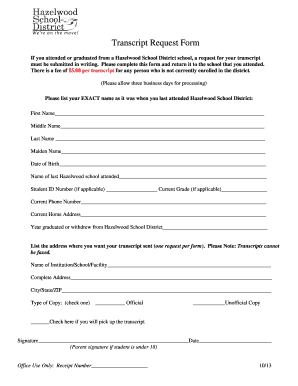
This guide provides clear instructions for users seeking to fill out the Hazelwood School District Transcripts online. Completing this form is essential for requesting transcripts from your time at the district.
Follow the steps to successfully complete your transcript request.
- Press the ‘Get Form’ button to obtain the transcript request form and open it in your chosen editor.
- Fill in your exact name as it was when you last attended the Hazelwood School District, including first name, middle name, last name, and maiden name if applicable.
- Enter your date of birth accurately to confirm your identity.
- Indicate the name of the last school you attended within the Hazelwood School District.
- If you have a student ID number, include it in the designated field along with your current grade if applicable.
- Provide your current phone number for any follow-up communication.
- Enter your current home address to ensure proper identification and delivery.
- State the year you graduated from or withdrew from the Hazelwood School District.
- Specify the address where you want your transcript sent, keeping in mind that requests need to be submitted one form at a time, and transcripts cannot be faxed.
- Select the type of copy you need by checking either the official or unofficial option.
- If you plan to pick up the transcript, check the designated box for that option.
- Sign the form and date it. If you are under 18, a parent or guardian should sign on your behalf.
- Finally, save your changes, and you can choose to download, print, or share the completed form as needed.
Complete your transcript request conveniently online today.
The easiest way to get your transcript is to use the online request services provided by your school or district. If you are looking for Hazelwood School District transcripts, accessing them through the school’s website or utilizing uslegalforms can simplify your experience. They provide step-by-step guidance to ensure you receive your transcripts without unnecessary delays.