Loading
Form preview
  • US Legal Forms
  • Form Library
  • More Forms
  • More Uncategorized Forms
  • Nysif Efroi

Get Nysif Efroi

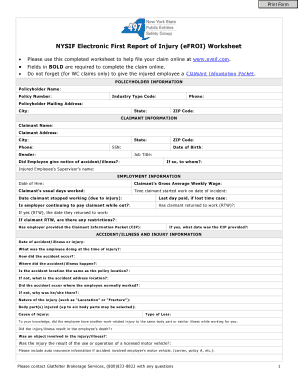
Print Form NYSIF Electronic First Report of Injury (eFROI) Worksheet Please use this completed worksheet to help file your claim online at www.nysif.com. Fields in BOLD are required to complete the.

How it works

  1. Open form

    Open form follow the instructions

  2. Easily sign form

    Easily sign the form with your finger

  3. Share form

    Send filled & signed form or save

How to fill out the Nysif Efroi online

The Nysif Electronic First Report of Injury (eFROI) is a necessary document for filing a workers' compensation claim online. This guide provides clear and concise instructions to help users accurately complete the form and expedite their claims submission.

Follow the steps to successfully complete the Nysif Efroi online.

  1. Press the ‘Get Form’ button to obtain the form and access it within your preferred online platform.
  2. Begin by completing the policyholder information section. Enter the policyholder name, policy number, industry type code, phone number, and mailing address, including city, state, and ZIP code.
  3. Next, provide the claimant information. This involves inputting the claimant's name, address, city, state, phone number, ZIP code, social security number, gender, date of birth, and job title. Ensure that you confirm whether the employee provided notice of the accident or illness, including details of to whom this notice was given.
  4. In the employment information section, input the date of hire, the claimant’s gross average weekly wage, and usual days worked. Additionally, indicate the time the claimant started work on the incident date, the date they stopped working due to the injury, and the last day they were paid in case of lost time. Note whether the employer is continuing to pay the claimant while they are out of work and if the claimant has returned to work.
  5. Proceed to detail the accident/illness and injury information. Record the date of the accident or illness, describe what the employee was doing at the time of the injury, and how the accident occurred. Clarify the accident location and whether it coincides with the policy location.
  6. Further in this section, define the nature of the injury, the body parts involved, and the cause of the injury. Specify if the employee had any earlier work-related injuries to the same body part. Confirm if the injury resulted in death or involved an object or a licensed motor vehicle.
  7. If applicable, respond to the additional questions for volunteer firefighters or ambulance workers regarding protective equipment. Provide medical provider details if medical care was received, including the name and address of the care provider.
  8. Finally, after completing all sections, review all input for accuracy. Users can save changes, download the form, print it, or share it as necessary.

Start filling out your Nysif Efroi online today to ensure a smooth claims process.

Get form

Experience a faster way to fill out and sign forms on the web. Access the most extensive library of templates available.
Get form

Related content

Employer's Role in Workers' Comp Claims
Report the injury online via NYSIF eFROI (electronic first report of injury). Use our...
Learn more

Related links form

Lien Removal Request Letter University Of Pune Rates Of Remuneration For Examination Work Piecing Together The E-Discovery Plan - Craig Ball Sandu Application Form

Questions & Answers

Get answers to your most pressing questions about US Legal Forms API.

Contact support

The NYSIF is a state fund designed to provide workers' compensation insurance and disability benefits to New York workers. It supports businesses by ensuring compliance with state insurance requirements while offering essential coverage for employees. With Nysif Efroi, you can manage each aspect of the claims process, reinforcing your commitment to your workforce's safety and well-being.

Yes, you can access Nysif on your mobile device, providing convenience and flexibility for users on the go. The mobile-friendly platform allows you to review claims, submit information, and stay updated on the status of your workers' compensation claims. By leveraging Nysif Efroi, mobile access enhances the overall user experience, making it easier to manage your insurance needs from anywhere.

The payer ID for Nysif is 50560, which is essential for healthcare providers submitting claims on behalf of patients covered under Nysif. This identifier streamlines the processing of workers' compensation claims and ensures that providers receive timely reimbursements. To make this process easier, you can access the Nysif Efroi system for efficient claim submission.

The most common workers' compensation claim involves slips, trips, and falls, representing a significant percentage of workplace injuries. These incidents often result in medical costs and time away from work, making it essential for employers to ensure safety measures are in place. Utilizing Nysif Efroi can help simplify the reporting of these claims, expediting the support for affected employees.

Nysif stands for New York State Insurance Fund, which provides workers' compensation insurance and disability benefits. It serves as a safety net for workers, ensuring they receive the necessary support in the event of work-related injuries or illnesses. By leveraging Nysif Efroi, businesses can navigate the process of filing claims seamlessly.

Nysif is funded by premiums collected from policyholders, specifically employers in New York who are required to provide workers' compensation insurance. This ensures that funds are available for claims and administrative costs. The structure promotes a stable insurance environment, ultimately benefiting all stakeholders, including workers and employers.

When dealing with Workers' Comp, avoid making statements that could weaken your claim. Do not admit fault or downplay your injuries. Focus on providing accurate, factual information instead. Clarity and honesty in your communication will strengthen your case while using the NYSIF eFROI system for seamless documentation.

Submitting a claim to the compensation fund involves filling out specific forms available on the NYSIF website. Ensure that you include all relevant information and documentation related to your case. Utilizing the eFROI system makes the submission process more structured and efficient.

To submit a claim to NYSIF, you must complete the necessary forms accurately. If using the online route, log in to the NYSIF eFROI system to submit your claim. For those preferring paper submissions, ensure your forms are sent to the correct NYSIF address to avoid delays.

To submit a claim to NYSIF, you can use both online and offline methods. Start by collecting all your required documents. If you prefer online submission, visit the NYSIF website to access the eFROI platform. Alternatively, you can mail your claim forms directly to NYSIF.

Get This Form Now!

Use professional pre-built templates to fill in and sign documents online faster. Get access to thousands of forms.
Get form
If you believe that this page should be taken down, please follow our DMCA take down processhere.

Industry-leading security and compliance

US Legal Forms protects your data by complying with industry-specific security standards.
  • In businnes since 1997
    25+ years providing professional legal documents.
  • Accredited business
    Guarantees that a business meets BBB accreditation standards in the US and Canada.
  • Secured by Braintree
    Validated Level 1 PCI DSS compliant payment gateway that accepts most major credit and debit card brands from across the globe.
Get Nysif Efroi
Get form
  • Adoption
  • Bankruptcy
  • Contractors
  • Divorce
  • Home Sales
  • Employment
  • Identity Theft
  • Incorporation
  • Landlord Tenant
  • Living Trust
  • Name Change
  • Personal Planning
  • Small Business
  • Wills & Estates
  • Packages A-Z
  • Affidavits
  • Bankruptcy
  • Bill of Sale
  • Corporate - LLC
  • Divorce
  • Employment
  • Identity Theft
  • Internet Technology
  • Landlord Tenant
  • Living Wills
  • Name Change
  • Power of Attorney
  • Real Estate
  • Small Estates
  • Wills
  • All Forms
  • Forms A-Z
  • Form Library
  • Legal Hub
  • About Us
  • Help Portal
  • Legal Resources
  • Blog
  • Affiliates
  • Contact Us
  • Delete My Account
  • Site Map
  • Industries
  • Forms in Spanish
  • Localized Forms
  • State-specific Forms
  • Forms Kit
  • Real Estate Handbook
  • All Guides
  • Notarize
  • Incorporation services
  • For Consumers
  • For Small Business
  • For Attorneys
  • USLegal
  • FormsPass
  • pdfFiller
  • signNow
  • altaFlow
  • DocHub
  • Instapage
Form Packages
  • Adoption
  • Bankruptcy
  • Contractors
  • Divorce
  • Home Sales
  • Employment
  • Identity Theft
  • Incorporation
  • Landlord Tenant
  • Living Trust
  • Name Change
  • Personal Planning
  • Small Business
  • Wills & Estates
  • Packages A-Z
Form Categories
  • Affidavits
  • Bankruptcy
  • Bill of Sale
  • Corporate - LLC
  • Divorce
  • Employment
  • Identity Theft
  • Internet Technology
  • Landlord Tenant
  • Living Wills
  • Name Change
  • Power of Attorney
  • Real Estate
  • Small Estates
  • Wills
  • All Forms
  • Forms A-Z
  • Form Library
Customer Service
  • Legal Hub
  • About Us
  • Help Portal
  • Legal Resources
  • Blog
  • Affiliates
  • Contact Us
  • Delete My Account
  • Site Map
  • Industries
  • Forms in Spanish
  • Localized Forms
  • State-specific Forms
  • Forms Kit
Legal Guides
  • Real Estate Handbook
  • All Guides
Prepared for you
  • Notarize
  • Incorporation services
Our Customers
  • For Consumers
  • For Small Business
  • For Attorneys
Our Sites
  • USLegal
  • FormsPass
  • pdfFiller
  • signNow
  • altaFlow
  • DocHub
  • Instapage
Social Media
Call us now toll free:
+1 833 426 79 33
As seen in:
© Copyright 1999-2026 airSlate Legal Forms, Inc. 3720 Flowood Dr, Flowood, Mississippi 39232
  • Your Privacy Choices
  • Terms of Service
  • Privacy Notice
  • Content Takedown Policy
  • Bug Bounty Program