Loading
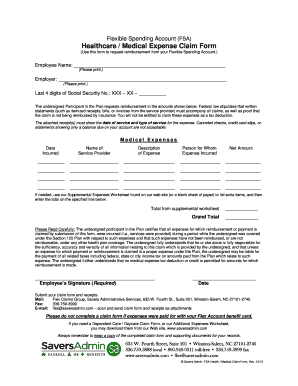
Get Savers Admin Fsa Login
How it works
-

Open form follow the instructions
-

Easily sign the form with your finger
-

Send filled & signed form or save
How to fill out the Savers Admin Fsa Login online
Filling out the Savers Admin Fsa Login form online can streamline your process for requesting reimbursements from your Flexible Spending Account. This guide will provide you with essential steps to ensure that all necessary information is accurately captured.
Follow the steps to navigate through the Savers Admin Fsa Login form.
- Click ‘Get Form’ button to obtain the form and open it in the online interface.
- Enter your employee name in the designated field. Make sure to print clearly to avoid any processing delays.
- Provide your employer's name exactly as it appears on relevant employment documents.
- Fill in the last four digits of your Social Security number to help identify your account.
- In the Medical Expenses section, record the date incurred, name of the service provider, description of the expense, person for whom the expense was incurred, and the net amount for each claim. Ensure that this information is accurate.
- If necessary, utilize the Supplemental Expenses Worksheet to list additional items. The total from this worksheet should be entered on the claim form.
- Certify that all provided expenses were incurred under the plan and have not been reimbursed through any other health plan. This is done by signing and dating the form.
- Once the form is complete, you can save the changes, download a copy, or print it. Ensure that you also have your receipts ready for submission.
- Submit your claim form and receipts either by mailing, faxing, or emailing, as stated in the filing instructions provided.
Begin filling out your Savers Admin Fsa Login form online now!