We use cookies to improve security, personalize the user experience, enhance our marketing activities (including cooperating with our marketing partners) and for other business use.
Click "here" to read our Cookie Policy. By clicking "Accept" you agree to the use of cookies. Read less
Read more
Accept
Loading
Form preview
  • US Legal Forms
  • Form Library
  • More Forms
  • More Multi-State Forms
  • Mean And Standard Deviation Distributions Matching Worksheet

Get Mean And Standard Deviation Distributions Matching Worksheet

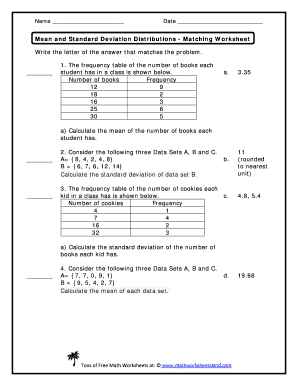
Name Date Mean and Standard Deviation Distributions Matching Worksheet Write the letter of the answer that matches the problem. 1. The frequency table of the number of books each student has in a.

How it works

  1. Open form

    Open form follow the instructions

  2. Easily sign form

    Easily sign the form with your finger

  3. Share form

    Send filled & signed form or save

How to fill out the Mean and Standard Deviation Distributions Matching Worksheet online

This guide provides a clear and supportive approach to filling out the Mean and Standard Deviation Distributions Matching Worksheet online. By following these steps, users can successfully complete the form and understand the underlying concepts of mean and standard deviation.

Follow the steps to complete the worksheet accurately.

  1. Click the ‘Get Form’ button to obtain the worksheet and access it in the online editor.
  2. Start with the first question which asks you to calculate the mean number of books that each student possesses. Refer to the provided frequency table and use the appropriate formula to compute the mean.
  3. Proceed to the second question focused on Data Set B. Calculate the standard deviation based on the given data set, applying the standard deviation formula.
  4. For the third question, analyze the frequency table of cookies to compute the standard deviation for that dataset by following the necessary steps.
  5. Lastly, for the final question, calculate the mean for Data Sets A and B as specified, ensuring all necessary calculations are completed accurately.
  6. After filling out all questions, review your responses for accuracy. Once satisfied, you can save your changes, download the completed worksheet, print it, or share it as needed.

Complete your worksheet online today for enhanced learning in statistics!

Get form

Experience a faster way to fill out and sign forms on the web. Access the most extensive library of templates available.
Get form

Related content

Z-Scores and NFL Quarterback Salaries - Virginia...
normal distribution;; graph of normally distributed data;; attributes of normal curves;...
Learn more
Discussion Worksheet – Normal Distribution
Put in the mean and standard deviation. How well does the computer drawing match your...
Learn more
A Semester Course in Finite Mathematics for...
Aug 10, 2012 — Practice Problems. Problem 2.1. What is the effective rate of interest...
Learn more

Related links form

Subrogation Receipt Sample Enter The First Four Letters Of Your Last Name General Ledger Journal Entry/Transfer Form Lake Area Mortgage

Questions & Answers

Get answers to your most pressing questions about US Legal Forms API.

Contact support

Begin by calculating the mean and standard deviation for each data set separately. Once you have these values, you can analyze their differences to determine which set has greater variability or central tendency. Utilizing a Mean And Standard Deviation Distributions Matching Worksheet can help visualize and compare these important statistics clearly.

To calculate standard deviation, first determine the mean of your data set. Then, compute the squared differences from the mean and find their average. The final step is to take the square root of that average; using a Mean And Standard Deviation Distributions Matching Worksheet can streamline this calculation process.

Excel offers convenient functions like AVERAGE for the mean and STDEV for standard deviation. Simply input your data range into these functions to get results quickly. Leveraging a Mean And Standard Deviation Distributions Matching Worksheet alongside Excel can help you gain deeper insights into your data.

Begin by calculating the mean of your data set. Next, find each value's deviation from the mean, square these deviations, and calculate their average. Finally, taking the square root of that average yields the standard deviation; the Mean And Standard Deviation Distributions Matching Worksheet can assist in organizing these calculations.

First, compute the mean of the data set. Then, calculate the squared differences from the mean and find their average. Taking the square root of this average gives you the standard deviation, which you can practice with a Mean And Standard Deviation Distributions Matching Worksheet to enhance your understanding.

To find the mean deviation of the given data set, start by calculating the mean. Then, determine the absolute deviations from the mean for each data point, and finally, average those absolute deviations. Using a Mean And Standard Deviation Distributions Matching Worksheet can simplify this process by guiding you through each step.

To fill a standard deviation table, list your data points along with their corresponding frequency counts. Next, organize these values into categories based on standard deviations from the mean. This systematic approach provides a clear representation of data distribution, allowing you to contribute effectively to your Mean And Standard Deviation Distributions Matching Worksheet.

To determine if a distribution is normal, visualize your data using a histogram or a bell curve plot. Check if the data is symmetrical with a clear peak around the mean. If your plotted data aligns closely with a normal distribution, it confirms that the assumptions for your Mean And Standard Deviation Distributions Matching Worksheet hold true.

In Excel, calculating the mean is as simple as using the AVERAGE function, while standard deviation can be calculated using the STDEV.P or STDEV.S functions, depending on your data sample. Just input your data range into these functions, and Excel will provide you with the results. Utilizing Excel for these calculations can enhance your Mean And Standard Deviation Distributions Matching Worksheet effortlessly.

To find the probability using the mean and standard deviation, you will first calculate the z-score of the value in question. Then, use z-tables or software to determine the probability associated with this z-score. This method is integral when working on your Mean And Standard Deviation Distributions Matching Worksheet, as it can aid in predicting data outcomes.

Get This Form Now!

Use professional pre-built templates to fill in and sign documents online faster. Get access to thousands of forms.
Get form
If you believe that this page should be taken down, please follow our DMCA take down processhere.

Industry-leading security and compliance

US Legal Forms protects your data by complying with industry-specific security standards.
  • In businnes since 1997
    25+ years providing professional legal documents.
  • Accredited business
    Guarantees that a business meets BBB accreditation standards in the US and Canada.
  • Secured by Braintree
    Validated Level 1 PCI DSS compliant payment gateway that accepts most major credit and debit card brands from across the globe.
Get Mean And Standard Deviation Distributions Matching Worksheet
Get form
Form Packages
Adoption
Bankruptcy
Contractors
Divorce
Home Sales
Employment
Identity Theft
Incorporation
Landlord Tenant
Living Trust
Name Change
Personal Planning
Small Business
Wills & Estates
Packages A-Z
Form Categories
Affidavits
Bankruptcy
Bill of Sale
Corporate - LLC
Divorce
Employment
Identity Theft
Internet Technology
Landlord Tenant
Living Wills
Name Change
Power of Attorney
Real Estate
Small Estates
Wills
All Forms
Forms A-Z
Form Library
Customer Service
Terms of Service
Privacy Notice
Legal Hub
Content Takedown Policy
Bug Bounty Program
About Us
Help Portal
Legal Resources
Blog
Affiliates
Contact Us
Delete My Account
Site Map
Industries
Forms in Spanish
Localized Forms
State-specific Forms
Forms Kit
Legal Guides
Real Estate Handbook
All Guides
Prepared for You
Notarize
Incorporation services
Our Customers
For Consumers
For Small Business
For Attorneys
Our Sites
US Legal Forms
USLegal
FormsPass
pdfFiller
signNow
airSlate WorkFlow
DocHub
Instapage
Social Media
Call us now toll free:
+1 833 426 79 33
As seen in:
  • USA Today logo picture
  • CBC News logo picture
  • LA Times logo picture
  • The Washington Post logo picture
  • AP logo picture
  • Forbes logo picture
© Copyright 1997-2025
airSlate Legal Forms, Inc.
3720 Flowood Dr, Flowood, Mississippi 39232
Form Packages
Adoption
Bankruptcy
Contractors
Divorce
Home Sales
Employment
Identity Theft
Incorporation
Landlord Tenant
Living Trust
Name Change
Personal Planning
Small Business
Wills & Estates
Packages A-Z
Form Categories
Affidavits
Bankruptcy
Bill of Sale
Corporate - LLC
Divorce
Employment
Identity Theft
Internet Technology
Landlord Tenant
Living Wills
Name Change
Power of Attorney
Real Estate
Small Estates
Wills
All Forms
Forms A-Z
Form Library
Customer Service
Terms of Service
Privacy Notice
Legal Hub
Content Takedown Policy
Bug Bounty Program
About Us
Help Portal
Legal Resources
Blog
Affiliates
Contact Us
Delete My Account
Site Map
Industries
Forms in Spanish
Localized Forms
State-specific Forms
Forms Kit
Legal Guides
Real Estate Handbook
All Guides
Prepared for You
Notarize
Incorporation services
Our Customers
For Consumers
For Small Business
For Attorneys
Our Sites
US Legal Forms
USLegal
FormsPass
pdfFiller
signNow
airSlate WorkFlow
DocHub
Instapage
Social Media
Call us now toll free:
+1 833 426 79 33
As seen in:
  • USA Today logo picture
  • CBC News logo picture
  • LA Times logo picture
  • The Washington Post logo picture
  • AP logo picture
  • Forbes logo picture
© Copyright 1997-2025
airSlate Legal Forms, Inc.
3720 Flowood Dr, Flowood, Mississippi 39232