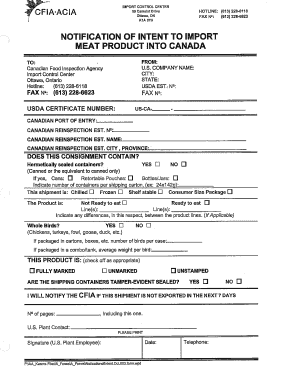
I IMPORT CONTROL CENTER 59 Camelot Drive Ottawa, ON K I A OY9 HOTLINE: (613) 228-6118 FAX NP: (613) 228-6623 NOTIFICATION OF INTENT TO IMPORT MEAT PRODUCT INTO CANADA TO: Canadian Food Inspection.
Open form follow the instructions
Easily sign the form with your finger
Send filled & signed form or save
How to fill out the Intent To Import online
Filling out the Intent To Import form is an essential step for individuals or organizations looking to import meat products into Canada. This guide will walk you through the process, ensuring you complete each section of the form accurately and efficiently.
Follow the steps to complete your Intent To Import form online.
- Press the ‘Get Form’ button to access the Intent To Import form and open it in your online editor.
- Provide the sender's information in the 'FROM' section. You'll need to include the U.S. company name, state, USDA establishment number, and fax number.
- Complete the 'Canadian Port of Entry' section with the appropriate information, including the Canadian reinspection establishment number and name, as well as city and province.
- Indicate whether the consignment contains hermetically sealed containers by checking either 'YES' or 'NO'. If applicable, specify the type of packaging used (cans, retortable pouches, bottles/jars) and the number of containers per shipping carton.
- Select the nature of the shipment — whether it is chilled, frozen, or shelf-stable — and indicate if the product is ready to eat or not ready to eat.
- If applicable, provide information regarding whole birds in the designated section, indicating if there are any specified packaging and quantities.
- Check the appropriate condition for the product in the section that specifies if it is fully marked, unmarked, or unstamped.
- Indicate if the shipping containers are tamper-evident sealed by selecting 'YES' or 'NO'.
- Acknowledge that you will notify the Canadian Food Inspection Agency if this shipment is not exported within the next 7 days.
- Complete the U.S. plant contact information and ensure it is printed clearly. Provide your telephone number, date, and signature of the U.S. plant employee.
- Once all sections are filled out accurately, save your changes, and you have the option to download, print, or share the completed form.
Complete your Intent To Import form online today to ensure a smooth importing process.
Experience a faster way to fill out and sign forms on the web. Access the most extensive library of templates available.
Related content
The importer, broker, or applicant must notify FSIS prior to Importing the samples using...
The Secretary of the Treasury shall deliver to the Secretary of Health and Human Services...
FEDERAL IMPORT MILK ACT: An Act to regulate the importation of fluid milk and cream into...
Get answers to your most pressing questions about US Legal Forms API.
How to import medicines to the UK?
To import medicines to the UK, first ensure you comply with the regulations set by the Medicines and Healthcare products Regulatory Agency (MHRA). You will need to complete relevant importation forms, including providing comprehensive details about the products and their origins. Utilizing platforms like uslegalforms can simplify this process by offering templates and guidance tailored to your Intent To Import. Following these steps diligently will help ensure a smooth import experience.
Where does the UK import medicine from?
The UK imports medicine from several countries, including the European Union, the United States, and India. These countries have established reliable supply chains that ensure a steady flow of pharmaceutical products. Understanding where the UK imports medicine can help you make informed decisions regarding your Intent To Import. It's important to stay updated on regulations that may affect sourcing from these regions.
How to fill out importer identity form?
To fill out the importer identity form, start by providing your full name and business name if applicable. Next, include your contact information, such as your phone number and email address. Ensure that you accurately state your tax identification number, as this information is critical for processing your Intent To Import. Finally, double-check your entries for accuracy to avoid delays in your import application.
How to start an Intent?
To start an Intent, you call the startActivity method, passing in the Intent object that you wish to execute. This command triggers the specified action or opens a new activity, depending on how you set up the Intent. Using Intent To Import correctly can streamline the way your app navigates and interacts with various components. Thus, mastering this process is key to developing efficient Android applications.
Can I use Intent to make a phone call?
Yes, you can use an Intent to make a phone call in an Android application. By creating an Intent with the ACTION_DIAL action, you can provide a phone number as a URI. This Intent To Import functionality prompts the user to confirm and proceed with the call. This approach enhances user experience by simplifying the phone calling process directly from your app.
What is an example of an Intent?
An example of an Intent is when you launch a new activity from your current one. You create an Intent that specifies the target activity and pass along any necessary data using putExtra. For instance, using an Intent To Import, you can send a user's name from one screen to another. This enables you to create a personalized experience in your application.
What does getting Intent mean?
Getting Intent refers to the process of retrieving the Intent object that started an activity in Android. This action allows the activity to access any information passed from the previous context. The Intent To Import mechanism is essential, as it enables components to share data and commands effectively. Thus, understanding how to get an Intent is crucial for building interactive Android applications.
How to make an Intent?
Making an Intent in Android is straightforward. You can create a new Intent object by using the Intent constructor, specifying the current context and the target activity class. With this Intent created, you can add extra data using the putExtra method, which further enhances the Intent To Import process. This allows you to communicate specific instructions or details that the destination activity will require.
How to receive an Intent?
You receive an Intent in your Android application by using the onStartActivity or onCreate method in an activity. You can retrieve the Intent that started the activity by calling getIntent(). From there, you access any data passed via the Intent to Import, which allows you to utilize information from other sources or activities. This process facilitates seamless interaction between different components of your application.
How to get import in Java?
To get an import in Java, you need to use the import statement at the beginning of your Java file. This statement allows you to include classes and packages from other libraries that are not part of the standard Java library. By doing this, you can leverage additional functionality and features available in those imported libraries, enhancing your application. Using the Intent To Import concept can help you manage and use different sections of your code more efficiently.
Use professional pre-built templates to fill in and sign documents online faster. Get access to thousands of forms.
If you believe that this page should be taken down, please follow our DMCA take down process here.