Get Century Link Low Income
How it works
-

Open form follow the instructions
-

Easily sign the form with your finger
-

Send filled & signed form or save
How to fill out the Century Link Low Income online
This guide is designed to help users effectively complete the Century Link Low Income application form online. By following this step-by-step approach, you can ensure that your application is filled out accurately and submitted successfully.
Follow the steps to complete your application for Lifeline assistance.
- Click ‘Get Form’ button to download the Century Link Low Income application form and open it in your preferred document editor.
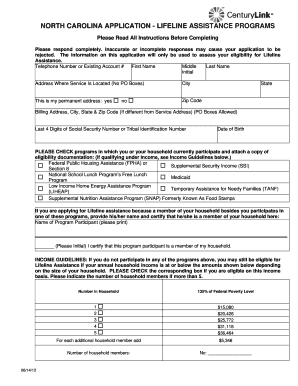
- Begin by filling out your contact information. Include your telephone number or existing account number, first name, middle initial, last name, and the address where service is located (no P.O. boxes). Indicate your permanent address by checking 'yes' or 'no'. Fill in the city, state, and zip code.
- If your billing address is different from the service address, complete that section as well, allowing for P.O. boxes if necessary.
- Enter the last four digits of your Social Security number or Tribal Identification number and provide your date of birth.
- Check the programs in which you or anyone in your household participates, and attach documentation proving eligibility. If a household member qualifies for Lifeline assistance through another program, provide their name and initial to certify membership.
- If you are not part of any program mentioned, check the box indicating income eligibility based on the provided income guidelines. Indicate the number of members in your household as appropriate.
- Read the important information about the Lifeline program thoroughly to understand the requirements and obligations. Initial next to each statement confirming your understanding and agreement.
- Sign and date the application under the Lifeline Assistance Applicant Signature section, ensuring your signature matches the name provided on the first page.
- Prepare the application for submission by gathering any supporting documents necessary based on your eligibility criteria, such as tax returns or benefit statements.
- Mail your completed application and any documents to CenturyLink Data Services or fax them to the provided fax number. Ensure you keep copies for your records.
Start your application process today and complete the Century Link Low Income form online for Lifeline assistance.
The Oregon phone assistance program, also known as the Oregon Lifeline Program, aims to assist low-income residents with their phone service costs. This program may benefit those who qualify, including participants in Century Link Low Income programs. It provides discounted landline or mobile services to eligible households. For more information and to see if you qualify, visit the Oregon public utility commission website.