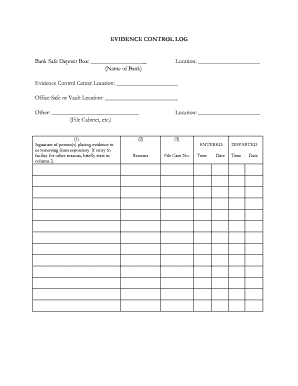
EVIDENCE CONTROL LOG Bank Safe Deposit Box: (Name of Bank) Location: Evidence Control Center Location: Office Safe or Vault Location: Other: (File Cabinet, etc.) Location: (1) Signature of person(s).
Open form follow the instructions
Easily sign the form with your finger
Send filled & signed form or save
How to fill out the Evidence Log online
The Evidence Log is a crucial tool for documenting the management of evidence in a secure and organized manner. This guide provides step-by-step instructions on how to fill out the Evidence Log online to ensure accurate record-keeping.
Follow the steps to effectively complete the Evidence Log.
- Press the ‘Get Form’ button to retrieve the Evidence Log and open it in the online editor.
- Begin by entering the name of the bank where the safe deposit box is located in the designated field labeled 'Bank Safe Deposit Box'.
- Next, fill in the specific location of the evidence control center in the field marked 'Evidence Control Center Location'.
- Indicate the office safe or vault location by completing the 'Office Safe or Vault Location' section.
- If there are other storage options, specify them in the 'Other' section, such as file cabinets or other secure locations.
- In the first column labeled 'ENTERED', input the time and date when the evidence is placed into the repository. Include the file case number and the reasons for entering the evidence in the respective fields.
- In the second column labeled 'DEPARTED', similarly document the time and date when evidence is removed from the repository.
- Ensure that the signature of the person(s) placing or removing evidence is recorded in the appropriate section. If the entry to the facility was for reasons other than evidence handling, provide a brief explanation in the second column.
- After completing all necessary sections and verifying the information for accuracy, you can save changes, download, print, or share the Evidence Log as needed.
Complete your Evidence Log online today to ensure proper management and documentation of evidence.
Experience a faster way to fill out and sign forms on the web. Access the most extensive library of templates available.
Related content
This Evidence Chain-of-Custody form is to be retained as a permanent record by the...
The Evidence Log is used to document and provide a written record of each item of evidence...
Jun 7, 2025 — Riley. EVIDENCE LOG ENTRY: HaTu-01. OBJECT: 1x surveillance tape of Tucker...
Get answers to your most pressing questions about US Legal Forms API.
How to write an evidence log?
Writing an evidence log involves systematically recording details of each piece of evidence. Ensure you include the date, time, description, and chain of custody information for every item. Engage with a structured format to promote clarity and consistency. Using tools provided by uslegalforms can streamline this process, aiding efficiency and accuracy.
How to write an evidence report?
To write an evidence report, start with a clear title and include all related details about the evidence. Summarize the collection process, including who collected it and where it was found. Be factual, and ensure that your report aligns with the entries in your evidence log to maintain accuracy. A well-organized report strengthens your credibility.
How to fill out an evidence log?
When filling out an evidence log, document each piece of evidence in a dedicated entry. Include crucial details such as the evidence description, collection date, and the person collecting it. Be consistent with your formatting for clarity and ease of reference. Utilizing a reliable platform like uslegalforms can simplify this process and improve accuracy.
What does an evidence log look like?
An evidence log typically consists of a table or structured format that includes essential details like item description, collection date, and chain of custody. Each entry should provide clear and concise information to track the evidence accurately. This organization enhances professionalism and ensures that your evidence log can withstand scrutiny in legal contexts.
How to fill out an evidence tag?
To fill out an evidence tag, start with the date and time the evidence was collected. Clearly write a description of the item, including any unique identifiers. Next, include the collector’s name and signature, along with the location where the evidence was found. This process ensures that your evidence log remains organized and reliable.
How to make an evidence log?
Creating an evidence log involves several steps, including determining what information needs to be tracked, organizing data into a clear structure, and documenting entries consistently. Start by gathering all pertinent details, then arrange them systematically, ensuring each entry is easy to follow. You can streamline this process by using uslegalforms, which provides tools to help you create a professional evidence log quickly and accurately.
What is log probability?
Log probability is a way of expressing the likelihood of a particular outcome occurring, often used in statistical analyses. It can provide insights into how plausible certain events are within the context of your evidence log. Understanding log probability helps legal professionals evaluate the strength of the evidence presented. Thus, incorporating these calculations into your evidence log can enhance its overall effectiveness.
What should be included in the evidence log?
An evidence log should include essential information such as the date and time of each entry, a description of events, the individuals involved, and any relevant documents or objects. Additionally, proper annotations explaining each log entry enhance clarity and context. Including these components ensures that anyone reviewing the log can easily understand its content. For better organization, consider utilizing uslegalforms to create a comprehensive evidence log.
What does log-likelihood tell us?
Log-likelihood is a statistical measure that indicates how well the observed data fits a given model. In legal contexts, it can help determine the strength of evidence supporting a particular hypothesis related to your case. Understanding the log-likelihood can assist legal professionals in evaluating the viability of arguments presented. Ultimately, aligning this analysis with your evidence log can bolster your case.
What is log model evidence?
Log model evidence represents the structured format of data organized within a log, designed to capture relevant information systematically. This type of evidence enhances the clarity of details surrounding an event and aids in statistical analysis. When modeled appropriately, log evidence can provide essential insights that strengthen your legal arguments. Utilizing the right tools, like those offered by uslegalforms, can simplify the creation of log model evidence.
Use professional pre-built templates to fill in and sign documents online faster. Get access to thousands of forms.
If you believe that this page should be taken down, please follow our DMCA take down process here.