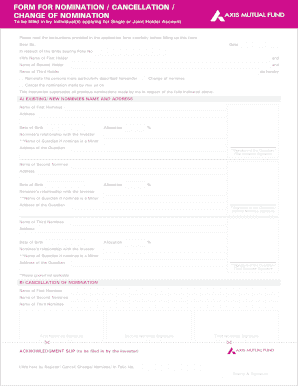
Ange of nominee please fill Sections A, B and C. 5. Nomination is mandatory for all the folios/accounts, where the mode of holding is single or the folio/account is opened by individual without any joint holding. New subscriptions received from individuals without nomination will be rejected. 6. The nomination can be made only by individuals holding units on their own behalf singly or jointly. Non-Individuals including Society, Trust, Body Corporate, Partnership Firm, Karta of Hindu Undivide.
Open form follow the instructions
Easily sign the form with your finger
Send filled & signed form or save
How to fill out the Axis Mutual Fund Nomination Form online
Filling out the Axis Mutual Fund Nomination Form online is an essential process for ensuring that your investment is well-managed and that your nominees are correctly designated. This guide provides step-by-step instructions to help you efficiently complete the form.
Follow the steps to fill out the Axis Mutual Fund Nomination Form online.
- Click 'Get Form' button to obtain the form and open it in the editor.
- Fill in the date in the specified format (DD/MM/YYYY) at the top of the form.
- Enter your folio number, which identifies your investment account.
- Provide the names of all holders of the account, including first, second, and third holders.
- Indicate whether you are nominating a new nominee, changing an existing one, or cancelling a nomination by selecting the appropriate option.
- In Section A, fill in the details for the new nominee(s), including their name, address, date of birth, and allocation percentage. Ensure that the total allocation equals 100%.
- If the nominee is a minor, include the name and address of their guardian. A signature from the guardian and the first nominee is also required.
- If you are cancelling nominations, complete Section B by providing the names and signatures of the existing nominees.
- For changing nominations, fill out Sections A, B, and C as required.
- Review all entered information for accuracy. Ensure that all required fields are complete to avoid registration issues.
- Once you have confirmed the accuracy of the information, save changes to the form. You may also choose to download, print, or share the completed form.
Start completing your Axis Mutual Fund Nomination Form online today to ensure your investment is managed according to your wishes.
Experience a faster way to fill out and sign forms on the web. Access the most extensive library of templates available.
Related content
For additional information on our human capital management, please refer to "Corporate...
nomination to seek or hold office, and they must be officially enrolled in ... The form...
Mar 20, 2018 — Axis enables a smarter and safer world by creating networked solutions...
Get answers to your most pressing questions about US Legal Forms API.
How to add nominee in Axis Mutual Funds?
To add a nominee in your Axis Mutual Funds, you need to login to your Axis Mutual Fund account. Navigate to the 'Nomination' section, and choose the option to add a new nominee. Fill out the required details in the Axis Mutual Fund Nomination Form, review them carefully, and submit the changes. This process ensures your investments are secure and aligned with your wishes.
How to file nomination in Mutual Fund?
Filing a nomination in your Mutual Fund entails a few simple steps. Begin by accessing your account on the Axis Mutual Fund platform. You can then locate the 'Nomination' option and choose to submit your Axis Mutual Fund Nomination Form online or offline. Ensure all nominee information is accurate before completing and submitting the form for processing.
How to create an online nomination form?
Creating an online nomination form for your Axis Mutual Fund is straightforward. First, visit the Axis Mutual Fund website and log in to your account. Find the 'Nomination' section under your investment details, then select 'Online Nomination'. Fill in the necessary nominee details and submit the Axis Mutual Fund Nomination Form to complete the process.
How to generate urn number for Axis Mutual Fund?
To generate a URN number for your Axis Mutual Fund, you need to log in to your investor account on the Axis Mutual Fund website. Once logged in, navigate to the 'Investor Services' section and select 'Generate URN'. Fill in the required details and submit the request. You will receive your URN number via email, which is essential for tracking your Axis Mutual Fund Nomination Form.
How to do nomination in mutual fund?
To do a nomination in mutual funds, complete the Axis Mutual Fund Nomination Form, providing all necessary nominee details. You can do this through your online investment account or by downloading the form. Once you submit it, the process will typically be confirmed within a short time, ensuring peace of mind regarding your investments.
What is the 7/5/3-1 rule in mutual funds?
The 7/5/3-1 rule in mutual funds outlines the distribution of nominees, which helps in simplifying the transfer of assets. Under this rule, you may designate a maximum of three primary nominees, with specific percentages assigned to each. It is beneficial to use the Axis Mutual Fund Nomination Form to specify your nominee preferences correctly.
What is the new MF rule for nominee?
The new mutual fund rule states that it is now mandatory to have a nominee for mutual fund investments. This regulation enhances security for your investments and ensures that assets are transferred smoothly in the event of an unfortunate situation. Utilizing the Axis Mutual Fund Nomination Form helps you comply with this rule easily.
How to fill a demat nomination form?
To fill a demat nomination form, you need to access the form provided by your demat service provider. Fill in the necessary details, including the nominee's information, and submit it along with the Axis Mutual Fund Nomination Form to ensure your mutual fund holdings are covered. Make sure to double-check all entries for accuracy.
Can I add nominees online?
Yes, you can easily add nominees online using the Axis Mutual Fund Nomination Form. Simply log into your account on the Axis Mutual Fund website, navigate to the nomination section, and follow the instructions. This streamlined process allows you to make updates conveniently from anywhere.
How to get an e-nomination form?
To obtain an e-nomination form, visit the Axis Mutual Fund website and look for the nomination section. You can download the electronic form directly from the site. Alternatively, the Axis Mutual Fund Nomination Form is also available through the uslegalforms platform, offering an easy and convenient way to ensure your nomination details are correctly filled out and submitted.
Use professional pre-built templates to fill in and sign documents online faster. Get access to thousands of forms.
If you believe that this page should be taken down, please follow our DMCA take down process here.