Loading
Get Printable Emar
How it works
-

Open form follow the instructions
-

Easily sign the form with your finger
-

Send filled & signed form or save
How to fill out the Printable Emar online
Filling out the Printable Emar correctly is essential for maintaining accurate medication records. This guide provides a step-by-step process to help you navigate the form efficiently and ensure compliance with necessary requirements.
Follow the steps to complete the Printable Emar with accuracy.
- Click the ‘Get Form’ button to obtain the form and open it in the editor.
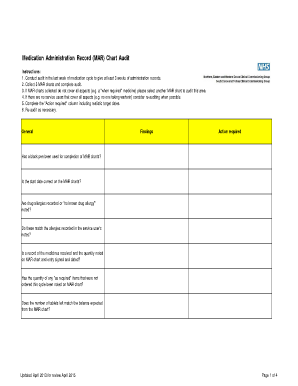
- Review the MAR chart components thoroughly. Ensure that the start date, medication details, and administration records match those in the service user's notes.
- Fill in the 'Action required' column with realistic target dates for necessary follow-ups or corrections.
- Check that all required signatures are clear and that there are no gaps in the administration records. Each entry should be signed immediately after administration.
- Validate the details of any 'as required' medicines, ensuring maximum doses and frequency of administration are clearly documented.
- For , ensure all details in the INR result sheet are complete and verify that doses align with the MAR chart.
- After completing all sections, ensure to save your changes and download, print, or share the form as necessary.
Start filling out documents online to ensure seamless organization and management.
Get form
Experience a faster way to fill out and sign forms on the web. Access the most extensive library of templates available.
MAR stands for Medication Administration Record. This document plays a crucial role in healthcare settings by tracking the administration of medications to patients. A printable eMAR ensures that healthcare providers can maintain a clear and organized record of medication management.
Get This Form Now!
Use professional pre-built templates to fill in and sign documents online faster. Get access to thousands of forms.