Loading
Form preview
  • US Legal Forms
  • Other Templates
  • More Forms
  • More Uncategorized Forms
  • Butler County Clerk Of Courts

Get Butler County Clerk Of Courts

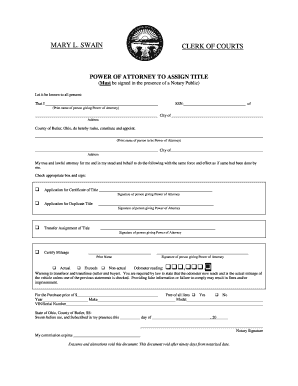
MARY L. SWAIN CLERK OF COURTS POWER OF ATTORNEY TO ASSIGN TITLE (Must be signed in the presence of a Notary Public) Let it be known to all present: That I SSN: of (Print name of person giving Power.

How it works

  1. Open form

    Open form follow the instructions

  2. Easily sign form

    Easily sign the form with your finger

  3. Share form

    Send filled & signed form or save

How to fill out the Butler County Clerk Of Courts online

Filling out the Butler County Clerk Of Courts Power of Attorney to Assign Title form online can be straightforward and efficient. This guide provides step-by-step instructions to help you complete the form correctly and submit it without complications.

Follow the steps to complete the form online:

  1. Click ‘Get Form’ button to obtain the form and open it in the editor.
  2. Begin by entering your name and Social Security Number (SSN) in the designated fields. Ensure that the information is accurate as it is crucial for the power of attorney to be valid.
  3. Next, fill in your address, including your city and county, to establish your location in Butler County, Ohio.
  4. Proceed to specify the person you are appointing as your attorney in fact. Print their name and provide their city and address details.
  5. You will then need to check the appropriate box corresponding to the action you are granting power for: Application for Certificate of Title, Application for Duplicate Title, Transfer Assignment of Title, or Certify Mileage.
  6. For each selected action, you must provide your signature to validate the entrance of power. Make sure to sign clearly as it should match your printed name.
  7. Indicate the odometer reading by choosing the right option that describes the vehicle's current mileage: Actual, Exceeds, or Non-actual. Provide the numeric reading in the space provided.
  8. Complete the details for the purchase price, year, make, model, and VIN/serial number of the vehicle being assigned. This information is essential for recordkeeping.
  9. Specify if there are any liens on the vehicle by selecting 'Yes' or 'No'.
  10. The form will require notarization. Ensure that you sign the document in front of a Notary Public who will then confirm your identity by signing and dating the document.
  11. Finally, after ensuring all information is filled out accurately, you can save changes, download, print, or share the completed form as necessary.

Start filling out the Butler County Clerk Of Courts form online today for a seamless document management experience.

Get form

Experience a faster way to fill out and sign forms on the web. Access the most extensive library of templates available.
Get form

Related content

Clerk of Courts | Butler County, PA
The Clerk of Courts offers criminal record checks, subpoena requests, private detective...
Learn more
Researching Dockets & Litigation Documents Guide
Nov 14, 2025 — You can search by docket number, party name, attorney name, case year...
Learn more
Commissioner Meeting October 15, 2018
Oct 15, 2018 — were Paul Hodge, Chuck Spradlin, Kathy Robison County Clerk, and County...
Learn more

Related links form

India RBL Bank Customer Information File (CIF) 2019 India Friends Of TREAD Gift Aid Declaration - Multiple Donation India PNB MetLife Claimant Statement For Death Claim – Form A 2018 India CBS CRF-1B 2020

Questions & Answers

Get answers to your most pressing questions about US Legal Forms API.

Contact support

Yes, you can view many Ohio court records online, including those from Butler County. The Butler County Clerk Of Courts website features an online portal where you can search for and access various records. This convenient option allows you to find necessary court information from the comfort of your home, saving time and effort.

The Butler County Clerk Of Courts provides a range of vital services, including managing court records, processing marriage licenses, and overseeing civil and criminal cases. Additionally, they offer online access to records, which makes it easier for the public to find important information. For comprehensive support, check out the various features available on their official website.

To obtain a copy of your marriage license in Butler County, visit the Butler County Clerk Of Courts office. They maintain records of marriage licenses and can assist you in the application process for duplicates. Ensure you bring valid identification and any necessary information, such as the names and date of the marriage, to expedite your request.

Finding court records in Butler County, Ohio, is straightforward. You can start by visiting the Butler County Clerk Of Courts website, which provides an online search tool. If you prefer, you can also visit the courthouse in person to request documents from the Clerk's office. Remember to have any relevant case numbers or names on hand to expedite your search.

To access Butler County court records, you can visit the Butler County Clerk Of Courts office in person, or you may access certain records online through their official site. The online platform offers various tools to help you search for case information effectively. If you need more detailed records, consider reaching out directly to the Clerk's office for assistance.

Yes, Butler County court records are generally considered public records. This accessibility allows individuals to view case information, court decisions, and other relevant documents. However, some records may have restrictions due to privacy laws. To ensure you receive the correct information, you can visit the Butler County Clerk Of Courts office or their official website.

The Ohio Clerk of Courts is a key government official responsible for maintaining court records and managing court operations within their jurisdiction. This office ensures transparency in the judicial process by providing public access to case filings and related documents. The Butler County Clerk Of Courts plays an essential role in this system, supporting residents with their legal needs. Understanding this function helps you navigate Ohio's legal processes more effectively.

The Butler County Clerk of Courts handles a variety of cases, including civil, criminal, and family law matters. They are responsible for processing filings, managing records, and ensuring that the judicial system operates smoothly. If you have a specific case type or need assistance, the Clerk's office is equipped to provide you with the necessary information and support.

Receiving a letter from the Butler County Clerk of Courts could indicate different things depending on your situation. You may be notified about upcoming court dates, changes in case status, or information regarding filings. If you are involved in a legal matter, staying informed via these communications is essential to ensure that you understand your obligations and rights.

The Butler County Clerk of Courts handles various essential documents and services. This includes processing court filings, maintaining legal records, and managing case information. If you need to retrieve records or file documents, you will typically go through the Clerk's office. They play a crucial role in ensuring the judicial process runs smoothly.

Get This Form Now!

Use professional pre-built templates to fill in and sign documents online faster. Get access to thousands of forms.
Get form
If you believe that this page should be taken down, please follow our DMCA take down processhere.
Get Butler County Clerk Of Courts
Get form
  • Adoption
  • Bankruptcy
  • Contractors
  • Divorce
  • Home Sales
  • Employment
  • Identity Theft
  • Incorporation
  • Landlord Tenant
  • Living Trust
  • Name Change
  • Personal Planning
  • Small Business
  • Wills & Estates
  • Packages A-Z
  • Affidavits
  • Bankruptcy
  • Bill of Sale
  • Corporate - LLC
  • Divorce
  • Employment
  • Identity Theft
  • Internet Technology
  • Landlord Tenant
  • Living Wills
  • Name Change
  • Power of Attorney
  • Real Estate
  • Small Estates
  • Wills
  • All Forms
  • Forms A-Z
  • Other Templates
  • Legal Hub
  • About Us
  • Help Portal
  • Legal Resources
  • Blog
  • Affiliates
  • Contact Us
  • Delete My Account
  • Site Map
  • Industries
  • Forms in Spanish
  • Localized Forms
  • State-specific Forms
  • Forms Kit
  • Real Estate Handbook
  • All Guides
  • Notarize
  • Incorporation services
  • For Consumers
  • For Small Business
  • For Attorneys
  • USLegal
  • FormsPass
  • pdfFiller
  • signNow
  • altaFlow
  • DocHub
  • Instapage
Form Packages
  • Adoption
  • Bankruptcy
  • Contractors
  • Divorce
  • Home Sales
  • Employment
  • Identity Theft
  • Incorporation
  • Landlord Tenant
  • Living Trust
  • Name Change
  • Personal Planning
  • Small Business
  • Wills & Estates
  • Packages A-Z
Form Categories
  • Affidavits
  • Bankruptcy
  • Bill of Sale
  • Corporate - LLC
  • Divorce
  • Employment
  • Identity Theft
  • Internet Technology
  • Landlord Tenant
  • Living Wills
  • Name Change
  • Power of Attorney
  • Real Estate
  • Small Estates
  • Wills
  • All Forms
  • Forms A-Z
  • Other Templates
Customer Service
  • Legal Hub
  • About Us
  • Help Portal
  • Legal Resources
  • Blog
  • Affiliates
  • Contact Us
  • Delete My Account
  • Site Map
  • Industries
  • Forms in Spanish
  • Localized Forms
  • State-specific Forms
  • Forms Kit
Legal Guides
  • Real Estate Handbook
  • All Guides
Prepared for you
  • Notarize
  • Incorporation services
Our Customers
  • For Consumers
  • For Small Business
  • For Attorneys
Our Sites
  • USLegal
  • FormsPass
  • pdfFiller
  • signNow
  • altaFlow
  • DocHub
  • Instapage
Social Media
Call us now toll free:
+1 833 426 79 33
As seen in:
© Copyright 1999-2026 airSlate Legal Forms, Inc. 17 Station Street, Ste. 203, Brookline, MA 02445
  • Your Privacy Choices
  • Terms of Service
  • Privacy Notice
  • Content Takedown Policy
  • Bug Bounty Program