Loading
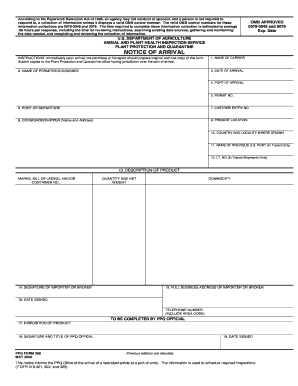
Get Notice Of Arrival - Aphis - Us Department Of Agriculture - Aphis Usda
How it works
-

Open form follow the instructions
-

Easily sign the form with your finger
-

Send filled & signed form or save
How to fill out the NOTICE OF ARRIVAL - APHIS - US Department Of Agriculture - Aphis Usda online
Filling out the Notice of Arrival for the Animal and Plant Health Inspection Service is essential for ensuring compliance with agricultural import regulations. This guide will provide you with clear, step-by-step instructions to complete the form accurately and efficiently.
Follow the steps to effectively complete the form online.
- Click ‘Get Form’ button to access the Notice of Arrival document and open it in your digital editor.
- Enter the name of the carrier. Include identifying details such as the airline with the flight number, ship name with voyage number, or truck/rail line and container/car number.
- Input the date of arrival, specifying the exact date the carrier arrives at the designated port.
- Fill in the name of the permittee or consignee, which is the individual responsible for the importation. Ensure the address is for a United States resident or organization.
- Indicate the port of arrival—the location where the carrier will dock.
- Provide the necessary permit number if the imported commodity requires it as a condition of entry.
- List the port of departure, which is the point of origin for the carrier in the foreign country.
- Input the Customs entry number associated with this notice to assist with tracking.
- Enter the name and address of the consignor or shipper, ensuring accuracy in the physical address provided.
- Specify the present location of the commodity; this should reflect where it is currently situated or set for inspection.
- Detail the country and locality where the commodity was cultivated, including State and Province names, and the farm's location if necessary.
- If applicable, mention the name of the previous U.S. port for shipments on a T&E or I.T. bond.
- For in-transit shipments only, provide the relevant I.T. number.
- Describe the product thoroughly, including any associated Marks, Bill of Lading, or Container Numbers, quantity, and net weight.
- Sign the form where indicated, confirming accuracy and completeness of the details provided.
- Provide the full business address of the importer or broker, along with the printed name and contact information.
- Date the form, ensuring you use the proper format (dd/mm/yyyy) to signify when the form was completed.
- Once filled, proceed to save your changes, download a copy for your records, print for submission, or share as necessary.
Complete your document online seamlessly and ensure compliance with agricultural regulations today.
CBP agriculture specialists enclose a Mail Interception Notice, PPQ Form 287, to document any agriculture items that are removed from the package. The package is then returned to the U.S. Postal Service for delivery. Information on importing agriculture items is located on the U.S. Department of Agriculture Web site.
Industry-leading security and compliance
US Legal Forms protects your data by complying with industry-specific security standards.
-
In businnes since 199725+ years providing professional legal documents.
-
Accredited businessGuarantees that a business meets BBB accreditation standards in the US and Canada.
-
Secured by BraintreeValidated Level 1 PCI DSS compliant payment gateway that accepts most major credit and debit card brands from across the globe.